What is the Most Low Maintenance Operating System: Discover Now
Are you tired of spending hours fixing your computer or dealing with constant updates? Imagine an operating system that just works—without the hassle or endless maintenance.
Finding the most low maintenance operating system can save you time, reduce frustration, and let you focus on what really matters. You’ll discover which operating system fits your needs perfectly and how it can make your digital life simpler and smoother.
Keep reading to find out which option could be your stress-free solution.
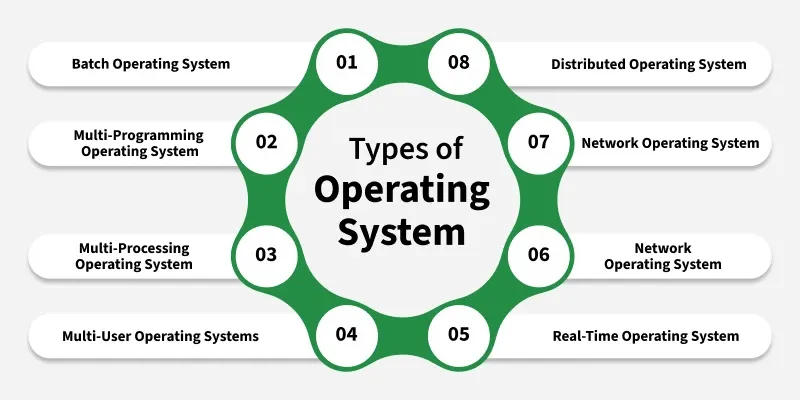
Credit: www.geeksforgeeks.org
Criteria For Low Maintenance
Understanding what makes an operating system truly low maintenance requires clear criteria. These criteria help you decide which OS will save you time, reduce frustration, and keep your computer running smoothly without constant babysitting. Let’s break down the key factors that define a low maintenance operating system.
System Updates
Frequent and automatic updates are crucial for a low maintenance OS. You want an operating system that installs updates quietly in the background without interrupting your workflow. Imagine not having to restart your machine multiple times a week just because the system demands it.
Some operating systems bundle updates efficiently, reducing the number of restarts and update prompts. Others might require manual intervention, which can be a hassle if you’re not tech-savvy or if you simply want your computer to work without constant supervision.
Security Management
Security should be built-in and proactive, not something you have to handle daily. A low maintenance OS comes with strong, automatic security features that protect you without frequent alerts or complicated configurations.
Think about how much easier it is when your system automatically scans for threats and blocks suspicious activity without you lifting a finger. This means fewer worries about malware or viruses eating up your time and resources.
Software Compatibility
How well an operating system supports the software you use can make or break your experience. A low maintenance OS ensures that essential applications run smoothly without constant troubleshooting or workarounds.
If your OS struggles to support the programs you rely on, you’ll spend more time fixing issues than getting work done. Compatibility matters more than you might think when aiming for minimal maintenance.
User Interface Simplicity
A clean and intuitive interface reduces the learning curve and the chance of user error. When your OS is easy to navigate, you spend less time figuring out how to do basic tasks and more time being productive.
Consider how a simple, straightforward UI can prevent accidental changes that might cause problems later. The less complex the interface, the fewer headaches you’ll face, especially if you’re not a tech expert.
Popular Operating Systems
Choosing a low maintenance operating system depends on ease of use, stability, and update management. Popular operating systems vary in these aspects. Each has its own way of handling updates, security, and user support. This section explores the main players to help you understand their maintenance needs.
Windows
Windows is the most widely used operating system worldwide. It offers broad software compatibility and frequent updates. Updates can be automatic but sometimes interrupt work. Users often need to manage drivers and security software. Regular restarts are common after updates. Windows is user-friendly but may require some maintenance.
Macos
macOS runs only on Apple devices. It has a clean interface and smooth integration with hardware. Updates are less frequent and usually run in the background. Apple controls both software and hardware, reducing compatibility issues. macOS tends to require less user intervention. Security is strong, and malware risks are low.
Linux Distributions
Linux offers many distributions like Ubuntu, Fedora, and Mint. Most are free and open source. Updates are frequent but usually quick and less intrusive. Linux is stable and secure with fewer viruses. Some technical knowledge helps with setup and updates. Maintenance is low if you use user-friendly distributions.
Chrome Os
Chrome OS is designed for simplicity and speed. It runs mainly web-based applications. Updates happen automatically and silently in the background. The system is lightweight and rarely needs manual fixes. Chrome OS is ideal for users who want minimal upkeep. Security is built-in, with automatic virus protection.
Windows Maintenance Needs
Windows is the most widely used operating system worldwide, but it requires regular attention to keep running smoothly. Understanding its maintenance needs helps you avoid unexpected slowdowns and security risks. Let’s look closely at what you need to manage to keep your Windows system in top shape.
Update Frequency
Windows pushes updates quite often—sometimes weekly or monthly. These updates include security patches, feature improvements, and bug fixes. Skipping updates might seem like a time-saver, but it can leave your system vulnerable or unstable.
Have you ever noticed your PC rebooting unexpectedly after an update? That’s a sign the system is trying to keep itself secure, but it can be frustrating if you’re in the middle of important work. You can control update timing to some extent, but completely avoiding them isn’t recommended.
Security Challenges
Windows is a frequent target for malware and hackers because of its popularity. This means you have to stay vigilant about security tools like antivirus software, firewalls, and safe browsing habits. The system provides built-in tools like Windows Defender, but sometimes they need manual tweaking or additional software.
Do you regularly check your system for threats or rely on automatic scans? Neglecting security can lead to data loss or system crashes. Staying proactive about security is part of Windows maintenance.
User Intervention
Windows often requires you to take action, whether it’s approving updates, managing storage space, or troubleshooting problems. Automatic maintenance tasks exist but don’t catch everything. For example, clearing temporary files or uninstalling unused apps can speed up your PC.
Think about the last time your computer slowed down—did you check what was causing it? Sometimes, simple steps like adjusting startup programs or updating drivers can make a big difference. Your involvement keeps Windows running efficiently.
Credit: learn.g2.com
Macos Maintenance Needs
macOS stands out for its minimal maintenance demands, making it a favorite for users who want a smooth experience without constant tinkering. Understanding its maintenance needs can help you keep your system running efficiently with little effort. Let’s look at what keeps macOS ticking quietly in the background.
Automatic Updates
One of the biggest time-savers in macOS is its automatic update feature. Your system regularly checks for software updates and installs them without interrupting your workflow. This means you don’t have to manually search for patches or security fixes.
Updates cover everything from the operating system to built-in apps, ensuring your Mac stays current and secure. If you’ve ever missed an important update on other platforms, you’ll appreciate how macOS handles this seamlessly.
Security Features
macOS includes strong built-in security that reduces the need for extra antivirus software. Features like Gatekeeper prevent unauthorized apps from running, protecting your Mac from malware. The system also uses sandboxing to isolate apps, limiting potential damage from any security breaches.
Apple’s regular security patches help guard against new threats automatically. Have you noticed how often you don’t have to worry about viruses compared to other operating systems?
Ease Of Use
Keeping macOS clean and fast doesn’t demand expert knowledge. The operating system provides simple tools to manage storage, clear caches, and monitor performance. You can free up space with just a few clicks using the built-in Storage Management feature.
Plus, macOS organizes files and apps intuitively, helping you avoid clutter that slows down your machine. Do you find yourself spending less time on maintenance tasks and more time on what truly matters?
Linux Maintenance Needs
Linux requires less maintenance compared to many other operating systems. Its open-source nature offers flexibility to users with different skill levels. Understanding how Linux maintenance works helps in choosing the right distro and managing updates smoothly. It also empowers users with control over their system settings.
Distro Variations
Linux comes in many versions called distros. Each distro has different maintenance needs. Some are designed for beginners and need very little upkeep. Others offer more control but require regular attention. Popular low-maintenance distros include Ubuntu, Linux Mint, and Fedora. These distros handle most tasks automatically.
Update Management
Linux updates are simple and fast. Most distros use package managers to handle updates. These tools keep software and security patches current. Updates rarely cause system problems. Users can schedule updates or run them manually. Automatic updates reduce the need for constant checks.
User Control
Linux gives users full control over their system. You decide what software to install or remove. This control helps keep the system clean and efficient. Users can customize settings to fit their needs. This reduces unnecessary processes and maintenance tasks.
Credit: learn.g2.com
Chrome Os Maintenance Needs
Chrome OS is designed with simplicity and ease of use in mind, which directly impacts how much maintenance it requires. If you want an operating system that lets you focus on your work instead of constant updates and troubleshooting, Chrome OS might be the right choice. Understanding its maintenance needs helps you see why it’s considered low maintenance by many users.
Automatic Updates
Chrome OS automatically updates itself without interrupting your workflow. You don’t need to manually download or install updates; the system handles everything in the background. This means your device stays secure and up to date without you lifting a finger.
Have you ever delayed a critical update on other systems, only to face issues later? With Chrome OS, that worry disappears because updates are seamless and fast.
Cloud Integration
Your files and settings on Chrome OS are stored in the cloud, which reduces the need for local backups and complex file management. This integration keeps your data safe and accessible from any device with an internet connection.
This cloud-first approach means less clutter on your device and fewer chances of losing important files. Wouldn’t it be nice to never worry about running out of storage or losing your work?
Limited Software Management
Chrome OS restricts software installation to apps from the Chrome Web Store or Google Play Store, which lowers the risk of malware and system slowdowns. You won’t have to hunt for drivers or worry about incompatible programs slowing your device down.
This controlled environment means less troubleshooting and fewer crashes. Do you prefer a system where most software just works without constant tinkering?
Comparing Maintenance Efforts
Choosing a low maintenance operating system depends on how much effort you want to spend managing it. Different systems require varying levels of attention. This section compares key factors that affect maintenance efforts.
Time Investment
Some operating systems need frequent updates and checks. Others run smoothly with minimal time spent. Windows often requires regular updates and restarts. macOS updates are less frequent but still need attention. Linux distributions vary widely; some need constant care, while others are almost set-and-forget.
Technical Skills Required
Operating systems differ in the knowledge needed to maintain them. Windows is user-friendly and requires basic skills for updates and troubleshooting. macOS also suits users with moderate technical skills. Linux can be challenging for beginners, often needing command-line use and deeper understanding. Easy-to-use Linux versions reduce this gap.
Frequency Of Issues
Some systems face more bugs and security problems. Windows tends to have frequent patches due to its popularity and wide hardware support. macOS has fewer issues but still needs occasional fixes. Linux is known for stability but depends on the specific distribution and how it is used. Stable versions of Linux often have rare problems.
Choosing The Right Os For You
Choosing the right operating system (OS) is more than just picking what looks good or is popular. It’s about matching your daily habits, device needs, and the kind of support you can rely on. This choice can simplify your digital life, saving you time and frustration, especially if you want something low maintenance.
Personal Usage Patterns
Think about how you use your computer. Do you mainly browse the web, stream videos, or run heavy software like video editors or games? If your activities are simple, like checking emails or writing documents, a lightweight OS with automatic updates could be ideal.
For example, I switched to a Linux distribution for casual web use, and it rarely needed my attention beyond occasional updates. This freed me from constant pop-ups and slowdowns.
Device Compatibility
Your device’s age and hardware specs matter a lot. Some operating systems demand more powerful components, while others run smoothly on older machines. Choosing an OS that fits your hardware can prevent lag and crashes, reducing the need for troubleshooting.
Older laptops often perform better with lightweight systems like Linux Mint or Chrome OS, which keep things simple and fast. Have you checked if your current device supports the OS you’re considering?
Support Availability
Reliable support can make or break your experience with an operating system. Look into how easy it is to find help when something goes wrong. This includes official customer service, online forums, and tutorials.
Windows, for instance, offers extensive support and frequent updates, but some users find it overwhelming. Meanwhile, macOS users benefit from dedicated Apple support and a stable environment, reducing maintenance tasks.
Frequently Asked Questions
What Is The Most Low Maintenance Operating System?
The most low maintenance operating system is typically Linux-based distributions like Ubuntu. They require fewer updates and less troubleshooting. Their security features reduce the need for frequent maintenance. Users benefit from stability and minimal manual intervention.
Why Is Linux Considered Low Maintenance?
Linux is low maintenance due to its open-source nature and robust security. It receives frequent automatic updates without system slowdowns. Its efficient resource use means fewer crashes and less need for repairs. Linux also avoids common malware, reducing maintenance tasks.
How Does Macos Compare In Maintenance Needs?
MacOS offers a balance of user-friendliness and low maintenance. It has integrated security features and regular system updates. Apple’s controlled hardware and software ecosystem reduce compatibility issues. Users experience fewer crashes and less manual configuration.
Can Windows Be Low Maintenance With Proper Settings?
Windows can be low maintenance if optimized correctly. Regular updates and antivirus tools help maintain stability. Using built-in troubleshooting tools reduces manual fixes. However, Windows generally requires more frequent maintenance than Linux or macOS.
Conclusion
Choosing a low maintenance operating system saves time and stress. It helps you focus on tasks, not updates or fixes. Simple systems need less care and run smoothly. This makes them ideal for beginners and busy users. Think about what fits your needs best.
A good choice keeps your computer fast and safe. Keep your system updated and enjoy hassle-free use. Easy maintenance means more peace of mind every day.