Do Smart Devices Slow Wifi: Uncover the Shocking Truth Today!
Have you ever noticed your WiFi slowing down when you add more smart devices at home? It’s frustrating, especially when you need a fast and stable connection.
You might wonder if your smart gadgets—like cameras, speakers, or lights—are the real cause behind the lag. Understanding how these devices affect your WiFi can help you fix the problem and enjoy smoother internet. Keep reading, and you’ll discover simple ways to make your WiFi faster, even with all your smart tech connected.
Credit: www.three.ie
How Smart Devices Connect
Understanding how smart devices connect to your network is key to figuring out if they slow down your WiFi. Each device uses specific methods and protocols to communicate, which affects overall performance. Let’s break down what kinds of devices you might have, the types of WiFi they use, and how having many devices can impact your connection.
Types Of Smart Devices
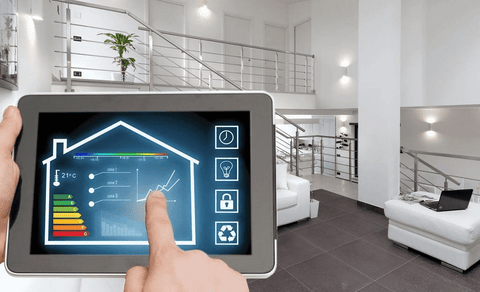
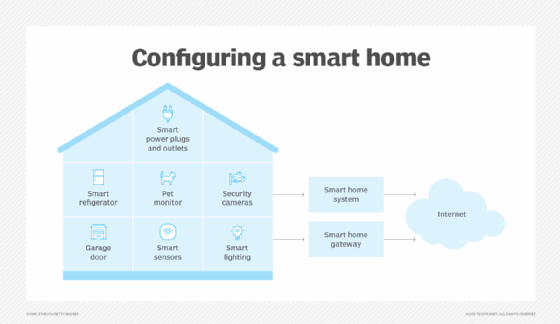
Smart devices come in many forms, from thermostats and security cameras to smart speakers and light bulbs. Each device serves a different purpose but shares one thing: they all connect wirelessly to your home network.
Some devices, like smart TVs or laptops, require higher bandwidth because they stream videos or download files. Others, such as smart sensors or light switches, send small amounts of data occasionally. Recognizing the type of device helps you understand its impact on your WiFi.
Wifi Protocols Used
Most smart devices connect using WiFi standards like 802.11n, 802.11ac, or the newer 802.11ax (WiFi 6). Each protocol offers different speeds and efficiency levels. Older devices using outdated protocols might slow down the network, especially if your router tries to support all devices simultaneously.
Some devices also use alternative connections like Bluetooth or Zigbee, which don’t rely on WiFi and therefore don’t affect your internet speed. Knowing which protocol your devices use can help you decide if upgrading your router or network setup is necessary.
Device Density Impact
The number of smart devices connected at once can strain your WiFi. Think about your home: a few devices might not cause issues, but dozens can create traffic jams on your network. Each device demands some bandwidth, and if too many connect, your overall speed drops.
Have you noticed your WiFi slowing when multiple devices are active? This happens because the router splits its attention, trying to serve each device. Managing device density by disconnecting unused gadgets or upgrading to a router designed for many connections can improve your experience.
Factors Affecting Wifi Speed
WiFi speed can vary significantly depending on several factors, especially when multiple smart devices connect to the same network. Understanding what affects your WiFi speed helps you manage your devices better and improve your internet experience. Let’s break down the main factors that could slow down your connection.
Bandwidth Consumption
Each smart device uses a portion of your available bandwidth. Streaming videos, online gaming, or video calls demand more data, leaving less bandwidth for other devices. Have you noticed your WiFi slowing down when several devices are active at once? That’s bandwidth being divided among them.
Devices like security cameras or smart TVs continuously send or receive data, which can hog your network. Limiting background activities or scheduling updates during off-peak hours can help free up bandwidth. Check your router’s settings to see which devices consume the most data.
Signal Interference
WiFi signals can weaken or get disrupted by physical obstacles and other electronic devices. Thick walls, microwaves, cordless phones, and even baby monitors can interfere with your WiFi signal. Have you tried moving your router to a more open spot and noticed better speeds?
Smart devices can cause interference too, especially if they use similar frequencies like 2.4 GHz. Switching some devices to 5 GHz WiFi can reduce interference and improve speed. Tools like WiFi analyzers can help identify interference sources in your home.
Router Capacity
Your router’s capacity limits how many devices it can efficiently support at once. Cheaper or older routers may struggle when many smart devices connect simultaneously. Are you using a router designed for multiple devices or just a basic model?
Routers come with specifications about the number of supported connections and maximum data throughput. Upgrading to a router with higher capacity or one that supports the latest WiFi standards (like WiFi 6) can make a noticeable difference. Also, placing your router centrally can ensure better coverage for all your devices.
Do Smart Devices Cause Slowdowns?
Are smart devices the hidden culprits behind your slow WiFi? With so many gadgets connected at once, it’s easy to suspect they might be hogging your internet. Let’s break down how these devices impact your network speed and what you can do about it.
Network Traffic Analysis
Each smart device constantly sends and receives data, which adds up quickly. Think about your smart TV streaming a show while your security camera uploads footage—both demand bandwidth. If too many devices communicate simultaneously, your network gets congested, leading to slower speeds.
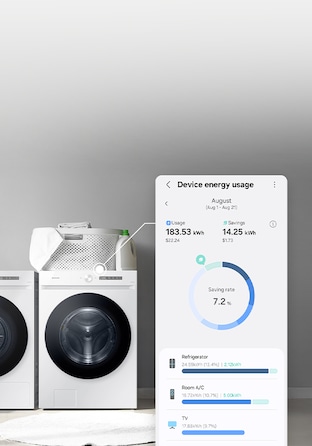
Have you checked which devices are using the most data on your network? Many routers offer tools to monitor traffic, helping you spot the biggest bandwidth consumers. Identifying these devices lets you manage your network more effectively.
Device Prioritization
Not all devices need equal access to your WiFi. Prioritizing critical devices, like your work laptop, can improve performance where it matters most. Many modern routers include Quality of Service (QoS) settings that allow you to assign priority levels.
Try setting your smart thermostat or voice assistant to a lower priority if you notice your video calls lagging. This small adjustment can make a big difference in maintaining smooth connectivity for essential tasks.
Background Data Usage
Smart devices often run updates or sync data in the background without you noticing. These hidden data transfers can slow down your network, especially if multiple devices update simultaneously. For instance, your smart fridge might download a software update while your phone is backing up photos.
To avoid surprises, schedule updates during off-peak hours or turn off automatic updates temporarily. Keeping an eye on background activity helps you keep your WiFi running at full speed when you need it most.
Credit: www.techtarget.com
Common Myths About Wifi Speed
Many people believe certain things about WiFi speed that just aren’t true. These myths can cause unnecessary worry about your internet connection, especially when you add more smart devices at home. Understanding what really affects WiFi speed helps you make smarter choices about your network setup.
Number Of Devices Vs Speed
It’s easy to think that every device you add will slow down your WiFi drastically. But the truth is, having multiple devices connected doesn’t always mean your speed will drop significantly. Your router can handle many devices at once, especially if they’re not all streaming or downloading large files simultaneously.
Think about your own experience: your phone, laptop, and smart speaker might all be connected, yet your video calls stay smooth. The slowdown usually happens when many devices demand heavy data all at the same time, not simply because they are connected.
Device Type Misconceptions
Some assume that certain smart devices, like smart bulbs or thermostats, eat up lots of bandwidth. In reality, these devices use minimal data because they mostly send small signals, not large files or streams. The type of device matters less than what it’s doing.
Consider this: streaming a 4K video consumes far more bandwidth than a smart sensor sending temperature updates. If you notice slow WiFi, check which devices are actively using high data—not just which ones are connected.
Isp Limitations
Your internet service provider (ISP) often sets the real speed limits, not your home devices. If your plan offers 100 Mbps, no number of smart gadgets will push that beyond its cap. The bottleneck might be your subscription speed rather than your equipment.
Have you ever upgraded your devices but still faced slow internet? It might be time to review your ISP plan. Sometimes, the best way to speed up your WiFi is to upgrade your service, not your gadgets.
Tips To Improve Wifi Performance
Improving WiFi performance can make your internet faster and more reliable. Small changes can reduce slowdowns caused by smart devices. Focus on key areas to get the best results.
Optimizing Router Placement
Place your router in a central, open area. Avoid corners, walls, and metal objects that block signals. Higher spots, like shelves, help spread the signal better. Keep the router away from microwaves and cordless phones. These can interfere with WiFi signals. Proper placement boosts coverage and speed across your home.
Managing Connected Devices
Too many devices connected at once can slow WiFi. Limit the number of active devices during important tasks. Turn off smart devices when not in use. Prioritize devices that need faster speeds, like laptops or work computers. Use your router’s settings to control device access and bandwidth. This keeps your network balanced and efficient.
Upgrading Hardware
Old routers may not handle many devices well. Newer models support faster speeds and better connections. Look for routers with dual-band or tri-band features. These separate devices across different frequencies. Consider WiFi extenders or mesh systems for larger homes. Updated hardware ensures your network keeps up with smart devices.
Future Of Smart Devices And Wifi
The future of smart devices and WiFi promises faster connections and smarter networks. As more devices join home networks, technology evolves to keep up. New standards and innovations aim to reduce slowdowns and improve user experience.
Wifi 6 And Beyond
WiFi 6 brings higher speeds and better efficiency. It supports more devices without losing performance. Future WiFi versions will increase capacity and lower delays. These upgrades help smart homes run smoothly with many connected gadgets.
Iot Network Innovations
New networks designed for the Internet of Things (IoT) focus on low power use and reliability. Technologies like mesh networks spread WiFi signals evenly. This reduces dead zones and keeps devices connected. IoT-specific protocols also help devices communicate better.
Smart Home Integration
Smart homes use central hubs to manage devices efficiently. These hubs balance traffic and avoid network overload. Integration allows devices to work together seamlessly. This coordination improves performance and reduces WiFi slowdowns.

Credit: www.reddit.com
Frequently Asked Questions
Do Smart Devices Affect Wifi Speed?
Yes, smart devices can impact WiFi speed. Each device connected to your network uses bandwidth, which can slow speeds. When multiple devices are active, the overall bandwidth is divided, potentially reducing speed for each device. Managing connected devices can help maintain optimal WiFi performance.
How Do Smart Devices Use Wifi?
Smart devices connect to WiFi for internet access and communication. They use data for updates, streaming, and more. Constant connectivity ensures they function optimally. However, this can consume significant bandwidth, impacting overall network speed if too many devices are connected simultaneously.
Can Smart Devices Cause Wifi Interference?
Yes, smart devices can cause WiFi interference. Devices operating on similar frequencies can disrupt signals. This interference can reduce WiFi performance. To minimize this, position your router away from other electronic devices and use dual-band routers to separate frequencies.
How Can I Improve Wifi With Smart Devices?
To improve WiFi, limit the number of active devices. Prioritize essential devices and disconnect unused ones. Upgrade to a dual-band router for better performance. Also, position your router centrally and away from obstructions to maximize coverage and reduce interference.
Conclusion
Smart devices can affect your WiFi speed, but it depends on many things. Too many devices using the network at once can slow it down. Some devices use more data than others. Placing your router in a good spot helps signal strength.
Regularly updating your devices and router can improve performance. Managing connected devices wisely keeps your WiFi running smoothly. Small changes make a big difference in your internet speed. Keep these tips in mind for better WiFi experience at home.