How Do You Identify Electronic Components: Ultimate Guide for Beginners
Are you staring at a circuit board wondering what all those tiny parts really are? Knowing how to identify electronic components is a key skill that can save you time, money, and frustration.
Whether you’re fixing a gadget, building a project, or just curious, understanding these components gives you power over your devices. In this guide, you’ll discover simple ways to recognize and understand each part, even if you’re a complete beginner. Ready to unlock the secrets hidden inside your electronics?
Keep reading, and you’ll soon see how easy it can be.

Credit: www.reddit.com
Basics Of Electronic Components
Understanding the basics of electronic components is essential if you want to identify them accurately. Each component has unique features that define its role in a circuit. Once you recognize these features, troubleshooting and building circuits become much easier.
Resistors: The Simple Yet Vital Components
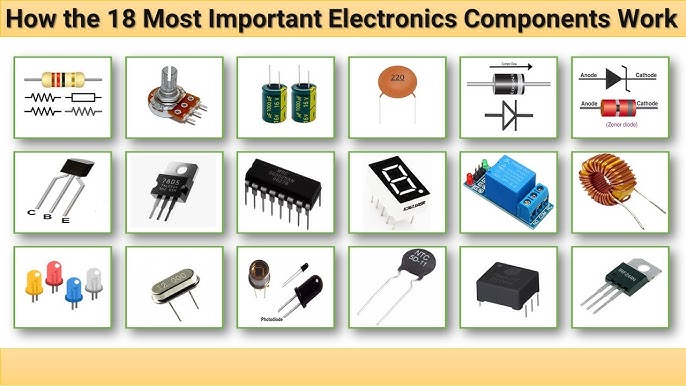
Resistors limit the flow of electric current. You can identify them by their cylindrical shape with colored bands wrapped around them. These color codes represent resistance values, which you can decode using a resistor color chart.
Have you ever wondered why those tiny bands hold so much information? Learning to read these colors saves you from guesswork and helps you choose the right resistor quickly.
Capacitors: Storing And Releasing Energy
Capacitors store electrical energy temporarily. They come in various shapes like small discs, cylinders, or rectangular blocks. Look for labels indicating capacitance values in microfarads (µF), picofarads (pF), or nanofarads (nF).
Some capacitors also have polarity markings. Identifying the positive and negative leads is crucial to avoid damaging your circuit.
Diodes: Allowing Current In One Direction
Diodes act like one-way valves for electric current. They often look like small cylinders with a silver or black band on one end. This band marks the cathode side, which helps you place the diode correctly.
Have you checked the diode’s orientation when your circuit doesn’t work? It’s a simple step that can save hours of frustration.
Transistors: The Tiny Switches And Amplifiers
Transistors control the flow of current and amplify signals. You’ll find them in three-legged packages, either flat or round. Identifying their type—NPN or PNP—is key and usually marked on the casing or datasheet.
Knowing how to read transistor markings lets you select the right one for your project without second-guessing.
Integrated Circuits (ics): Complex Components In Small Packages
ICs combine multiple electronic functions in a single chip. They look like black rectangles with many metal legs. Identification requires reading the part number printed on the surface.
Have you tried searching an IC’s part number online? It’s the fastest way to find datasheets and understand its function.
Common Types Of Components
Electronic devices use many different components to work. Each part plays a special role. Knowing common types helps to understand and fix circuits. These parts come in various shapes and sizes. Their labels and codes show their functions and values.
Here are some common electronic components you will find in most circuits:
Resistors
Resistors control the flow of electric current. They reduce current to protect other parts. Color bands on resistors show their resistance value. Resistance is measured in ohms (Ω). Resistors come in many sizes and power ratings.
Capacitors
Capacitors store and release electrical energy. They block direct current and allow alternating current to pass. Capacitors have values shown in microfarads (µF), nanofarads (nF), or picofarads (pF). They come as ceramic, electrolytic, or film types.
Inductors
Inductors store energy in a magnetic field. They resist changes in current flow. Inductors look like coils of wire. Their value is measured in henries (H). Inductors help filter signals and store energy temporarily.
Diodes
Diodes allow current to flow in one direction only. They protect circuits by blocking reverse current. Common types include standard, Zener, and LED diodes. Diodes have polarity marked by a line or band. They convert AC to DC in power supplies.
Transistors
Transistors control electrical signals and amplify current. They act like switches or signal boosters. Transistors have three leads called emitter, base, and collector. Types include NPN and PNP for bipolar junction transistors. They form the building blocks of digital circuits.
Identifying Components By Appearance
Identifying electronic components by appearance is a practical skill. It helps to recognize parts quickly without complex tools. Many components have unique shapes, sizes, and markings. These visual clues guide you to their function and value.
Careful observation can reveal the type and rating of a component. Color bands, labels, and physical design all provide useful hints. This section explains how to identify common components just by looking.
Resistors
Resistors usually have a small cylindrical body. They often show colored bands around them. Each color band represents a number for resistance value.
- Four or five bands indicate value and tolerance.
- Common resistor colors include brown, red, orange, yellow.
- Smaller resistors may look like tiny rectangles.
Capacitors
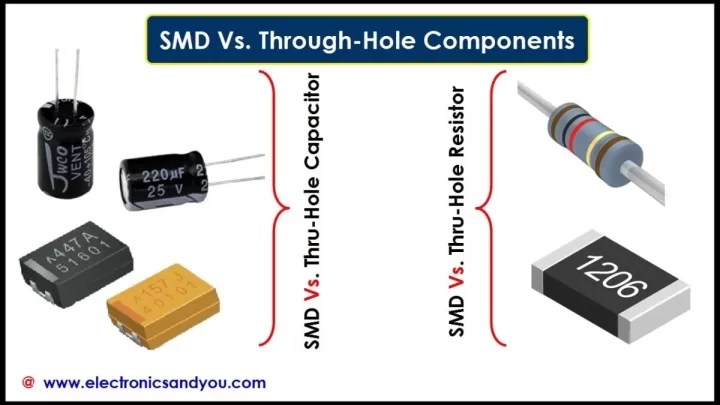
Capacitors come in different shapes and sizes. Electrolytic capacitors are usually cylindrical with polarity markings. Ceramic capacitors are small and disc-shaped with no polarity.
- Look for voltage and capacitance printed on the body.
- Polarity is important for electrolytic types.
- Some capacitors use codes instead of numbers.
Diodes And Leds
Diodes have a small cylindrical or rectangular shape. A band marks the cathode side. LEDs resemble small bulbs and glow when powered.
- Diode bands show current flow direction.
- LEDs come in various colors and shapes.
- Check for clear or colored plastic cases.
Transistors
Transistors are often small with three legs. They come in shapes like flat-faced or rounded bodies. Labels or part numbers are usually printed on them.
- Look for a flat side or tab for orientation.
- Common types include NPN and PNP.
- Check datasheets for exact identification using part numbers.
Integrated Circuits (ics)
ICs are black rectangular chips with many pins. They have printed codes on top for identification. The number of pins varies widely.
- Pin 1 is often marked with a dot or notch.
- Code helps find the IC function and specs.
- Package types include DIP, SOIC, and QFP.
Reading Component Codes
Reading component codes is essential for identifying electronic parts accurately. Components often have small markings that show their values and types. Understanding these codes helps avoid mistakes and speeds up repair or assembly tasks.
Codes come in different forms, mainly color bands or alphanumeric characters. Recognizing these patterns allows quick decoding of resistors, capacitors, and other parts. This skill is useful for hobbyists and professionals alike.
Color Codes
Color codes use colored bands to represent numbers and multipliers. This system is common on resistors. Each color means a specific digit or factor.
- First two bands show the first two digits.
- Third band shows the multiplier.
- Fourth band indicates tolerance.
For example, a resistor with bands brown, black, red, and gold means 1, 0, ×100, and ±5% tolerance. Learning the color chart is simple with practice. It helps identify resistance values quickly without extra tools.
Alphanumeric Codes
Alphanumeric codes use letters and numbers to show component values and ratings. This method is common on capacitors, inductors, and semiconductors.
- Letters often represent units or multipliers.
- Numbers indicate value or part number.
- Some codes include manufacturer symbols.
For instance, a capacitor marked “104” means 100,000 pF or 0.1 μF. Letters like “K” or “M” show tolerance or voltage rating. Learning these codes helps identify parts without datasheets.
Using A Multimeter For Identification
Using a multimeter is one of the most reliable ways to identify electronic components quickly and accurately. This handy tool helps you measure voltage, current, resistance, and continuity, all of which reveal valuable details about the component you’re testing.
Many people overlook how much a multimeter can teach you beyond just checking if something works. Have you ever wondered if that old resistor is still good or what type of diode you have on hand? A multimeter can answer those questions with ease.
Identifying Resistors By Measuring Resistance
Set your multimeter to the resistance (ohms) mode to test resistors. Touch the probes to each end of the resistor, and note the reading on the display.
This number tells you the resistor’s value, which you can compare to the color bands on the resistor. If the reading is way off, the resistor might be damaged or mislabeled.
Checking Diodes Using The Diode Test Mode
Switch your multimeter to the diode test setting, then place the red probe on the anode and the black probe on the cathode.
A good diode will show a voltage drop typically between 0.5 to 0.8 volts. If it reads zero or infinite, the diode is either shorted or open, respectively.
Testing Capacitors With Resistance Or Capacitance Mode
If your multimeter has a capacitance setting, use it to measure the capacitor’s value directly. Otherwise, set it to resistance mode and observe the reading as you touch the probes to the capacitor terminals.
A healthy capacitor will show a low resistance that gradually increases as it charges. If the resistance stays low or doesn’t change, the capacitor might be faulty.
Using Continuity Mode To Identify Switches And Fuses
Continuity mode checks if electricity can flow through a component. Touch the probes to each end of a switch or fuse.
If the multimeter beeps or shows a very low resistance, the component is closed or intact. No beep or high resistance means it is open or broken.
Component Datasheets And Specifications
Component datasheets and specifications are your best allies in identifying electronic components accurately. These documents provide detailed information straight from the manufacturers, helping you understand every aspect of a part before you use it. Knowing how to read and interpret these datasheets can save you from costly mistakes and improve your projects’ reliability.
What Information Do Datasheets Provide?
Datasheets typically include electrical characteristics, mechanical dimensions, pin configurations, and recommended operating conditions. You will find maximum voltage and current ratings, power consumption, and temperature limits clearly listed. This information helps you determine if a component fits your circuit’s needs.
For example, a resistor’s datasheet will show its resistance value, tolerance, and power rating. A capacitor’s datasheet might list capacitance, voltage rating, and equivalent series resistance (ESR). Knowing these details prevents you from using a part that could fail or cause damage.
How To Interpret Key Specifications
Focus on the parameters that directly affect your application. Look at maximum ratings to avoid pushing components beyond their limits. Pay attention to typical operating values to understand how the component behaves under normal conditions.
Understanding pin configuration diagrams is crucial when identifying components with multiple pins, such as integrated circuits or transistors. Misreading these can lead to wrong connections and circuit failure. Always cross-check pin numbers and functions before wiring.
Using Datasheets To Confirm Component Identity
Sometimes, a component’s markings are faded or unclear. Datasheets can help you match these markings to exact part numbers and specifications. Compare physical dimensions and pin layouts with the datasheet to verify the component.
Have you ever had a mystery component and struggled to identify it? I’ve found that scanning the datasheet against any visible markings and testing electrical parameters often reveals its identity. This approach turns uncertainty into confidence.
Where To Find Reliable Datasheets
Manufacturers’ official websites are the most trustworthy sources for datasheets. Electronics distributors like Digi-Key and Mouser also provide datasheets alongside product listings. Avoid random downloads from unverified sites to ensure accuracy.
Keeping a digital library of datasheets for frequently used components can speed up your work. Tools like datasheet managers or bookmarking sites help you access specs quickly when you need them.
Tools For Component Identification
Identifying electronic components requires the right tools. These tools help you read values, check connections, and recognize parts quickly. Using proper tools saves time and reduces mistakes. Here are some essential tools for component identification.
Multimeter
A multimeter measures voltage, current, and resistance. It helps test if a component works properly. You can check resistors, capacitors, and diodes with it. A digital multimeter shows clear readings, making it easier to understand.
Component Tester
A component tester identifies various parts automatically. It shows details like resistance, capacitance, or transistor type. This tool is small and simple to use. It is great for beginners and experts alike.
Magnifying Glass Or Loupe
Small components often have tiny labels. A magnifying glass or loupe helps read these markings. It makes visual inspection easier and more accurate. This tool is cheap but very helpful.
Datasheets And Component Codes
Datasheets provide detailed information about parts. Use component codes to find datasheets online. These documents show pinouts, values, and electrical limits. They are useful for confirming the exact component type.
Oscilloscope
An oscilloscope displays electrical signals in real time. It helps identify active components by their signal patterns. This tool is common in labs and professional workspaces. It offers deeper insights than simple meters.
Esr Meter
An ESR meter measures the equivalent series resistance of capacitors. It detects old or damaged capacitors that look fine visually. This tool is essential for testing electrolytic capacitors in circuits.
Ic Pinout Diagrams
Integrated circuits have many pins with specific functions. Pinout diagrams help identify each pin’s role. They guide testing and replacement of ICs. These diagrams are often found in datasheets or online.

Credit: www.electronicsandyou.com
Tips For Beginners
Identifying electronic components can feel overwhelming when you’re just starting out. The good news is that with the right approach, you can quickly build confidence and avoid common mistakes. Here are some practical tips that will make your learning curve smoother and more enjoyable.
Understand Component Markings And Codes
Most electronic parts come with codes printed on them. These codes might look like a random mix of letters and numbers, but they hold the key to understanding the component’s value and type.
Take a resistor, for example. The colored bands on it represent its resistance value. Learning to read these bands can save you from guesswork and frustration.
Keep a reference chart handy or use a smartphone app to decode these markings while you work.
Use A Multimeter Early And Often
A multimeter is your best friend when identifying unknown components. It can measure voltage, current, resistance, and continuity, helping you verify if a part is functioning properly.
Don’t just rely on visual inspection; testing components with a multimeter gives you concrete information. When I first started, I mistakenly assumed a capacitor was good just by looking at it—but the multimeter showed otherwise.
Practicing with your multimeter builds your intuition about components and circuits.
Refer To Datasheets For Detailed Information
Datasheets might seem intimidating at first, but they provide essential details about a component’s specifications and pin configuration.
Once you get used to reading them, datasheets will help you avoid wiring mistakes and select the right parts for your projects. For instance, knowing the voltage rating of a capacitor prevents damage and ensures safety.
You can find datasheets online by searching the part number printed on the component.
Learn By Disassembling Simple Devices
Taking apart old gadgets can teach you a lot about electronic components. You’ll see how resistors, capacitors, diodes, and transistors are used together in real circuits.
Pay attention to how components are connected and labeled. This hands-on experience reinforces your theoretical knowledge and sparks curiosity about how things work.
Have you ever opened a broken radio or toy? Try it next time, and see what you discover.
Ask Questions And Join Communities
Don’t hesitate to ask questions when you’re unsure about a component. Online forums and local hobby groups are great places to get advice from experienced enthusiasts.
Sharing your observations and challenges can lead to helpful tips and new learning opportunities. When I shared my early mistakes online, community members offered guidance that saved me hours of trial and error.
Engaging with others keeps your motivation high and accelerates your learning.

Credit: www.youtube.com
Frequently Asked Questions
What Are The Common Types Of Electronic Components?
Common electronic components include resistors, capacitors, diodes, transistors, and integrated circuits. Each serves a specific function in circuits, such as controlling current, storing charge, or amplifying signals.
How Can I Read Electronic Component Labels?
Electronic components have color codes or printed markings. Resistors use color bands, while capacitors and ICs have alphanumeric codes. Refer to datasheets or charts to decode these labels accurately.
What Tools Help Identify Electronic Components?
Multimeters, component testers, and magnifying glasses assist in identification. Multimeters measure resistance, voltage, and continuity. Testers can detect component type and value quickly and reliably.
Why Is Identifying Electronic Components Important?
Correct identification ensures proper circuit assembly and troubleshooting. It prevents damage to devices and ensures components meet design specifications, improving overall circuit performance and reliability.
Conclusion
Identifying electronic components is easier with practice and patience. Start by learning common symbols and codes. Use a multimeter to check parts safely. Reading datasheets helps understand each component’s role. Take your time to study different shapes and sizes. Soon, recognizing components will feel natural.
This skill supports building and fixing circuits confidently. Keep exploring and testing to improve every day.