How to Create Electronic Music at Home: Ultimate Beginner’s Guide
Are you fascinated by the beats and rhythms that make electronic music so captivating? Imagine creating your own tracks right from the comfort of your home.
Whether you’re a seasoned musician or a complete newbie, the world of electronic music is at your fingertips. With the right tools and a bit of guidance, you can transform your creative ideas into soundscapes that are uniquely yours. This guide will show you how to set up your own home studio and start crafting those killer beats.
Curious about the secrets behind the tracks you love? Stay with us as we uncover the essentials you need to create electronic music effortlessly. Your musical journey is just a click away!
Essential Gear For Home Music
Creating electronic music at home requires more than just passion—it demands the right tools. Having essential gear tailored to your workflow can transform your ideas into polished tracks. Let’s dive into the key equipment that sets the foundation for your home studio.
Choosing The Right Computer
Your computer is the heart of your music setup. It needs enough power to run software smoothly without lag or crashes. Both Windows PCs and Macs work well; pick the one you feel comfortable with and that fits your budget.
Look for at least 8GB of RAM, a fast processor, and ample storage. Solid-state drives (SSD) speed up loading times, which helps when juggling multiple tracks. Think about whether portability matters—laptops offer flexibility, while desktops often provide better performance for the price.
Digital Audio Workstations
A Digital Audio Workstation (DAW) is the software where you compose, edit, and mix your music. Popular options include Ableton Live, FL Studio, and Logic Pro. Each has its unique workflow, so try free trials to find what clicks with you.
Consider what genres you want to create and how intuitive the interface feels. Some DAWs excel at live performance, while others shine in detailed editing. Remember, the best DAW is the one you’ll enjoy working with every day.
Audio Interfaces And Controllers
An audio interface connects your instruments and microphones to your computer. It improves sound quality and reduces latency, making your recordings crisp and clear. Focusrite Scarlett and PreSonus AudioBox are reliable choices for beginners.
Controllers, like MIDI keyboards or pad controllers, let you play virtual instruments with more expression. They can speed up your creative process and make your sessions more hands-on. Ask yourself: do you want to perform parts live, or prefer drawing notes in the DAW?
Headphones Vs Studio Monitors
Deciding between headphones and studio monitors depends on your space and listening habits. Headphones offer detailed sound and block outside noise, perfect for late-night sessions. However, they can sometimes exaggerate bass or treble, leading to mixes that don’t translate well elsewhere.
Studio monitors provide a more accurate, room-filling sound. They help you hear how your tracks will sound on different systems. If your room is untreated or noisy, consider starting with quality headphones and gradually adding monitors when you can control your environment better.
Basic Music Theory For Beginners
Understanding basic music theory can transform how you create electronic music at home. It gives you the tools to build melodies, harmonies, and rhythms that actually sound good together. Knowing just a few simple concepts will boost your confidence and make your music more enjoyable to listen to.
Simple Chords And Scales
Start with major and minor scales because they form the foundation of most songs. A major scale sounds bright and happy, while a minor scale feels more emotional or moody.
Try playing a C major scale (C, D, E, F, G, A, B). Notice how it sounds? Now, build simple chords using just three notes from that scale, like C-E-G for a C major chord.
These chords are your building blocks. When you string them together, you create harmony. Ask yourself: which chords make you feel a certain emotion? That feeling can guide your next track.
Rhythm And Timing
Rhythm is the heartbeat of your music. Even the catchiest melody falls flat without good timing.
Start by understanding beats and measures. Most electronic music uses a 4/4 time signature, meaning four beats per measure. Try tapping your foot to count the beats while listening to a favorite track.
Use a metronome or DAW grid to keep everything steady. Experiment with different note lengths and rests to make your rhythm interesting. How can you make your beats stand out without being too complicated?
Song Structure Basics
Knowing how to arrange your music keeps listeners engaged. Most electronic tracks follow a simple structure: intro, build-up, drop, breakdown, and outro.
- Intro:Sets the mood and introduces elements
- Build-up:Increases energy and anticipation
- Drop:The main part where the beat hits hard
- Breakdown:Drops energy to give listeners a breather
- Outro:Winds down and closes the track
Try sketching your song on paper before you start producing. What moments do you want your listeners to remember? Planning structure helps you stay focused and creative.
Setting Up Your Home Studio
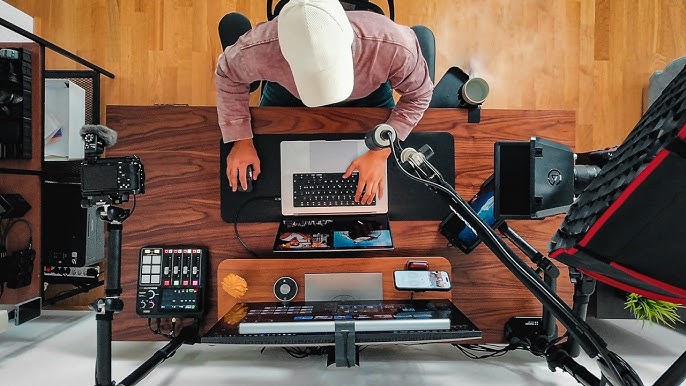
Setting up your home studio lays the foundation for creating great electronic music. A well-organized space boosts creativity and helps you work efficiently. It also improves sound quality and comfort. Focus on three key areas to make your studio effective and enjoyable.
Optimizing Room Acoustics
Good acoustics help you hear your music clearly. Avoid placing speakers near walls or corners to reduce echo. Use foam panels or bass traps on walls to absorb sound reflections. A thick rug on the floor can reduce unwanted noise. Curtains or heavy fabrics also help control sound in the room.
Cable Management Tips
Messy cables can cause frustration and disrupt workflow. Use cable ties or Velcro straps to bundle cables neatly. Label each cable for easy identification. Keep cables away from power cords to reduce noise interference. Use a cable organizer or box to hide excess cables and keep your desk clean.
Creating A Comfortable Workspace
Comfort affects how long you can work without feeling tired. Choose a good chair with back support. Position your desk and equipment at a height that feels natural. Ensure enough lighting to reduce eye strain. Keep your workspace tidy and personalized to inspire creativity.
Starting Your First Track
Starting your first electronic music track can feel exciting and a bit overwhelming. The key is to begin simple and build step by step. Focus on one element at a time. This approach helps you stay clear and creative. Each part of your track plays a role in shaping the final sound.
Choosing A Genre
Pick a genre that inspires you. Genres like house, techno, or trap have unique sounds and rhythms. Choose one that matches your mood or taste. This choice guides your track’s style and instruments. You can explore different genres later as you grow.
Building Drum Patterns
Start with the drums to set the rhythm. Use basic drum sounds like kicks, snares, and hi-hats. Create a simple loop that repeats. Keep the beat steady and easy to follow. This foundation helps other sounds fit well together.
Crafting Basslines
Add a bassline to give your track depth. Bass supports the rhythm and adds groove. Use low sounds that move smoothly with the drums. Try short, repeating notes or a simple melody. The bass should complement the drum pattern, not overpower it.
Adding Melodies And Harmonies
Introduce melodies and harmonies to add emotion. Use keyboards, synths, or sampled sounds. Keep melodies clear and catchy, but not too complex. Harmonies add richness and fill the space. Play with different notes until the sound feels right.
Using Synths And Effects
Synths and effects shape the heart of electronic music creation. They let you build sounds from scratch and add depth or texture to your tracks. Using these tools creatively can transform simple ideas into rich, immersive music.
Basic Synthesizer Functions
Synthesizers generate sounds by creating and shaping audio signals. Most synths have key components like oscillators, filters, and envelopes.
- Oscillators:Produce raw sounds with waveforms such as sine, square, or sawtooth.
- Filters:Remove or emphasize certain frequencies, changing the sound’s tone.
- Envelopes:Control how sounds start, hold, and fade away over time.
Learning how to adjust these parts helps you create unique sounds. Experiment with different waveforms and filter types to find your style.
Applying Effects And Plugins
Effects alter the sound to make it more interesting or polished. Common effects include reverb, delay, distortion, and chorus.
- Reverb:Adds space and depth, making sounds feel like they are in a room or hall.
- Delay:Creates echo effects that repeat the sound.
- Distortion:Adds grit and edge, useful for adding energy.
- Chorus:Thickens the sound by layering slight variations.
Plugins are software tools that offer these effects inside your music program. Use plugins to shape your sound without needing extra hardware.
Automation Techniques
Automation controls how sounds change over time in your track. It can adjust volume, effects, or synth parameters automatically.
- Fade sounds in or out smoothly.
- Change filter cutoff to create movement.
- Adjust effect levels to build tension or release.
Automation makes your music dynamic and engaging. Set points on your timeline to control changes precisely and bring life to your tracks.
Mixing And Mastering Basics
Mixing and mastering are crucial stages in making your electronic music sound polished and professional. They shape the final vibe of your track, bringing all the sounds together clearly and powerfully. Understanding the basics will help you avoid common pitfalls and get results that make you proud of your work.
Balancing Levels
Start by adjusting the volume of each track so nothing overpowers the rest. Your kick drum shouldn’t drown out the bass, and your synths should complement, not clash. Listen carefully and ask yourself: can you clearly hear every important element?
Use your ears more than the meters. Sometimes a track looks balanced on screen but feels messy in your headphones. Try muting tracks one by one to identify what’s too loud or too quiet.
Eq And Compression Tips
EQ helps you carve space for each sound. Cut frequencies that clash and boost those that add character. For example, reduce low mids on a synth if it’s muddying the bass.
Compression controls dynamics and adds punch. Use it lightly on drums to keep their energy consistent. Be cautious—over-compressing can make your track sound flat and lifeless.
- Cut before you boost on EQ to avoid clutter
- Use sidechain compression to make the kick and bass work together
- Listen to how compression affects the track’s groove
Finalizing Your Track
Mastering is the last step to make your track sound good on any system. Use a limiter to raise the overall volume without causing distortion. Pay attention to how your track sounds on different speakers and headphones.
Don’t rush this phase. Take breaks and come back with fresh ears to catch mistakes you missed. Ask yourself: does your track hold energy and clarity from start to finish?
Sharing And Promoting Your Music
Sharing and promoting your electronic music is key to reaching new listeners. It helps you grow your audience and get feedback. Focus on making your music easy to find and enjoy. Use online tools to spread your sound and connect with fans.
Uploading To Streaming Platforms
Get your music on popular streaming services. Platforms like Spotify, Apple Music, and SoundCloud reach millions of listeners worldwide. Prepare your tracks with good titles and cover art. Use digital distributors to upload your music easily. This makes your songs available on many platforms at once.
Building An Online Presence
Create profiles on social media and music sites. Share updates, behind-the-scenes content, and new releases. Use clear photos and consistent branding. Post regularly to keep fans interested. A website or blog can also showcase your music and story. This helps people find all your content in one place.
Engaging With Music Communities
Join online groups and forums focused on electronic music. Participate in discussions and share your tracks. Listen to others and give feedback. Collaboration opportunities often arise from active involvement. These communities support growth and help you stay inspired.
Frequently Asked Questions
What Basic Equipment Is Needed To Create Electronic Music?
To create electronic music at home, start with a computer, digital audio workstation (DAW), MIDI controller, and headphones. These basics allow you to compose, mix, and produce music efficiently. Additional gear can enhance your setup but isn’t mandatory for beginners.
How Do I Choose The Right Digital Audio Workstation?
Choose a DAW based on your budget, workflow, and music style. Popular options include Ableton Live, FL Studio, and Logic Pro. Most DAWs offer trial versions, so test a few to find one that fits your creative process and technical skills.
Can Beginners Create Quality Electronic Music At Home?
Yes, beginners can create quality electronic music with practice and patience. Learning basic music theory, sound design, and mixing techniques helps. Online tutorials and courses provide valuable guidance to improve your skills step-by-step.
What Are Some Essential Music Production Tips For Beginners?
Focus on learning your DAW, experimenting with sounds, and keeping arrangements simple. Use reference tracks to guide your mixing. Regular practice and seeking feedback improve your music production skills quickly and effectively.
Conclusion
Creating electronic music at home is fun and rewarding. Start small and learn one step at a time. Use simple tools and sounds to build your skills. Practice often, and don’t be afraid to try new ideas. Your creativity will grow with each track you make.
Keep exploring different styles and techniques. Most importantly, enjoy the process and express yourself freely. Music is about feeling, not perfection. Keep going, and your home studio will become your own creative space.