
Change block type or style
Move Paragraph block from position 5 up to position 4
Change block type or style
Block Paragraph is at the beginning of the content and can’t be moved up
Move Paragraph block from position 1 down to position 2
Change text alignment
Displays more block tools
blob:https://techpopnest.com/f7a0b09a-2a51-4b5e-8b18-5c39efe07f5e
Suggestion Score Publish Date Inbound Internal Links Outbound Internal Links Outbound External Links Desc Asc
Move Paragraph block from position 5 down to position 6
Change text alignment
Displays more block tools
blob:https://techpopnest.com/f7a0b09a-2a51-4b5e-8b18-5c39efe07f5e
Suggestion Score Publish Date Inbound Internal Links Outbound Internal Links Outbound External Links Desc Asc
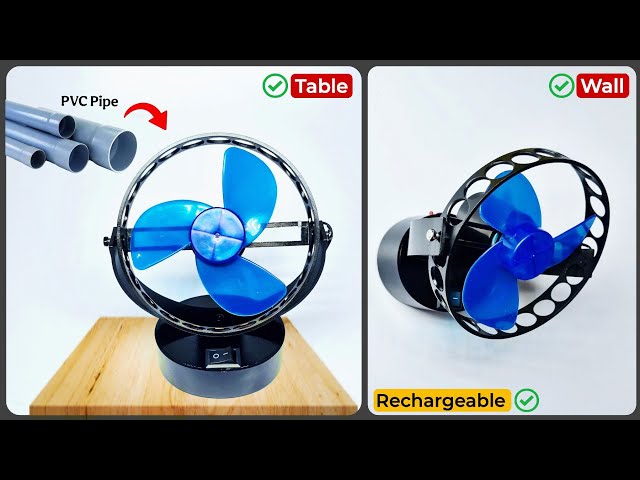
Have you ever looked at small electronic gadgets and wondered if you could make them yourself? The thought of creating your own devices at home is exciting, isn’t it?
Imagine holding a gadget that you built with your own hands. Not only does it save money, but it also gives you a sense of accomplishment. You don’t need to be an expert or have expensive tools to get started.
You’ll learn simple steps and tips to create small electronic gadgets right in the comfort of your home. Dive in, and you’ll soon discover how fun and rewarding DIY electronics can be!

blob:https://techpopnest.com/f7a0b09a-2a51-4b5e-8b18-5c39efe07f5e
Suggestion Score Publish Date Inbound Internal Links Outbound Internal Links Outbound External Links Desc Asc
Credit: www.instructables.com
Essential Tools And Materials
Creating small electronic gadgets at home requires the right tools and materials. These essentials help you build projects safely and efficiently. Having a clear understanding of what you need will make the process smoother. It will also improve your results and reduce mistakes.
Basic Electronics Components
Start with common parts found in most beginner kits. These components form the building blocks of your gadgets.
- Resistors – control electric current flow.
- Capacitors – store and release electrical energy.
- LEDs – light up to show circuit activity.
- Transistors – act as switches or amplifiers.
- Diodes – allow current in one direction only.
- Push buttons – simple switches to control circuits.
- Breadboard – a platform to build circuits without soldering.
- Wires – connect components together.
- Battery holders – secure power sources for your projects.
Recommended Tools For Beginners
Having the right tools makes building gadgets easier and more precise. Beginners should focus on basic, easy-to-use equipment.
- Soldering iron – joins electronic parts permanently.
- Wire cutters and strippers – prepare wires for connections.
- Multimeter – measures voltage, current, and resistance.
- Tweezers – handle small components carefully.
- Screwdrivers – tighten or loosen screws in cases.
- Helping hands tool – holds parts steady while working.
- Small pliers – bend and shape wires.
- Safety glasses – protect eyes during soldering.
Safety Precautions
Safety is crucial when working with electronics. Following simple rules prevents accidents and injuries.
- Work in a well-ventilated area to avoid fumes.
- Always unplug devices before starting work.
- Wear safety glasses to protect your eyes.
- Handle the soldering iron carefully; it is very hot.
- Keep liquids away from your workspace.
- Store tools and components safely after use.
- Check power sources to avoid electric shocks.

Credit: www.homemade-circuits.com
Simple Circuit Projects
Simple circuit projects are a great way to start creating your own electronic gadgets at home. They help you understand the basics of electricity and components without needing complex tools. Plus, these projects are practical—you can actually use what you build every day.
Building A Led Flashlight
A LED flashlight is a perfect beginner project that shows how circuits control light. You only need a few parts: a battery, a switch, a resistor, and an LED. Connecting these correctly will light up the LED when you flip the switch.
Try different resistor values to see how the brightness changes. This hands-on test helps you grasp how electricity flows and affects your circuit. Have you ever noticed how a simple switch can control so much power? Building this flashlight will give you that insight.
Creating A Basic Alarm System
Making a basic alarm system teaches you about sensors and triggers in electronics. You can use a buzzer, a battery, a switch, and wires to create a circuit that sounds an alarm when the switch is opened or closed.
This project shows how everyday security devices work. You might even think about customizing the alarm’s sensitivity by adding different switches or sensors. What would you protect with a homemade alarm system?
Assembling A Portable Speaker
Putting together a portable speaker combines audio electronics with simple circuit design. You’ll need a small amplifier board, a speaker driver, a battery pack, and some wires. Connecting these parts correctly lets you play music from your phone or MP3 player.
This project is rewarding because you get to hear your creation in action. It also encourages you to experiment with different speaker sizes or battery types to improve sound quality and battery life. How would your favorite tunes sound through a speaker you built yourself?
Microcontroller-based Gadgets
Microcontroller-based gadgets bring simple electronics to life. These small computers control many everyday devices. Building your own gadget helps you learn electronics and coding. It is fun and rewarding to see your creation work.
Microcontrollers like Arduino are popular for beginners. They are affordable and easy to use. You can create many projects with just a few parts. Start with simple ideas and grow your skills step by step.
Getting Started With Arduino
Arduino is a small circuit board with a microcontroller chip. It reads inputs and controls outputs. You can connect sensors, lights, and motors to it. The Arduino software lets you write code to tell it what to do.
Buy a basic Arduino starter kit to get all parts. Follow simple tutorials to learn uploading code. Experiment with blinking an LED light first. This builds confidence and shows how code controls hardware.
Making A Temperature Sensor
A temperature sensor measures heat and sends data to Arduino. Use a sensor like the TMP36 or DS18B20. Connect the sensor wires to Arduino pins correctly. Write code to read sensor values and convert them to degrees.
Display the temperature on a screen or send it to a computer. This project teaches analog and digital signals. It also shows how microcontrollers handle real-world data.
Designing An Automatic Plant Watering System
This system waters plants based on soil moisture. Use a soil moisture sensor to detect dry soil. Connect it to Arduino and a water pump or valve. Write code to start watering when soil is dry.
This gadget saves water and keeps plants healthy. It combines sensors, actuators, and programming. You learn how microcontrollers control devices based on sensor input.
Wearable Electronics
Wearable electronics bring technology closer to your daily life by attaching smart functions directly to your body. These gadgets blend convenience and innovation, making it easy to track health, express creativity, or stay connected. Building your own wearable device at home can be surprisingly simple and rewarding, especially when you understand the basics and have the right materials.
Diy Fitness Tracker
Creating a fitness tracker starts with a few key components: a microcontroller, a heart rate sensor, and a small display. You can use platforms like Arduino or ESP32 for easy programming and flexibility.
Attach the heart rate sensor to your wrist area and connect it to the microcontroller. Then, program the device to collect data and show your heart rate or steps on the display. Have you ever wanted to customize your fitness goals or track unique activities? Building your own tracker lets you do just that.
Creating A Light-up Badge
A light-up badge is a simple, fun project that requires LEDs, a battery pack, and conductive thread or copper tape. You can sew or stick the circuit onto fabric, creating patterns that light up when powered.
Choose colors and designs that represent your personality or interests. This project teaches you how to connect components in a wearable format while making a statement piece. What message would you display if you could design your own electronic badge?
Smartwatch Basics
Building a basic smartwatch involves integrating a microcontroller, display screen, and sensors like accelerometers or temperature sensors. The challenge is balancing functionality with size and power consumption.
Start with simple features such as time display, step counting, or notifications through Bluetooth connection to your phone. This hands-on experience helps you understand how commercial smartwatches work and lets you tailor features to your needs. What features would make your smartwatch truly personal?
Troubleshooting Tips
Troubleshooting is a crucial skill when making small electronic gadgets at home. You will often face unexpected problems that can slow down your progress. Understanding how to identify and fix these issues quickly keeps your projects moving forward and saves you frustration.
Common Issues And Fixes
Loose connections are one of the most frequent problems you’ll encounter. Check all wires and components carefully; a simple wiggle can sometimes restore functionality.
Another common issue is incorrect component placement. Double-check your circuit diagram and ensure each part is where it should be. Swapping two resistors or reversing a diode can stop your gadget from working.
Overheating components might indicate a short circuit or wrong voltage. If you notice a burnt smell or discoloration, immediately disconnect power and inspect your setup. Using a multimeter helps pinpoint shorts and voltage errors.
Testing Your Circuits
Testing early and often helps catch problems before they get complicated. Use a multimeter to measure voltage, current, and resistance at different points in your circuit.
Simple tools like a breadboard let you prototype and test circuits without soldering. This way, you can make changes quickly and avoid permanent mistakes.
Have you tried using LEDs or small buzzers as indicators? They provide instant feedback on whether sections of your circuit are active or not. This can save time tracking down faults.
Improving Project Reliability
Once your gadget works, think about how to keep it working consistently. Secure all connections with solder or quality connectors to avoid accidental disconnections.
Adding a fuse or current limiter can protect your project from damage during unexpected power surges. This small step can save you hours of repair work.
Organizing your workspace and labeling components reduces the chance of errors when assembling or modifying circuits. Have you noticed how much easier troubleshooting becomes when everything is neatly arranged?
Expanding Your Skills
Expanding your skills is the key to moving beyond simple gadget making and creating more complex and useful electronics at home. It challenges you to learn new techniques, understand different components, and solve unexpected problems. The more you push yourself, the more confident and capable you become in your DIY projects.
Online Resources And Tutorials
There is a wealth of free and paid online content designed to help you level up your electronics skills. Websites like Instructables, YouTube channels dedicated to electronics, and platforms like Coursera offer step-by-step tutorials that suit all skill levels.
These resources often include detailed diagrams, parts lists, and troubleshooting tips. Have you ever tried following a tutorial that didn’t quite match your tools or components? Adjusting and experimenting along the way is where real learning happens.
Joining Maker Communities
Connecting with others who share your passion can accelerate your learning. Maker communities, both online and offline, provide support, feedback, and inspiration.
You can ask questions, share your projects, and get advice from experienced makers. Local workshops or maker fairs are great places to meet people and discover new ideas. Are you ready to turn your solo hobby into a shared adventure?
Exploring Advanced Projects
Once you feel comfortable with basic gadgets, challenge yourself with projects that require programming microcontrollers or integrating sensors. Building things like home automation devices or wearable electronics can deepen your understanding.
These projects often require combining skills—coding, soldering, and circuit design—which will make you a more versatile maker. What complex gadget have you always wanted to create but never dared to try?

Credit: www.instructables.com
Frequently Asked Questions
What Tools Are Essential For Making Small Electronic Gadgets?
Basic tools include a soldering iron, wire cutters, multimeter, and screwdriver. These tools help assemble and test circuits effectively.
Which Components Are Needed To Start Gadget Building At Home?
Start with resistors, capacitors, LEDs, transistors, and microcontrollers. These parts form the foundation of most small electronic projects.
How Do I Ensure Safety When Building Gadgets?
Always work in a well-ventilated area and wear safety glasses. Avoid touching live circuits and keep liquids away from electronics.
Can Beginners Make Functional Gadgets Without Experience?
Yes, beginners can build simple gadgets using kits and tutorials. Start small to learn basic skills and gradually increase complexity.
Conclusion
Making small electronic gadgets at home is fun and rewarding. You can learn new skills step by step. Start with simple projects and build your confidence. Using common parts saves money and time. Experimenting helps you understand how gadgets work.
Keep practicing, and your projects will improve. Enjoy the process and stay curious. Soon, you’ll create useful devices by yourself. Home electronics can be a great hobby for anyone. Try it today and see what you can build!


