Is a 32-Inch Mini LED Monitor Worth It for Editing?
If you're asking whether a 32 inch mini led monitor is ideal for editing, the practical answer is yes for most editors. These displays deliver the brightness and contrast that HDR work demands without the burn-in risk of OLED. They aren't a perfect fit for every workflow, though.
Print editors and color purists may still prefer a traditional IPS panel.
In our research across manufacturer specs and aggregate buyer reviews, current 32-inch mini LED models with 1152 or more local dimming zones land surprisingly close to reference-grade performance. The technology sits in a sweet spot between price and capability. Here's what you need to consider before putting one on your desk.
Quick Answer: Is a 32-Inch Mini LED Monitor Ideal for Editing?
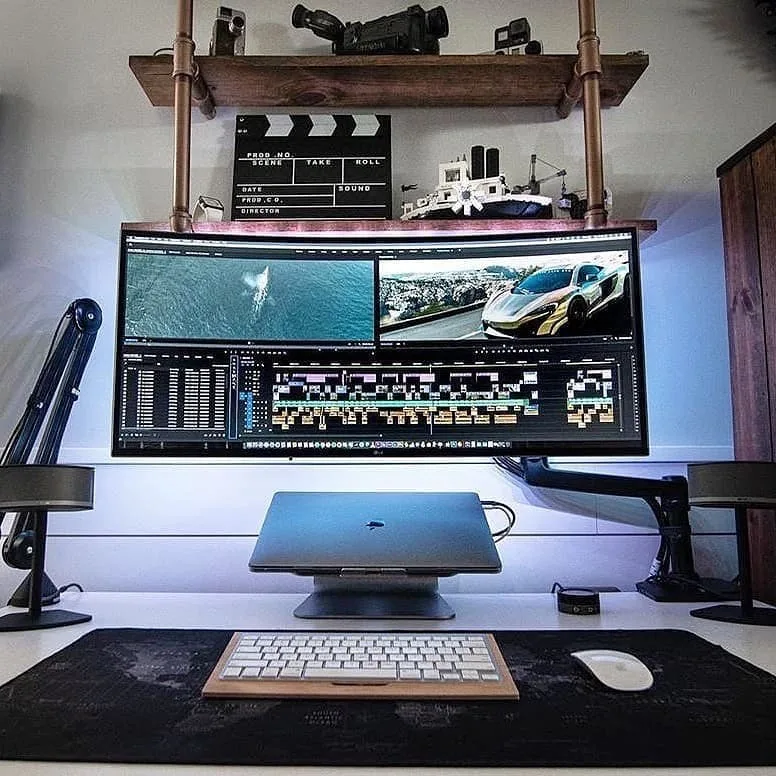
Image source: Bing (Web (fair-use with source credit))
A 32 inch mini LED monitor is ideal for editing for most professionals. It offers high brightness, strong contrast, and accurate color. HDR editing works best on these panels.
The main downside is blooming in dark scenes.
That quick breakdown hides a lot of detail. Editors working with SDR content get most of the benefit. Editors grading HDR video get the biggest jump in quality.
If you travel between studios, you'll also want to weigh this against portable display options that can match your color needs on the road.
How Mini LED Backlighting Actually Changes the Editing Picture
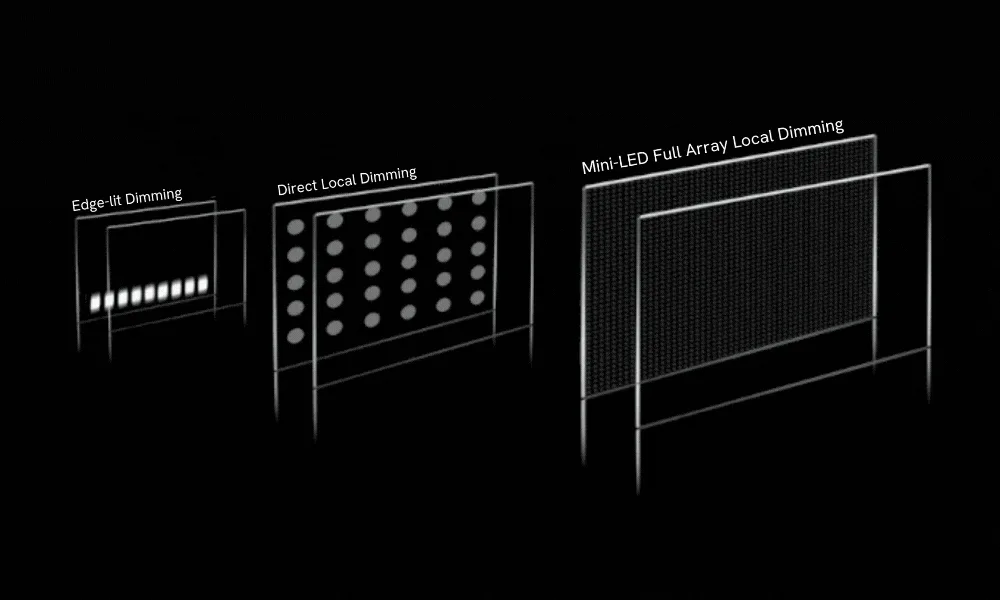
Image source: Bing (Web (fair-use with source credit))
Mini LED is a backlight technology that uses thousands of tiny light-emitting diodes behind an LCD panel. Full-array local dimming (FALD) is the system that controls those zones individually. Instead of one big backlight washing the whole screen, the monitor can brighten or darken specific regions.
That's how you get deep blacks and bright highlights on the same display.
The practical result for editors is contrast that standard IPS panels can't touch. VESA DisplayHDR certification levels like 600 or 1000 tell you the sustained brightness and black level performance. Higher zone counts usually mean tighter control and less light bleed between areas.
Key specs to check on any 32-inch mini LED monitor:
- Zone count: 576 is entry-level, 1152 is good, 2304 is excellent
- Peak brightness: 1000 nits minimum for serious HDR grading
- Color gamut: look for 97% or higher DCI-P3 coverage
- Panel uniformity: check reviews for gray uniformity and backlight bleed
Aggregate user reviews show that monitors with 1152 zones handle most editing scenes cleanly. Stars in a night sky or bright subtitles over dark video will still show some halo. The more zones you have, the smaller that halo gets.
Keep in mind that the backlight also affects how you calibrate. Hardware calibration tools like the X-Rite i1 Display Pro can push these panels to a Delta E of less than 1. That's the accuracy you'd expect from a dedicated color grading monitor.
The same display principles apply whether you're using a desktop monitor or a laptop panel.
Mini LED vs. OLED vs. Standard IPS: The Real Tradeoffs
The shortest way to put it: mini LED beats standard IPS on contrast and brightness, and it beats OLED on price and text clarity. But each technology has a real weakness. Let's put them side by side.
| Feature | Mini LED | OLED | Standard IPS |
|---|---|---|---|
| Black levels | Very good | Perfect | Average |
| Peak brightness | 1000–1600 nits | 400–1000 nits | 300–500 nits |
| Burn-in risk | None | Moderate | None |
| Text rendering | Sharp | Can show fringing | Sharp |
| Price (32-inch 4K) | $700–$2,500 | $1,200–$3,000 | $400–$1,200 |
| Color volume | Strong | Excellent | Good |
Mini LED vs. OLED: Brightness, Burn-In, and Text Rendering
OLED wins on contrast because every pixel turns itself off. That gives perfect blacks and no blooming at all. But OLED panels have a burn-in risk if you leave static timelines or menus on screen for hours.
For editors working 8-hour days in the same app, that's a real concern.
OLED text rendering is also a subtle issue. Some 32-inch QD-OLED models use subpixel layouts that make small text look slightly fuzzy. Mini LED uses a standard LCD layer, so text stays crisp.
If you read scripts, code, or long document timelines, you'll appreciate that.
Brightness is another differentiator. Mini LED panels regularly hit 1000 nits or more. Most OLED monitors peak around 600 to 1000 nits in small windows, and their full-screen brightness is much lower.
When you're grading HDR content that needs sustained highlights, mini LED holds up better in aggregate reviews.
Mini LED vs. Standard IPS: Contrast Without the Price Jump
Standard IPS monitors like the Dell UltraSharp series have accurate color but weak contrast, often around 1000:1. Dark scenes look gray and washed out. Mini LED backlighting fixes that by dimming the dark areas independently.
You don't need to pay OLED money to get that improvement. A 32-inch mini LED monitor with good zone count costs roughly the same as a mid-range IPS editing display. The tradeoff is that mini LED introduces blooming, which IPS doesn't have.
If you do mostly print design in bright rooms, standard IPS may still be the more practical choice.
That's why matching your home editing workstation to the right display tech matters. One panel can't be perfect at everything.
Photo Editing, Video Editing, or HDR Grading: Where Mini LED Fits Best
Mini LED is an excellent match for HDR video editing and color grading. It's also very good for photo retouching. The story changes a bit depending on what you actually do all day.
For HDR grading, the panel's ability to show specular highlights is the key. A 1000-nit peak with proper local dimming reveals details in bright skies, highlights, and light sources that a 400-nit IPS panel just clips away. You can see what the final HDR deliverable will actually look like.
For photo editing, the strong color volume helps. Monitors with quantum dot layers cover 95% to 99% of DCI-P3 and Adobe RGB. That means rich, saturated colors in prints and digital work.
The main catch is that blooming can be distracting when viewing a dark photo with bright elements, like a night cityscape.
For SDR video editing, mini LED is good but not mandatory. Most streaming content in SDR stays under 200 nits. You won't use the full brightness often.
Then again, the high contrast still makes the image look punchier on the timeline.
Real-world workflows often include gaming or general browsing after work hours. A 32-inch mini LED monitor doubles as a great gaming display. That makes it easier to justify one screen for both tasks.
If you're planning a purchase, keep an eye on when display prices typically drop so you can stretch your budget further.
The Blooming Problem: How Bad Is It in Real Editing Work?
Blooming is the soft halo of light that appears around bright objects on a dark background. It happens when a local dimming zone is larger than the bright object it's supposed to illuminate. On a 576-zone monitor, those halos are noticeable.
On a 2304-zone model, they're much harder to spot.
How bad it is depends on what you're editing. If you grade horror films, dark shows, or anything with credits sequences, you'll see it. A bright white subtitle over a black scene is the classic trigger.
Some editors find it mildly annoying. Others find it unacceptable.
There's a common fix: turn local dimming off when working in SDR. Then the monitor behaves like a standard IPS panel with high brightness and accurate color. You only switch dimming on when previewing HDR content.
That gives you both worlds, though it means extra steps in your workflow.
Aggregate user reviews suggest that monitors with 1152 zones or more handle most realistic scenes well. The halo effect is subtle enough that clients rarely notice it during review sessions. Editors working alone in a dark room will notice it more.
If you're producing deliverables for HDR streaming platforms, check your footage on the mini LED with dimming on. Also check it with dimming off. The difference between the two tells you how much creative judgment you need to apply.
A 32-inch mini LED is a long-term editing upgrade that pairs well with a capable workstation. But the panel is only half the equation. You still need a proper colorimeter, a consistent lighting setup, and calibration software to get reference-grade results.
What Specs Actually Matter on a 32-Inch Mini LED Editing Monitor
Not every 32-inch mini LED monitor is built for editing. Gaming models emphasize refresh rate and response time. Editing models prioritize color accuracy, dimming precision, and calibration tools.
Focus on measurable specs, not marketing names.
| Spec | What to Look For | Why It Matters |
|---|---|---|
| Local dimming zones | 1152 or more | Fewer visible halos in dark scenes |
| Peak brightness | 1000 nits minimum | Real HDR highlight detail |
| DCI-P3 coverage | 97% or higher | Standard color space for video |
| Adobe RGB coverage | 90% or higher | Needed for print work |
| Delta E | Under 2 | Consistent accurate color |
| Hardware 3D LUT | Built-in calibration | Stable day-to-day accuracy |
Zone count is the first number to check. Two monitors can both carry VESA DisplayHDR certification and perform very differently in dark scenes. The spec doesn't mandate a zone count.
It only defines brightness, contrast, and color thresholds. That's why a 576-zone monitor and a 2304-zone monitor can both claim the same badge.
Also verify connectivity before buying. HDMI 2.1 and DisplayPort 1.4 handle 4K at high bit depths. USB-C with 90W or higher power delivery charges a MacBook on a single cable.
Editors who work from a laptop will feel that difference every single day.
As of 2026, the safest choices pair an 1152-zone panel with quantum dot technology for color. That combination shows up in most professional-grade models.
Calibration and Setup: Getting True-to-Life Color
A mini LED monitor is only as accurate as its calibration. Out of the box, most units run bright, slightly blue, and oversaturated. Gaming users love that.
Editors hate it.
Set up your panel properly before you grade anything. Here's a practical workflow:
- Turn off local dimming for SDR editing.
- Pick a neutral picture mode like "Standard" or "User".
- Attach a colorimeter. The X-Rite i1 Display Pro and Datacolor SpyderX are the reliable choices.
- Calibrate to D65 white point, 2.2 gamma, and 120 nits brightness.
- Save the ICC profile, or load a 3D LUT if the monitor supports hardware calibration.
Calibrate SDR and HDR modes separately. They use different tone curves and brightness targets. Skipping the HDR pass leaves your HDR previews tinted.
The National Institute of Standards and Technology (NIST) maintains color measurement standards that calibration software uses. Aggregate user reviews show post-calibration Delta E values under 1 on strong 1152-zone panels. At that point, your colorimeter accuracy matters more than the monitor itself.
Calibrate in the same room where you edit, and keep the lighting consistent.
How Much Should You Spend: Pricing Tiers for 32-Inch Mini LED Monitors
Mini LED prices have dropped hard over the past few years. As of 2026, good 32-inch models start around $700. Professional-editing-grade units run between $1,200 and $2,500.
| Tier | Price Range | Typical Zones | Best For |
|---|---|---|---|
| Entry | $700–$1,000 | 576 | SDR photo editing, gaming |
| Mid | $1,200–$1,800 | 1152 | Professional video editing |
| High | $2,000–$3,500 | 2304 | HDR grading, color-critical work |
Entry-level 576-zone monitors handle SDR work cleanly. Blooming shows up in dark HDR scenes, especially around bright subtitles or highlights. If you edit mostly bright content, you'll rarely notice it.
The mid-range is the value sweet spot. A 1152-zone panel with 97% DCI-P3 coverage and hardware LUT support covers nearly every professional need. Most editors should start here.
High-end 2304-zone models approach OLED pricing. They exist for editors who want maximum HDR punch without burn-in risk. They also hold up as all-day mixed-use displays.
Keep an eye on the used market. A year-old 1152-zone model can drop 30% to 40% below MSRP. Inspect panels in person for dead pixels and gray uniformity.
Also check your monthly energy costs for power draw. A 32-inch mini LED pulls 50 to 80 watts during HDR use. That adds up over a full editing month, though it stays far below what a reference monitor consumes.
Common Mistakes Editors Make With Mini LED Monitors
The most common mistake is leaving local dimming on for SDR editing. It crushes near-black detail and exaggerates contrast. Turn it off unless you're previewing HDR.
Second, never calibrate with dynamic contrast or auto-brightness enabled. Those features fight the colorimeter and produce unstable readings. Disable all image enhancement before measuring.
Third, skip bias lighting and you'll misjudge black levels. A dim, neutral light behind the monitor reduces eye strain and makes dark scenes look consistent. Without it, mini LED glow appears worse than it is.
Fourth, ignore gray uniformity at your own risk. Some units show blotchy patches on mid-gray screens. This is separate from IPS glow.
Check a 50% gray image in a dark room before mounting the monitor to a stand.
Finally, match your room to your content. Editing HDR in a bright room forces you to crank brightness. Editing SDR in complete darkness makes dark scenes look overly punchy.
Control the environment first.
Who Should Buy a 32-Inch Mini LED — and Who's Better Off With OLED or IPS
Mini LED sits between OLED and IPS in both price and performance. It's ideal for editors who want contrast without burn-in worry.
Choose mini LED if you grade HDR video, work 8-hour days with static timelines, or want one monitor for editing and gaming. It delivers OLED-like contrast at roughly two-thirds the price.
Choose OLED if you work with per-pixel contrast, review movies in dark rooms, and never keep static UI elements on screen for long stretches. 32-inch QD-OLED models also show slightly less accurate text rendering for some users.
Choose standard IPS if you do print work, need wide viewing angles for client reviews, or want the simplest calibration path. IPS panels are stable, predictable, and about half the price.
If you need a portable secondary display, a mini LED main monitor pairs well with an OLED laptop screen for client feedback. If you're torn between monitor generations, waiting for more zone count is reasonable. But as of 2026, 1152-zone mini LED is mature tech.
FAQs: Quick Answers on Mini LED Monitors for Editing
Does Mini LED Have Burn-In Risk Like OLED?
No. Mini LED uses a standard LCD panel with a backlight, so burn-in is not a concern. Static timelines, menus, and desktop icons can stay on screen for hours without leaving permanent marks.
OLED panels suffer from burn-in over time. Mini LED does not.
Is 32 Inches Too Big for Editing?
Not for most workflows. A 32-inch 4K monitor gives you roughly 138 pixels per inch. That density matches a 27-inch 2560×1440 panel in sharpness.
You get more timeline space, larger preview windows, and easier multi-window layouts. Sit at least 60 to 80 centimeters away for comfortable viewing.
What Brightness Do I Need for HDR Editing?
You need at least 1000 nits peak brightness for serious HDR work. VESA DisplayHDR 1000 certification is a solid baseline. Brighter is better for grading high-end content, but 1000 nits covers the vast majority of HDR deliverables.
Anything below 600 nits will clip highlights and hide detail.
Can I Calibrate a Mini LED Monitor?
Yes. Mini LED monitors calibrate exactly like standard IPS panels. Use an X-Rite i1 Display Pro or Datacolor SpyderX colorimeter.
Calibrate SDR and HDR modes separately. Some professional models include built-in 3D LUT hardware calibration, which stores the correction directly on the monitor for consistent accuracy.
How Many Local Dimming Zones Do I Need for Editing?
Aim for 1152 zones or more if you edit video. That count handles most dark scenes without distracting halos. Editors working mostly in SDR can get by with 576 zones.
If you grade HDR content full time, save up for a 2304-zone panel. It gets noticeably close to OLED contrast.
Final Verdict: Is It the Right Choice for Your Editing Setup?
A 32 inch mini LED monitor is ideal for editing if you work with video, deliver HDR, or want one screen that does everything well. It beats standard IPS on contrast and brightness, and it beats OLED on burn-in safety and price. The main tradeoff is blooming, which disappears on the higher-zone panels.
For most professionals, an 1152-zone mini LED with 97% DCI-P3 coverage and hardware LUT support is the smart buy. It hits the balance between reference quality and everyday usability. As of 2026, that combination sits around $1,200 to $1,800.
That's a fair price for a display that handles editing, grading, and gaming without compromise.
If you only edit bright SDR content, a standard IPS panel still makes sense. If you need perfect blacks and can accept burn-in risk, OLED is tempting. But for the widest range of editing work, mini LED is the most versatile choice you can make.