Best Operating System for Laptop: Top Choices for Performance & Flexibility
Choosing the best operating system for your laptop can greatly impact your productivity and user experience. With various options available, selecting the right one tailored to your needs is crucial.
In today’s digital era, operating systems are the backbone of our laptops. They determine how effectively we interact with our devices. Whether you’re a student, professional, or casual user, the right OS can enhance your computing tasks. Windows 11 offers a user-friendly interface and compatibility with many applications.
For those seeking flexibility and open-source benefits, Linux Mint provides a reliable alternative. Android-x86 brings the mobile experience to a larger screen, appealing to those who enjoy Android’s simplicity. Each operating system has unique features and benefits. Understanding them can help you make an informed decision for your laptop needs.
Bootable Usb For Windows 11

The Bootable USB for Windows 11 Home/Pro/Education is ideal for users who need a reliable and versatile tool to install or repair Windows 11 on their PC or laptop. This product is perfect for IT professionals, system administrators, and everyday users who want to fix boot problems, perform system recovery, or install Windows without worrying about system requirements. If you need an easy-to-use and efficient solution for maintaining or reinstalling your Windows 11 operating system, this bootable USB is the right choice.
Pros:
- Compatible with all versions of Windows 11 including Home, Pro, and Education editions
- Does not require any system requirements to function, making it highly versatile
- Enables installation, repair, and recovery of Windows 11 on both PCs and laptops
- Supports 64-bit systems, ensuring compatibility with modern hardware
- Compact and portable, easy to carry for on-the-go troubleshooting
Cons:
- Generic brand, which may cause concerns for users seeking branded products
- May require some technical knowledge for effective use in complex repair scenarios
- Limited to Windows 11 64-bit systems, not compatible with 32-bit versions
This Bootable USB from USB Companion offers a seamless way to install or repair Windows 11 without worrying about hardware limitations or system requirements. Its broad compatibility with multiple Windows 11 editions ensures that users can rely on it for various troubleshooting and installation needs. The device’s portability and ease of use make it a valuable tool for anyone who frequently handles Windows installations or system repairs.
Additionally, the USB drive supports essential recovery features, allowing users to fix boot problems and recover their systems quickly, minimizing downtime. While it is a generic brand product, its functionality and convenience make it an indispensable accessory for IT professionals and casual users alike who want a dependable solution for managing Windows 11 environments.
To buy this product, click here.
Android-x86 Os Bootable Usb
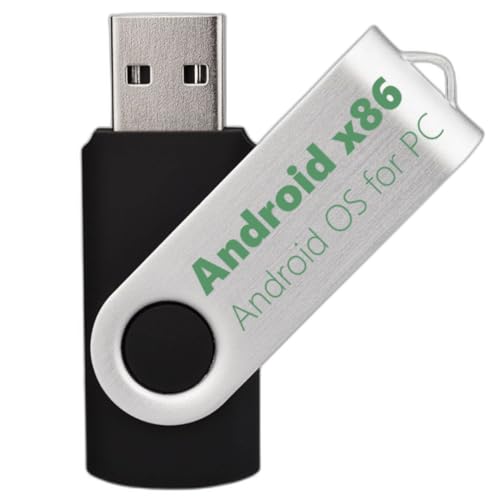
The Android-x86 OS Bootable USB is ideal for tech enthusiasts, developers, and users looking to experience the Android operating system on their PC or laptop. It suits those who want a portable and flexible OS solution without installing software permanently, especially for testing or development purposes across both 64-bit and 32-bit architectures.
Pros:
- Supports both 64-bit and 32-bit systems, enhancing compatibility.
- Comes as a bootable USB, allowing easy portability and quick setup.
- Based on Android Linux OS, providing a familiar interface for Android users.
- Includes a setup guide for straightforward installation and usage.
- Allows users to run Android apps natively on PCs and laptops.
Cons:
- May have limited hardware driver support compared to standard desktop OS.
- Performance can vary depending on the PC or laptop specifications.
- Some Android apps may not be fully optimized for x86 architecture.
The Android-x86 OS Bootable USB transforms any compatible PC or laptop into an Android-based device, enabling users to enjoy mobile apps and games on a larger screen. Its dual support for 64-bit and 32-bit systems ensures versatility across a wide range of hardware, while the portable nature of the bootable USB means you can carry your OS and data anywhere without leaving a trace on the host machine. The included setup guide simplifies the installation process, making it accessible even for those with moderate technical skills.
Additionally, the system leverages the robust and open-source Android Linux OS platform, offering users access to a vast ecosystem of applications and customization options. While hardware compatibility and app optimization may present minor challenges, the ability to run Android natively on a PC provides a unique and valuable experience for developers, testers, and casual users alike. Overall, it is a practical and innovative solution for those seeking a flexible, portable operating system based on Android.
To buy this product, click here.
Hp 2025 14″ Laptop

The HP 2025 14″ Laptop is ideal for business professionals and students who need a powerful yet lightweight device for multitasking, productivity, and everyday use. Its blend of performance, portability, and modern features makes it perfect for users seeking a reliable laptop with advanced capabilities such as Copilot AI and Wi-Fi 6.
Pros:
- Powered by an efficient Intel 4-Core N150 processor for smooth multitasking and enhanced performance
- Large 8 GB RAM supports seamless running of multiple applications simultaneously
- Ample and fast storage with 384 GB (128GB UFS + 256GB SD) for quick access to files and programs
- Equipped with Windows 11 Pro offering robust security and business-oriented features
- Lightweight design at just 3.24 pounds, making it highly portable for on-the-go use
- Stylish Rose Gold finish adds a modern and elegant aesthetic
- Includes Copilot AI to assist with productivity and workflow optimization
- Wi-Fi 6 ensures faster and more stable internet connectivity
Cons:
- Battery life may be limited during heavy usage due to powerful components
- Storage configuration combining UFS and SD might require management for optimal space use
- Screen size at 14 inches may not be ideal for users needing larger displays for detailed work
The HP 2025 14″ Laptop boasts a compact and sleek form factor with dimensions of 8.89 inches height, 0.78 inches width, and 12.76 inches length, making it easy to carry around in backpacks or briefcases. Its Intel 4-Core N150 processor delivers efficient computing power, enabling users to effortlessly handle business applications, web browsing, and multimedia tasks. The 8 GB RAM further enhances the system’s responsiveness, reducing lag during multitasking sessions.
Storage on this laptop combines a 128GB UFS drive for rapid boot and application loading with an additional 256GB SD card, providing flexible space management for documents and media. The integration of Copilot AI adds a smart assistant to improve productivity by offering contextual help, automating routine tasks, and optimizing workflows. With Windows 11 Pro and Wi-Fi 6, users benefit from advanced security features and faster internet speeds, ensuring a smooth and secure computing experience tailored for both business and academic environments.
To buy this product, click here.
Nimo 15.6″ Ips Fhd Student Laptop

The NIMO 15.6″ IPS FHD-Student-Laptop is ideal for students, remote workers, and everyday users who need a powerful yet affordable laptop for multitasking, studying, and entertainment. With its robust Intel Pentium Quad Core N100 processor, ample 16GB RAM, and large 1TB SSD, this laptop is perfect for those who demand speed and storage without the premium price tag. Users looking for a lightweight, stylish, and feature-rich device will find this laptop an excellent choice.
Pros:
- Powerful Intel Pentium Quad Core N100 processor with speeds up to 3.4GHz, outperforming many i3 models
- Generous 16GB RAM ensures smooth multitasking and efficient workflow
- Large 1TB SSD provides fast boot times and extensive storage space
- 15.6″ IPS FHD display offers clear, vibrant visuals ideal for study and entertainment
- Convenient backlit keyboard and fingerprint sensor for enhanced usability and security
- Modern connectivity options including Type-C, Bluetooth 5.2, and WiFi 6
- Pre-installed with Windows 11 for a user-friendly and secure experience
- Lightweight and sleek silver design with portable dimensions
Cons:
- Not suitable for high-end gaming or heavy graphic design tasks
- Battery life may vary depending on usage intensity
- Limited upgrade options due to compact design
Featuring a 15.6-inch IPS Full HD display, the NIMO laptop delivers crisp and vibrant visuals that enhance both study sessions and media consumption. The IPS technology ensures wide viewing angles and true-to-life colors, making it ideal for users who value screen quality. Coupled with the powerful Intel Pentium Quad Core N100 processor, this laptop handles everyday tasks, multitasking, and streaming effortlessly, surpassing the performance of many entry-level i3 processors.
The inclusion of 16GB RAM and a spacious 1TB SSD means users can run multiple applications simultaneously without lag and enjoy fast file access and storage. Additional features like a backlit keyboard and fingerprint sensor enhance security and usability, especially in low-light environments. With the latest connectivity options such as Type-C, Bluetooth 5.2, and WiFi 6, users benefit from faster data transfer, stable wireless connections, and future-proof compatibility. Overall, the NIMO 15.6″ laptop offers a balanced combination of performance, convenience, and style for students and home users alike.
To buy this product, click here.
Microsoft Surface Laptop 7 Ai Copilot+ Pc For Business
 Intel i7-1355U), 16GB, 1TB SSD) 20-Hr Battery Life, Backlit, Wi-Fi 7, Win 11 Pro, Sapphire”/>
The 2025 Microsoft Surface Laptop 7 AI Copilot+ PC for Business is ideal for professionals and business users who need a powerful, portable, and efficient device to handle multitasking, demanding applications, and long work hours. If you require a laptop with a stunning 13.8″ 2K+ touchscreen, cutting-edge processing power beyond typical Intel i7 chips, and extended battery life, this model is tailored for you.
Pros:
- Advanced Snapdragon X Elite processor offering superior performance compared to Intel i7-1355U
- Generous 16GB RAM for smooth multitasking and productivity
- Large 1TB SSD ensures fast storage access and ample space
- Stunning 13.8″ 2K+ touchscreen enhances visual clarity and usability
- Impressive 20-hour battery life supports all-day work without recharging
- Backlit keyboard for comfortable typing in low-light environments
- Wi-Fi 7 connectivity ensures ultra-fast internet speeds
- Comes with Windows 11 Pro for enhanced security and business features
- Elegant Sapphire color and slim dimensions make it highly portable
Cons:
- Price may be on the higher side for casual users or students
- Limited upgrade options due to slim design
- Some users may prefer a larger screen for intensive graphic work
The 2025 Microsoft Surface Laptop 7 AI Copilot+ PC features the revolutionary Snapdragon X Elite processor, delivering exceptional speed and efficiency that surpasses traditional Intel i7-1355U processors. This enables users to handle complex business applications, AI-driven tasks, and multitasking with ease. The vibrant 13.8″ 2K+ touchscreen not only provides crystal-clear visuals but also supports intuitive touch interactions, making it easier to navigate and increase productivity.
Additionally, the laptop boasts a robust 20-hour battery life, perfect for professionals on the go who cannot afford interruptions during meetings or travel. With 16GB RAM and a massive 1TB SSD, it ensures rapid data processing and ample storage for business documents, presentations, and multimedia files. The inclusion of Wi-Fi 7 technology further guarantees ultra-fast and stable internet connectivity, essential for seamless remote work and cloud-based collaboration. Overall, this laptop is designed to meet the high demands of modern business users seeking power, portability, and innovative features in one sleek package.
To buy this product, click here.
Auusda 16″ Laptop

The Auusda 16″ Laptop with a powerful Ryzen 3 3250U processor, 8GB RAM, and a spacious 512GB SSD is ideal for students, professionals, and casual users who need a reliable and efficient laptop for everyday tasks. Those who value portability paired with decent performance, enhanced security features like Fingerprint Unlocking, and a modern operating system such as Windows 11 Pro will find this laptop particularly suitable.
Pros:
- Fast and responsive performance with Ryzen 3 3250U and 8GB RAM
- Large 512GB SSD provides ample storage and quick boot times
- Multiple connectivity options including USB 3.0 ports, Full-Function Type-C, and HDMI
- Fingerprint Unlocking enhances security and ease of access
- Backlit Keyboard allows comfortable typing in low-light environments
- Lightweight and slim design with just 3.7 pounds weight and 0.7 inches thickness
Cons:
- Integrated graphics may not handle heavy gaming or intensive graphic tasks well
- WiFi 5 may be less future-proof compared to newer standards like WiFi 6
The Auusda 16″ Laptop delivers a balanced combination of performance and portability. Powered by the Ryzen 3 3250U processor and equipped with 8GB of RAM, it ensures smooth multitasking and efficient handling of everyday applications. Its large 512GB SSD not only offers plenty of storage space but also significantly speeds up boot times and file access, enhancing overall productivity. The inclusion of Windows 11 Pro provides users with an up-to-date and secure operating environment.
Designed with connectivity and security in mind, this laptop features multiple USB 3.0 ports, a versatile Full-Function Type-C port, and an HDMI output for easy connection to external displays. The Fingerprint Unlocking feature adds an extra layer of protection while facilitating quick access. Additionally, the backlit keyboard improves usability in dimly lit conditions, making it a practical choice for users who work late or in varying environments. Its lightweight and slim profile further enhance its appeal for users on the go.
To buy this product, click here.
10.1 Inch Mini Laptop
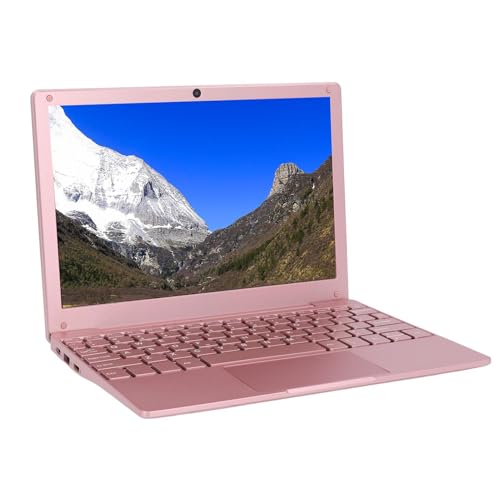
The 10.1 Inch Mini Laptop is ideal for students, professionals, and casual users who need a compact, portable device without compromising on performance. If you’re looking for a lightweight laptop with a sharp display and sufficient storage for everyday tasks, this model suits your needs perfectly. Its combination of a 10.1 inch display with 1280×800 resolution and an 8GB RAM with 256GB storage configuration makes it a versatile choice for on-the-go computing.
Pros:
- Compact and lightweight design for easy portability
- Clear and vibrant 10.1 inch display with 1280×800 resolution
- Ample 8GB RAM ensures smooth multitasking
- Generous 256GB storage capacity for files and applications
- Front 0.3MP camera suitable for video calls
Cons:
- Lower resolution front camera may affect video quality
- Smaller screen size might not be ideal for extensive media consumption
- Limited brand recognition compared to major laptop manufacturers
The 10.1 Inch Mini Laptop features a sharp 10.1 inch display with a resolution of 1280×800, delivering crisp visuals ideal for browsing, document editing, and streaming. Its compact size makes it extremely portable, perfect for users who need a reliable device while traveling or attending classes. The inclusion of a front 0.3MP camera allows for basic video conferencing and online communication, which is essential in today’s digital environment.
Powered by 8GB RAM and equipped with 256GB of storage, this mini laptop offers a balance of speed and capacity that supports multitasking and storing important files without lag. Whether you are working on presentations, managing emails, or enjoying multimedia content, the system’s performance ensures a smooth user experience. Additionally, the device’s operating system compatibility with various software enhances its versatility for different user needs.
To buy this product, click here.
Targus Dock430 Usb-c Multi-function Displayport Alt Mode Video Docking Station

The Targus DOCK430 USB-C Multi-Function DisplayPort Alt Mode Video Docking Station is ideal for professionals, remote workers, and tech enthusiasts who require a versatile and powerful docking solution. If you use multiple peripherals, external monitors, or need reliable charging for your laptop, this docking station offers broad compatibility and convenience that streamlines your workspace. It is especially suitable for users with USB-C enabled laptops and devices seeking a single hub to connect and power everything efficiently.
Pros:
- Supports 85W Power Delivery to keep laptops charged while in use
- Offers DisplayPort Alt Mode for high-quality video output
- Broad compatibility with a wide range of hosts, devices, peripherals, laptops, and operating systems
- Compact design with dimensions of 3.3 x 7.1 x 1.1 inches and lightweight at 2.57 pounds
- Reliable brand reputation with Targus
Cons:
- Limited to devices that support USB-C with DisplayPort Alt Mode
- May require specific cables or adapters depending on device configuration
- No built-in Ethernet port mentioned, which could be a limitation for wired networking
The Targus DOCK430 features an efficient USB-C interface that supports DisplayPort Alt Mode, allowing users to connect external monitors with crisp, high-definition video output. This capability makes it perfect for multitasking professionals who rely on extended or mirrored displays for enhanced productivity. The docking station’s power delivery of 85W ensures that your laptop remains charged during intensive work sessions, eliminating the need for separate chargers and reducing cable clutter.
In addition to video and power, the dock’s broad compatibility with various operating systems and devices means users can seamlessly integrate it into mixed-device environments without compatibility worries. Its compact and lightweight design makes it easy to transport, ideal for users who frequently switch workspaces or require a portable docking solution. Overall, the Targus DOCK430 provides a streamlined and efficient way to expand your laptop’s connectivity options while maintaining a clean and organized setup.
To buy this product, click here.
Linux Mint Os Bootable Usb Flash Thumb Drive For Pc

The Linux Mint OS Bootable USB Flash Thumb Drive is ideal for users seeking a reliable and portable operating system solution for their PC. Whether you’re a professional needing a stable environment for work, a student requiring an efficient platform for everyday tasks, or an entertainment enthusiast wanting easy access to multimedia, this USB drive offers a versatile and user-friendly option. It is perfect for those who want to experience or install Linux Mint OS without altering their existing system.
Pros:
- Pre-installed with Linux Mint OS for instant use
- Compact and portable design with beige color making it easy to carry
- Compatible with most PCs for work, entertainment, and daily tasks
- Offers a secure and stable alternative to traditional operating systems
- Dimensions (Height: 0.5″, Width: 0.75″, Length: 2.0″) ensure convenience without bulk
Cons:
- Limited to PC compatibility; may not work with some non-PC devices
- Users unfamiliar with Linux OS might face a learning curve initially
- No additional storage beyond the OS; primarily designed for booting and installation
This Linux Mint OS Bootable USB Flash Thumb Drive comes from Tech Store On, a trusted brand known for delivering quality tech products. Its lightweight and compact beige design makes it an excellent choice for users who need to carry their operating system on the go. The pre-installed Linux Mint OS ensures a smooth startup, enabling users to quickly access a full-featured, open-source operating system optimized for performance and ease of use.
Beyond portability, this USB flash drive offers a secure and customizable computing environment. Users benefit from the inherent stability and security of Linux Mint, which supports a wide range of applications ideal for work, entertainment, and everyday computing tasks. Whether you want to troubleshoot your existing OS, explore Linux for development purposes, or enjoy a distraction-free workspace, this bootable USB drive provides a convenient and efficient solution.
To buy this product, click here.
Targus Dual Monitor Universal Usb-c Dv4k Dp Docking Station

The Targus Dual Monitor Universal USB-C DV4K DP Docking Station with 65W Power is ideal for professionals and tech enthusiasts who require a versatile and powerful docking solution. If you need to connect multiple displays and peripherals seamlessly to your laptop or compatible device while ensuring reliable power delivery, this docking station is an excellent choice. It suits users working in environments that demand multitasking across dual monitors and broad compatibility with various operating systems and devices.
Pros:
- Supports dual 4K displays via USB-C and DisplayPort for enhanced multitasking and productivity.
- Provides up to 65W power delivery to keep your laptop charged during intensive use.
- Broad compatibility with a wide range of hosts, devices, peripherals, laptops, and operating systems.
- Compact and lightweight design (only 1.0 pounds and small dimensions) makes it portable and desk-friendly.
- Reliable brand reputation from Targus ensures quality and durability.
Cons:
- Limited to USB-C and DisplayPort connections; may require adapters for other video interfaces.
- Power delivery capped at 65W, which might be insufficient for some high-power laptops.
- May not support all USB-C laptops fully due to varying standards across manufacturers.
The Targus Docking Station DOCK315USZ offers robust connectivity options tailored to users who need to enhance their workspace with dual 4K monitors. Its universal compatibility means it can easily integrate with different laptops and operating systems, reducing the hassle of compatibility issues. The inclusion of 65W power delivery ensures that your devices stay charged, reducing cable clutter and maintaining a clean workspace. Its compact size and sleek black design make it an unobtrusive addition to any desk setup.
Additionally, the docking station’s multiple ports allow users to connect a variety of peripherals, enhancing workflow efficiency without the need for multiple adapters or hubs. Whether you are a remote worker, content creator, or business professional, this docking station provides the flexibility and performance to support demanding multitasking environments. Its lightweight build also makes it convenient for users who frequently move between office and home setups.
To buy this product, click here.
Frequently Asked Questions
Which Operating System Is Best For Business Laptops?
Windows 11 Pro is ideal for business laptops. It offers security, productivity tools, and AI features like Copilot. It supports a wide range of hardware and software, ensuring compatibility with business applications and peripherals.
Can I Install Windows 11 On Any Laptop Without Requirements?
Yes, you can use a bootable USB to install Windows 11 Home/Pro/Education without strict system requirements. This method helps fix boot problems and recover your PC or laptop easily.
What Is The Advantage Of Android-x86 Os On Laptops?
Android-x86 OS brings a portable, Android-based Linux experience to laptops. It supports both 64-bit and 32-bit systems and offers a lightweight alternative for everyday tasks and app compatibility.
How Does Linux Mint Perform On Everyday Laptops?
Linux Mint is a user-friendly Linux OS great for work and entertainment. It runs smoothly on most laptops and supports common software, making it an excellent choice for users seeking an alternative to Windows or macOS.
Are Docking Stations Compatible With Multiple Operating Systems?
Yes, Targus USB-C docking stations support various operating systems. They provide power, multiple video outputs, and peripheral connectivity, enhancing laptop functionality for work and multitasking environments.
What Features Make The 2025 Microsoft Surface Laptop Ideal?
The 2025 Surface Laptop offers a 2K+ touchscreen, Snapdragon X Elite processor, 16GB RAM, and 20-hour battery life. It supports Wi-Fi 7 and AI Copilot, making it powerful for business and student use.
Conclusion
Choosing the best operating system for your laptop depends on what you need most. Windows 11 offers strong support for business, education, and gaming with regular updates. Linux Mint and Android-x86 are great options if you want a lightweight, free system for daily tasks or older laptops.
Devices like the HP 2025 and Microsoft Surface Laptop come with Windows 11 Pro, making them ideal for work and study. For students, laptops like the NIMO 15. 6″ with Windows 11 provide good speed and features at a lower price.
Accessories such as Targus docking stations help expand connectivity, fitting many operating systems. Remember, no single OS fits all needs perfectly. Think about your laptop’s hardware and what programs you use most. This way, you can pick the operating system that keeps your device fast, secure, and easy to use.
Choose wisely and enjoy your computing experience.