Can You Hard Wire Smart Home Devices: Ultimate Guide to Seamless Setup
Imagine a home where everything works seamlessly, just the way you want. From lights that adjust to your mood, to security systems that keep you safe.
Smart home devices make this possible, offering convenience and control at your fingertips. But, there’s a question that often pops up: Can you hard wire smart home devices? The answer might surprise you. By hard wiring, you could boost reliability and reduce network congestion.
It sounds promising, right? You’ll discover how and why you might consider hard wiring your smart devices. Dive in to learn how you can create a smarter, more efficient home setup that suits your lifestyle perfectly.

Credit: www.familyhandyman.com
Benefits Of Hard Wiring Smart Devices
Hard wiring smart home devices offers several key benefits that improve their overall performance. It creates a stable connection that wireless devices sometimes lack. This setup also helps save energy and strengthens security against hacking threats.
Improved Reliability And Stability
Hard wired devices maintain a consistent connection. They do not suffer from signal drops or interference. This means your smart home runs smoothly without interruptions. Devices respond faster and perform more predictably.
Power Efficiency Advantages
Hard wiring reduces the need for batteries. Devices draw power directly from your home’s electrical system. This lowers energy consumption and decreases maintenance. You avoid frequent battery replacements and save money over time.
Enhanced Security Features
Hard wired devices are less vulnerable to hacking. They do not rely on Wi-Fi or radio signals that can be intercepted. This provides a safer environment for your smart home data. Physical connections offer an extra layer of protection.
Types Of Smart Devices Suitable For Hard Wiring
Hard wiring smart home devices can improve reliability and reduce battery dependence. Not all smart devices suit hard wiring. Devices that need constant power and stable connections often benefit most. Knowing which devices fit best helps plan your home setup efficiently.
Smart Thermostats
Smart thermostats often require a continuous power source. Hard wiring them ensures they stay powered without frequent battery changes. This keeps your heating and cooling systems running smoothly. Many models support direct wiring to your home’s HVAC system.
Security Cameras
Hard wired security cameras offer steady power and better connectivity. They avoid interruptions caused by weak Wi-Fi signals. This setup supports higher video quality and longer recording times. Outdoor cameras especially benefit from hard wiring to withstand weather.
Smart Lighting Systems
Smart lighting works well with hard wiring since lights need constant power. Hard wired lights respond faster and avoid signal drops. This setup supports dimming, color changes, and scheduling features effectively. It also reduces the need to replace batteries.
Home Automation Hubs
Home automation hubs control multiple smart devices. They require stable power and internet connections. Hard wiring hubs reduces downtime and improves network reliability. This setup helps keep all your smart devices connected seamlessly.
Tools And Materials Needed
Before you start hard wiring your smart home devices, gathering the right tools and materials is crucial. Having everything on hand not only makes the process smoother but also keeps you safe and efficient. Let’s break down what you’ll need to get started.
Essential Wiring Tools
Wiring smart devices requires precision, so having the right tools is a game changer. You’ll need a reliable wire stripper to remove insulation without damaging the wires. A multimeter helps you check voltage and continuity to avoid costly mistakes.
Other handy tools include:
- Screwdrivers with various heads for securing devices
- Needle-nose pliers for bending and holding wires
- Cable cutters to trim excess wire
- A drill if mounting devices requires new holes
Think about how often you’ll use these tools beyond this project. Investing in quality can save you frustration and replacement costs down the line.
Compatible Cables And Connectors
Not all cables and connectors work well with smart home devices. You want cables that match the voltage and current ratings specified in your device manuals. For most smart devices, low-voltage cables like 18-22 gauge thermostat wire or Cat5e Ethernet cables are common.
Connectors must be secure and easy to work with. Wire nuts, crimp connectors, and terminal blocks are popular choices. Avoid twisting wires together without proper connectors, as this can lead to loose connections and hazards.
Have you checked the compatibility of your cables with your device specs? Skipping this step can cause device failure or even electrical fires.
Safety Equipment
Safety isn’t optional when dealing with electrical wiring. Always use insulated gloves to protect your hands from shocks. Safety goggles shield your eyes from sparks or debris, especially when drilling or cutting wires.
A voltage tester is essential to confirm that the circuit is off before you start working. Don’t forget to turn off power at the breaker box for the area you’re working on. This simple precaution can prevent serious accidents.
Are you prepared with these safety basics before touching any wires? Taking safety seriously protects not only your home but your well-being too.

Credit: wasserstein-home.com
Step-by-step Hard Wiring Process
Hard wiring smart home devices offers a reliable and clean setup. This process involves careful planning and safety checks. Following clear steps ensures your devices work smoothly and safely. Below is a simple guide to help you hard wire smart home devices with confidence.
Planning Your Wiring Layout
Start by mapping where each device will go in your home. Check the distance between devices and your power source. Plan the wiring paths to avoid obstacles and keep cables hidden. Use a pencil and paper or a digital tool to sketch the layout. This helps prevent mistakes and saves time during installation.
Shutting Off Power Safely
Before touching any wires, turn off the power at the circuit breaker. Use a voltage tester to confirm no electricity flows. This step protects you from electric shocks. Safety should always come first in any wiring project. Keep the breaker off until all connections are complete and tested.
Running Cables And Making Connections
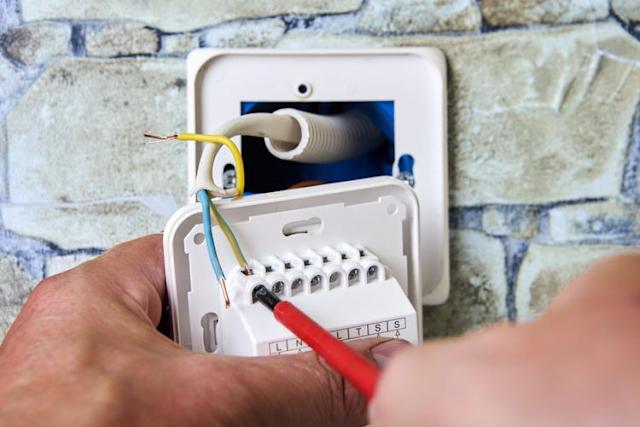
Run cables carefully along the planned paths, securing them with clips or staples. Strip the cable ends without damaging the wires inside. Connect wires according to device instructions, matching colors and terminals. Use wire nuts or connectors for secure joins. Double-check each connection for tightness and correct placement.
Testing And Troubleshooting
Turn the power back on and test each smart device. Check if devices respond and work as expected. If a device fails, turn power off before rechecking connections. Look for loose wires or wrong connections. Use a multimeter to find electrical issues. Repeat tests until all devices function correctly.
Common Challenges And Solutions
Hard wiring smart home devices can offer more reliable connections and reduce dependency on Wi-Fi. However, this approach comes with its own set of challenges that you need to address to ensure smooth installation and operation. Understanding these common obstacles can help you plan better and avoid costly mistakes.
Dealing With Existing Wiring
Older homes often have outdated wiring that may not support modern smart devices. You might find wires that are frayed, incompatible, or simply not routed where you need them. Before starting, test the wiring with a multimeter or consult an electrician to confirm it’s safe and functional.
If rewiring isn’t an option, consider using adapters or junction boxes to bridge old wiring with new devices. This can save time and money while keeping your setup secure. Have you checked if your current wiring meets the voltage and connectivity requirements of your smart devices?
Avoiding Interference
Electrical interference can disrupt your smart devices, causing delays or failures. This often happens when power lines run too close to data cables or other electronics. To reduce interference, separate power and data cables and use shielded wiring where possible.
Adding ferrite beads or surge protectors can also minimize noise on the line. Think about your home’s layout—are there heavy appliances nearby that might cause electrical noise? Identifying these spots early helps prevent headaches later.
Managing Device Compatibility
Not every smart device is designed to be hardwired, and some require specific connectors or voltage levels. Check the specifications carefully before buying to avoid incompatible hardware. Mixing brands can be tempting but may create communication issues between devices.
Using a single ecosystem or hub can simplify compatibility challenges. If you’re unsure, reach out to the manufacturer or read user forums to learn from others’ experiences. What smart devices are you planning to hardwire, and have you verified their compatibility?
Safety Tips For Hard Wiring
Hard wiring smart home devices improves reliability and reduces clutter. Safety is vital during installation to protect your home and family. Follow key safety tips to avoid risks and ensure proper setup.
Electrical Code Compliance
Always follow local electrical codes and regulations. These codes protect you from unsafe wiring practices. Use the correct wire types and sizes for your smart devices. Check for permits or inspections required by law. Compliance helps prevent future problems and keeps your insurance valid.
Preventing Electrical Hazards
Turn off power before starting any wiring work. Use insulated tools to avoid electric shocks. Avoid overloading circuits with too many devices. Secure all connections tightly to prevent sparks and shorts. Keep wires away from water and heat sources. Test connections carefully before restoring power.
When To Hire A Professional
Call an electrician for complex or unfamiliar wiring jobs. Professionals ensure safe installation and code compliance. They have tools and knowledge to handle hidden wiring issues. Hiring an expert prevents costly repairs and safety hazards later. Trust professionals if you feel unsure or unsafe.
Comparing Hard Wired Vs Wireless Setups
Deciding between hard wired and wireless setups for your smart home devices can shape how your system performs and fits into your daily life. Both options come with clear advantages and challenges that influence your home’s convenience, security, and even future upgrades.
Performance Differences
Hard wired devices generally offer a more reliable connection because they use physical cables. This means fewer interruptions and faster data transfer, which is crucial for security cameras or smart locks where delay can be a problem.
Wireless devices rely on Wi-Fi or Bluetooth signals, which might be affected by walls, distance, or other electronics. However, modern wireless tech has improved significantly, often handling everyday tasks smoothly, like controlling lights or thermostats.
Ask yourself: Does your smart device need instant response, or is slight delay acceptable? This can help you pick the right setup.
Installation Complexity
Hard wiring requires running cables through walls, ceilings, or floors. This often means more work, possible wall damage, and sometimes professional help, especially in existing homes.
Wireless setups are usually plug-and-play. You can add or move devices without worrying about rewiring, making it easier if you like to experiment or upgrade often.
If you’ve ever tried to hide cables neatly or drill through drywall, you know the hassle. Wireless might save you that trouble, but keep in mind the potential coverage limits.
Cost Considerations
Hard wired systems typically have higher upfront costs because of materials and labor. But they might save you money over time with less maintenance and fewer device replacements due to signal issues.
Wireless devices are often cheaper to buy and install initially. Yet, you may spend more on range extenders or replacements if connections fail.
Think about your budget not just now, but over the years. Would investing more upfront in hard wiring pay off in long-term stability for your smart home?
Future Trends In Smart Home Wiring
The future of smart home wiring is shaping up to be a blend of innovation and practicality. As smart devices multiply in your home, wiring options must evolve to keep pace with new demands. Let’s look at some trends that could transform how you power and connect your smart devices.
Integration With Iot Standards
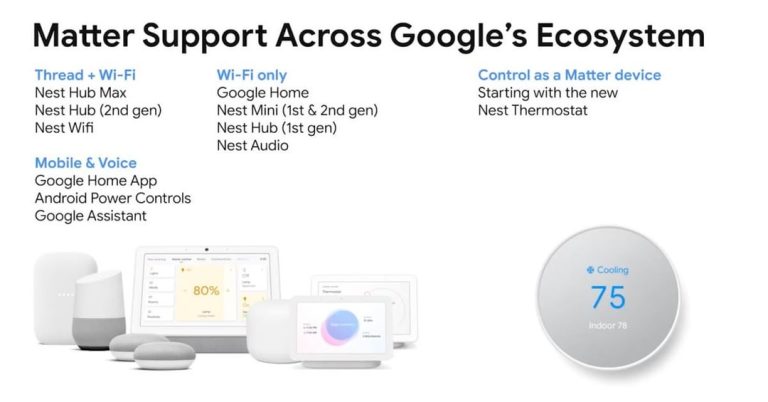
Smart home devices are becoming more connected through common Internet of Things (IoT) standards. This means your wired systems will need to support multiple protocols like Zigbee, Z-Wave, and Matter simultaneously.
Wiring infrastructures that accommodate these standards will make your home more adaptable. Imagine adding a new device without worrying if it fits your existing setup—this flexibility saves time and hassle.
Advancements In Power Over Ethernet
Power over Ethernet (PoE) is gaining traction for smart homes because it combines data and power in one cable. This simplifies installation and reduces clutter since fewer wires run through your walls.
New PoE standards offer higher power levels, letting you run more demanding devices like security cameras and smart speakers directly from Ethernet cables. Could this reduce your need for separate power outlets?
Wireless And Wired Hybrid Solutions
Many smart home setups will blend wired and wireless connections to balance reliability and convenience. Critical devices like thermostats and security systems may stay wired for stable power, while less essential gadgets can go wireless.
This hybrid approach offers the best of both worlds. Have you considered which devices in your home would benefit most from a wired connection and which could thrive wirelessly?
Credit: www.techradar.com
Frequently Asked Questions
Can Smart Home Devices Be Hardwired Directly?
Yes, many smart home devices support hardwiring. This provides stable power and reliable connectivity, reducing signal interference and battery dependency. Always check device specifications and consult a professional for safe installation.
What Are The Benefits Of Hardwiring Smart Devices?
Hardwiring ensures constant power, improves device reliability, and reduces latency. It also eliminates battery replacement needs and minimizes network interruptions caused by wireless interference.
Are All Smart Home Devices Compatible With Hardwiring?
No, not all smart devices support hardwiring. Some are designed solely for wireless operation. Always verify compatibility before attempting to hardwire a device to avoid damage.
Is Professional Installation Necessary For Hardwired Smart Devices?
Professional installation is recommended for safety and proper setup. Electric work requires expertise to comply with codes and avoid hazards. DIY installation risks damage and voids warranties.
Conclusion
Hard wiring smart home devices offers steady power and reliable connection. It reduces the need for frequent battery changes. Yet, installation might need basic electrical skills or professional help. Wireless options give more flexibility but can face signal problems. Choosing the right setup depends on your home and needs.
Safe wiring keeps your devices running smoothly. Smart homes can be simple or complex. Understanding your options helps you decide best. Keep safety first when dealing with electricity. Hard wiring can improve your smart home experience.