Do You Get Ads on a Smart Devices: Surprising Truths Revealed
Are you curious why ads pop up on your smart devices? Whether you’re streaming a show, checking the weather, or using an app, ads seem to find their way to your screen.
But do you really get ads on every smart device you own? Understanding how and why these ads appear can help you take control of your experience. Keep reading to discover the truth about ads on your smart devices—and learn simple ways to manage them.
Ads On Smart Devices
Ads on smart devices have become a common part of daily digital life. Whether you’re streaming shows, playing games, or browsing apps, ads often appear to catch your attention. But have you ever wondered what types of ads you actually see and where they come from?
Types Of Ads You Encounter
On your smart devices, ads come in many forms. Some are video ads that play before or during your favorite shows. Others are banner ads that sit quietly at the bottom or top of the screen while you use apps.
You might also notice pop-up ads that interrupt your activities or native ads designed to look like regular content. Some ads are interactive, inviting you to click or swipe for more information. Have you ever paused a video just to skip an ad? That’s a common experience on smart devices.
Common Platforms Serving Ads
Many platforms deliver these ads straight to your device. Streaming services like YouTube and Hulu often serve video ads tailored to your interests. Social media apps such as Facebook and Instagram show sponsored posts and stories that blend with your feed.
Mobile games frequently display rewarded ads, where watching a short clip can earn you in-game perks. Even smart TVs and voice assistants pull ads from platforms like Google Ads and Amazon Advertising. Knowing which platforms serve your ads can help you control or limit what you see.
How Ads Reach You
Ever wondered how ads pop up exactly when you need them—or sometimes when you don’t? Understanding how ads reach you on your smart devices can give you more control over what you see. It all starts with the data your devices collect and how advertisers use that information to tailor the ads specifically for you.
Data Collection Methods
Your smart devices gather information constantly. This can include your location, browsing habits, app usage, and even voice commands. Many apps and websites request permissions that allow them to track your behavior both on and off the platform.
Think about the last time you searched for a new pair of shoes or checked the weather. That data doesn’t just disappear. It’s stored and analyzed to help advertisers understand your preferences.
- Cookies track your online activity across different websites.
- Device sensors collect location data to serve local ads.
- App usage patterns reveal your interests and routines.
Targeting And Personalization
Once your data is collected, it gets matched with specific ad campaigns designed to catch your attention. Ads are personalized to fit your interests, making it more likely you’ll engage with them.
Have you noticed ads that seem to read your mind? That’s because advertisers use your data to predict what you might want next. They create detailed audience profiles and adjust ads in real time based on your behavior.
Personalization isn’t just about showing you what you like; it’s also about timing and context. For example, if you’ve been browsing travel sites, you might see ads for flights or hotels right before you plan your next trip.
Smart Tvs And Ads
Smart TVs have changed how people watch television. They connect to the internet and offer many apps and services. This convenience comes with a trade-off. Ads are now part of the viewing experience on many smart TVs. These ads can appear in different ways, sometimes surprising users.
Built-in Advertising Features
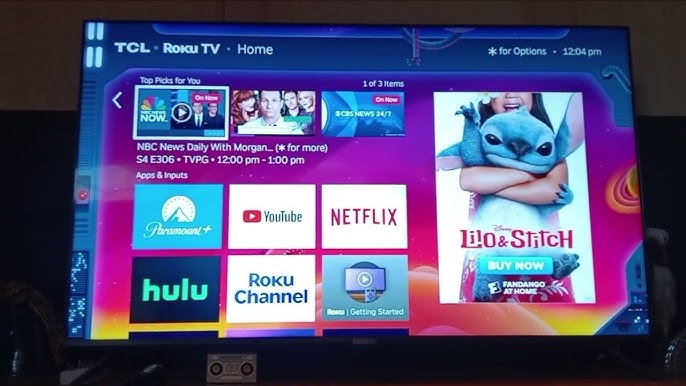
Many smart TV makers include advertising features in their systems. These features help companies show ads based on what viewers watch. Ads can appear on the home screen or within apps. Some smart TVs collect data to offer more targeted ads. This means ads may match your interests or recent searches.
Smart TV ads can take several forms:
- Banner ads on menus or settings screens
- Sponsored content or recommendations
- Interactive ads that invite user engagement
Ad Interruptions During Streaming
Ads can also interrupt streaming shows or movies. Free streaming apps often include commercials to support their content. These ads play before, during, or after the program. Sometimes, ads may feel longer or more frequent than expected.
Paid streaming services usually offer fewer or no ads. Yet, some lower-cost plans still show ads. Interruptions can disrupt the viewing flow and frustrate users. Knowing about these ads helps manage expectations while watching.

Credit: www.youtube.com
Smartphones And Tablets
Smartphones and tablets have become an essential part of daily life, not just for communication but also for entertainment, shopping, and work. However, these devices often come with a trade-off: advertisements. Understanding how ads appear on your device can help you manage your experience better and avoid unwanted interruptions.
In-app Advertisements
Many free apps rely on in-app advertisements to generate revenue. These ads can appear as banners at the top or bottom of your screen, full-screen pop-ups, or even short video clips. Have you ever been playing a game only to have a video ad suddenly take over? That’s a common way developers keep their apps free while still making money.
Some apps allow you to pay for an ad-free experience. If you find ads too distracting, consider whether the cost is worth the convenience. Otherwise, be prepared for ads that may interrupt your usage at any moment.
Push Notifications And Ads
Push notifications are another way ads reach you on smartphones and tablets. These are alerts that pop up on your home screen or notification center, often promoting sales, app updates, or new offers. You might notice your favorite shopping app sending you frequent deal notifications—these are designed to grab your attention even when you’re not using the app.
You can usually control push notifications in your device settings. Turning off notifications for specific apps can reduce unwanted ads without affecting app functionality. Have you checked your notification settings lately to see which apps are allowed to send you messages?
Privacy Concerns
Smart devices often collect data to deliver personalized ads. This raises privacy concerns for many users. Understanding how data is shared and controlled can help protect your privacy.
Data Sharing With Advertisers
Smart devices gather information like app usage, location, and preferences. This data is shared with advertisers to target ads better. Sometimes, data goes to third-party companies without clear user consent. This practice can expose sensitive information. Users may not know what data is collected or who sees it.
User Control Over Ads
Most smart devices offer settings to manage ad preferences. Users can limit data sharing or opt out of personalized ads. Some devices allow resetting advertising IDs to reduce tracking. Privacy settings vary by brand and device. Regularly checking and updating these controls helps maintain privacy.
Ways To Limit Ads
Ads on smart devices can be annoying and interrupt your experience. There are ways to limit these ads and make your device usage smoother. Simple tools and settings can reduce the number of ads you see. These methods help protect your privacy and save data too.
Ad Blockers And Software
Ad blockers stop ads from showing on your device’s apps and browsers. You can download these apps from trusted sources. They work by filtering out unwanted ads before they load. Many ad blockers let you choose what types of ads to block. Some also prevent trackers that follow your online activity. Using ad blockers can speed up page loading and reduce distractions.
Device Settings Adjustments
Smart devices have built-in settings to limit ads. You can turn off ad personalization to stop targeted ads. This setting blocks the use of your data for ad targeting. Adjusting privacy settings reduces how much data apps can collect. You can also limit background app refresh to reduce ad updates. Regularly updating your device keeps these privacy options working well.
Future Of Ads On Smart Devices
The future of ads on smart devices is shaping the way you interact with technology daily. As devices become smarter and more integrated into your life, ads will evolve to become more personalized and less intrusive. This shift will affect how you perceive advertising and how brands communicate with you.
Trends In Advertising Technology
Advertising technology is moving fast. Expect more use of artificial intelligence to target ads that fit your interests precisely.
Voice-activated ads on smart speakers and interactive ads on smart TVs will become common. Imagine your smart fridge suggesting recipes based on the groceries you buy, with sponsored product placements.
Augmented reality (AR) ads will let you try products virtually before buying. This hands-on experience can make ads feel more like helpful suggestions than interruptions.
Balancing User Experience And Ads
Ads can easily annoy you if they disrupt your experience. The challenge is to keep ads relevant and respectful of your time.
Many companies are working on ways to limit ad frequency and ensure ads don’t slow down your device. You might see ads only during natural breaks, like between songs or episodes.
What if ads were designed to add value instead of distracting? For example, a workout app could offer sponsored tips that help improve your routine without feeling pushy.

Credit: www.youtube.com

Credit: www.threads.com
Frequently Asked Questions
Do Smart Devices Show Ads?
Yes, many smart devices display ads. These ads can appear on smart TVs, speakers, and even some appliances. They help manufacturers subsidize costs and provide free or cheaper services. However, users often have options to minimize or disable these ads in settings.
Can I Disable Ads On Smart Devices?
In most cases, you can reduce or disable ads. Access the device’s settings menu and look for ad preferences. Some devices offer an ad-free experience through premium subscriptions. Always check the user manual or online support for specific instructions related to your device.
Why Do Smart Devices Have Ads?
Smart devices display ads to generate revenue. This helps manufacturers keep device prices competitive. Ads can also fund free or low-cost services. Some smart devices offer personalized ads, enhancing user experience by tailoring content to individual preferences.
Are Ads On Smart Devices Targeted?
Yes, ads on smart devices are often targeted. They use data from your usage patterns and preferences. This personalization aims to make ads more relevant to you. However, you can usually adjust privacy settings to limit targeted advertising.
Conclusion
Smart devices often show ads to support free services. These ads can appear on apps, games, or even screensavers. Some users find ads annoying, while others accept them as part of using smart tech. You can usually control ad settings or limit tracking in device menus.
Staying aware helps you manage your experience better. Ads are a common part of many smart devices today. Understanding this can help you use your devices more comfortably.