
Do you ever get the feeling that your smart devices are eavesdropping on your conversations? You’re not alone.
In a world where technology is seamlessly integrated into our daily lives, the thought of our devices listening in can be unsettling. But don’t worry, because you’re about to discover some simple steps to take control of your privacy. Imagine the peace of mind knowing that your conversations stay just that—yours.
Ready to dive into practical tips and regain your personal space? Let’s explore how you can keep your smart devices from listening to you.
Risks Of Smart Device Eavesdropping
Smart devices are designed to make life easier, but they come with risks you might not expect. One of the biggest concerns is that these devices can listen in on your private conversations without you knowing. This eavesdropping risk is not just about privacy—it can lead to serious security problems that affect your personal and financial safety.
Common Hacking Techniques
Hackers often target smart devices by exploiting weak security settings or outdated software. They use methods like:
- Phishing attacks:Tricking users into clicking malicious links that install spyware.
- Man-in-the-Middle attacks:Intercepting data between your device and the internet.
- Exploiting default passwords:Many smart devices come with factory-set passwords that users never change.
- Malware injection:Infecting devices with malicious software that activates microphones or cameras.
Even a simple overlooked update can open the door for hackers to listen in on your conversations. Have you checked if your device’s firmware is up to date recently?
Consequences Of Unauthorized Listening
The fallout from unauthorized eavesdropping goes beyond just privacy invasion. Hackers can gather sensitive information like passwords, credit card numbers, or business secrets. This can lead to identity theft, financial loss, or even blackmail.
Imagine discussing your bank details or personal plans, only to have that information stolen and misused. It’s a scary reality that many ignore until it’s too late. How safe do you really feel knowing your smart device might be spying on you?
Securing Your Network
Securing your network is a key step to stop smart devices from listening without permission. A protected network blocks unauthorized access. This keeps your personal information safe and limits device vulnerabilities. Simple actions can make your network much safer.
Using Strong Wi-fi Passwords
Create a Wi-Fi password that is hard to guess. Use a mix of letters, numbers, and symbols. Avoid common words or easy patterns. Change the password regularly to keep it secure. Strong passwords prevent outsiders from accessing your network and devices.
Enabling Network Encryption
Turn on encryption for your Wi-Fi network. Encryption scrambles data sent over the network. This stops hackers from reading your information. Choose WPA3 if your router supports it, or WPA2 as a backup. Encryption is a basic but powerful defense.
Setting Up Guest Networks
Use a separate guest network for visitors or smart devices. This keeps your main network private and safer. Guests cannot access your personal devices or files. Set a different password for the guest network. This limits risks from unknown devices connecting to your network.
Device Settings To Enhance Privacy
Your smart devices are designed to listen and respond, but that doesn’t mean you have to surrender your privacy. Adjusting device settings can significantly reduce unwanted eavesdropping. These tweaks put you back in control without sacrificing convenience.
Disabling Always-on Listening
Many smart devices use always-on microphones to catch wake words, but this means they’re constantly listening. You can turn off this feature in your device’s settings, forcing it to only listen after you manually activate it. This simple change cuts down on background listening and gives you peace of mind.
For instance, on some smart speakers, you can press a physical mute button or disable the wake word detection in the app. Have you checked if your device offers this option? It’s often buried in privacy or sound settings but worth the hunt.
Managing App Permissions
Apps linked to your smart devices often request access to microphones, cameras, and location data. Take a moment to review these permissions regularly and revoke any that seem unnecessary. This limits the amount of data apps can collect silently.
Think about your own phone—how many apps have microphone access that don’t need it? Removing these permissions not only protects your privacy but can improve device performance.
Regular Firmware Updates
Smart devices frequently receive firmware updates that patch security holes and improve privacy controls. Ignoring these updates can leave your device vulnerable to exploits that enable unauthorized listening. Make sure your device is set to update automatically or remind yourself to check for updates often.
Once, I ignored a firmware update for weeks and later found out it included crucial security fixes. Don’t let outdated software become a backdoor for privacy breaches on your devices.
/images/2022/12/09/securing_iot_devices.jpg)
Credit: allaboutcookies.org
Physical Measures To Protect Devices
Protecting your smart devices from unwanted listening doesn’t always require complex software or technical know-how. Simple physical measures can make a huge difference in keeping your conversations private. These straightforward actions are easy to implement and can give you peace of mind about your device’s listening capabilities.
Covering Microphones
One of the most direct ways to stop your device from listening is by covering its microphones. You can use small pieces of tape, like electrical or painter’s tape, to block the microphone openings. This physically prevents sound from reaching the microphone.
Some people use specially designed microphone blockers, which plug into the headphone jack or charging port to trick the device into thinking an external microphone is connected. Have you ever tried this? It’s surprising how effective such a simple tool can be.
Keep in mind that covering microphones might affect your device’s ability to respond to voice commands or take calls. But if privacy is your priority, this trade-off could be worth it.
Placing Devices Strategically
Where you put your smart devices matters. Placing them in rooms or areas where sensitive conversations don’t happen reduces the risk of accidental eavesdropping. Think about moving your smart speaker to a less-used room or a corner that’s farther from your usual seating area.
Devices near windows or walls that face public areas might pick up more sounds than you realize. Have you noticed how some devices react unexpectedly in noisy environments? That’s a sign they’re picking up more than just your voice.
Try to create “quiet zones” where your devices aren’t present. This physical separation gives you control over what can and cannot be overheard. It’s a simple habit that adds an extra layer of privacy without needing any technical skills.
Using Security Tools And Software
Keeping your smart devices from listening to your private conversations requires more than just turning off microphones. Security tools and software play a crucial role in blocking unwanted access and detecting suspicious activity. These tools help you stay one step ahead of potential eavesdroppers by actively protecting your devices.
Installing Antivirus And Anti-malware
Antivirus and anti-malware software can prevent hackers from installing spyware that listens to your smart devices. These programs scan for malicious apps or files that might exploit your microphone or camera.
Choose software that offers real-time protection and regular updates. For example, I once noticed unusual app behavior after installing a new game, and my antivirus flagged it immediately, preventing potential eavesdropping.
Make sure to run full system scans periodically and avoid downloading apps from untrusted sources. This simple habit can save your privacy from being compromised.
Utilizing Network Monitoring Tools
Network monitoring tools give you insight into what your smart devices are sending and receiving. These tools can alert you if a device suddenly starts transmitting large amounts of data, which might indicate it’s recording without your knowledge.
Apps like Wireshark or Fing show detailed network activity and connected devices. You can spot unusual traffic patterns and decide if you need to cut off a device or reset your network.
Have you ever wondered where your device’s data goes when you’re not actively using it? Monitoring your network helps you answer that question and take control.
/images/2022/12/28/how-to-stop-alexa-from-listening_08_1.jpg)
Credit: allaboutcookies.org
Best Practices For Smart Device Usage
Keeping your smart devices from listening in without your consent starts with smart habits. You need to actively manage what you install, track what your device is doing, and make sure everyone in your home understands the risks. These best practices help you keep control over your privacy without sacrificing convenience.
Avoiding Suspicious Apps
Not every app you see is safe, even if it looks useful. Apps from unknown developers or ones with poor reviews can secretly turn on your device’s microphone. Only download apps from official stores like Google Play or Apple’s App Store, and check permissions before you install anything.
Have you ever installed an app that later asked for more access than you expected? That’s a red flag. Always ask yourself if the app really needs microphone access or if it’s just fishing for data.
Regularly Reviewing Device Activity
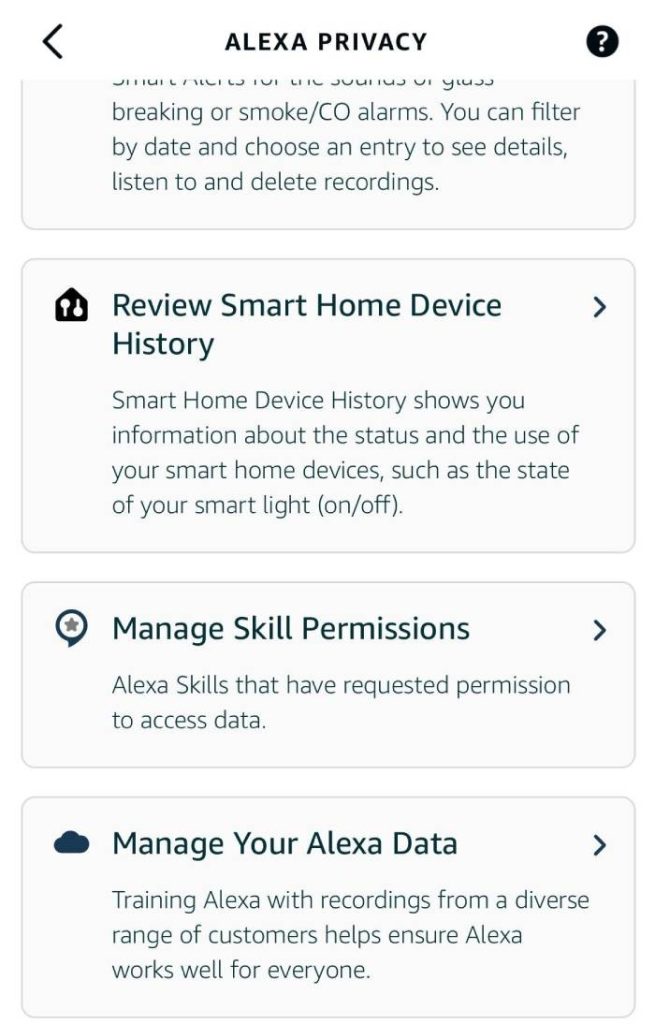
It’s easy to forget your smart devices are always listening, but you can check their activity logs to stay informed. Many devices allow you to see what commands were recorded or when the microphone was activated. Reviewing this regularly helps you spot unusual or unexpected activity early.
Turn on alerts for microphone use if your device supports it. This way, you’ll get notified the moment your device starts listening. It’s like having an extra set of eyes on your privacy.
Educating Household Members
Your smart device listens not just to you but everyone around it. Teaching your family or roommates about privacy settings and risks helps prevent accidental oversharing. Explain why it’s important to mute devices when not in use or to avoid sensitive conversations near them.
Encourage everyone to keep their apps updated and to think twice before granting permissions. Privacy is a shared responsibility in a smart home.
/images/2022/12/27/how-to-stop-alexa-from-listening.jpg)
Credit: allaboutcookies.org
Frequently Asked Questions
How Can I Stop Smart Devices From Always Listening?
You can disable the microphone or mute your smart device. Adjust privacy settings to limit voice data collection. Use physical covers or turn off voice assistants when not in use.
Are There Settings To Control Smart Device Listening?
Yes, most smart devices have privacy settings to manage voice data. You can review and delete voice recordings and restrict app permissions for microphone access.
Does Turning Off Wi-fi Stop Smart Devices From Listening?
Turning off Wi-Fi limits device connectivity but may not fully disable microphones. For full privacy, mute or disable the microphone through device settings.
Can I Use Hardware Tools To Block Smart Device Microphones?
Yes, microphone blockers or covers can physically prevent devices from recording sound. They are effective, simple solutions to stop unauthorized listening.
Conclusion
Smart devices can listen more than you want. Turning off microphones helps. Check your device settings often. Use physical covers for extra safety. Keep software updated to block new threats. Be careful what apps you allow. Control your privacy step by step.
Small actions protect your personal space. Stay aware and take charge today. Your peace of mind matters most.


