
Imagine a world where all your smart devices seamlessly communicate with each other, making your life easier and more efficient. You’re probably wondering if a single hub, like the Zigbee Smart Hub, could be the key to this harmonious connectivity.
Can it really control any smart device in your home? This question is crucial for anyone looking to optimize their smart home experience and avoid the frustration of incompatible gadgets. You’ll discover the potential of the Zigbee Smart Hub and how it could transform the way you interact with your smart devices.
Stay with us, and by the end, you’ll have a clear understanding of whether this hub is the universal solution you’ve been searching for.

Credit: enermyx.com
Zigbee Smart Hub Basics
The Zigbee Smart Hub is a key component in smart home setups. It acts as the central point that connects and controls various smart devices. Understanding its basics helps in knowing what devices it can support and how it operates.
What Is A Zigbee Smart Hub
A Zigbee Smart Hub is a device that links Zigbee-compatible smart gadgets. It manages communication between these devices and your smartphone or voice assistant. This hub ensures that all connected devices work together smoothly.
It supports devices like smart lights, locks, sensors, and switches. The hub makes it easier to control your home automation from one app or system.
How Zigbee Technology Works
Zigbee technology uses low-power radio signals to connect devices. It creates a mesh network where devices pass signals to each other. This design extends the range and improves reliability.
The technology operates on a 2.4 GHz frequency, which is common and widely supported. Devices communicate quickly and use little energy, making them efficient for smart home use.
- Devices connect directly to the hub or through other devices.
- The mesh network helps cover large areas without losing signal.
- Zigbee devices can work even if some nodes fail.
Device Compatibility
Device compatibility is a key factor for any smart hub. It defines how many and which devices the hub can control. A Zigbee smart hub supports various devices but not all. Knowing the limits helps in planning your smart home setup.
Supported Device Types
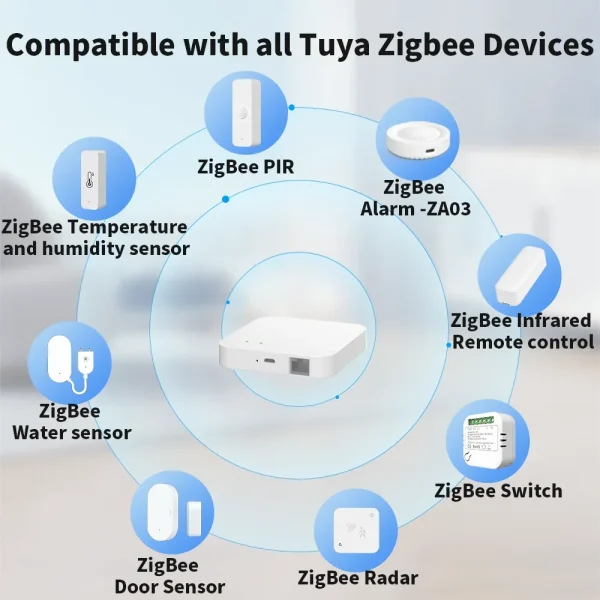
Zigbee smart hubs work well with many device types. Common ones include:
- Smart bulbs and lights
- Motion sensors
- Door and window sensors
- Smart plugs and outlets
- Thermostats
- Locks
- Smoke and CO detectors
These devices communicate using the Zigbee protocol, ensuring smooth control and automation.
Brand Compatibility
Zigbee is an open wireless standard. Many brands use it for their devices. Popular brands compatible with Zigbee hubs include:
- Philips Hue
- IKEA TRÅDFRI
- Samsung SmartThings
- Osram Lightify
- Centralite
Devices from these brands often work well together. Using a Zigbee hub allows easy integration of multiple brands.
Limitations With Non-zigbee Devices
Zigbee hubs cannot directly control devices that do not use Zigbee. Wi-Fi, Z-Wave, or Bluetooth devices require separate bridges or hubs. Some hubs offer multi-protocol support but with limited features.
Non-Zigbee devices may need extra setup steps. They might not work as smoothly or respond instantly. Always check device protocols before buying for your Zigbee hub.
Connecting Devices To Zigbee Hub
Connecting devices to a Zigbee smart hub allows seamless control of many smart home gadgets. This hub acts as a central point that links various devices, enabling communication and coordination. Devices like lights, sensors, and switches can work together through the Zigbee network. Understanding how to connect devices is key to building an efficient smart home setup.
Pairing Process
Start by powering on the Zigbee hub and the device you want to connect. Put the device into pairing mode, usually by holding a button or switching it on in a specific way. Use the hub’s app or interface to search for new devices. Once the hub detects the device, confirm the connection. The device will join the Zigbee network and become controllable through the hub.
Most devices automatically connect within a few minutes. Keep devices close to the hub during pairing for a stronger signal. Follow device manuals for exact pairing steps, as they can vary.
Troubleshooting Connection Issues
Check that the device is in pairing mode. Move the device closer to the hub to improve signal strength. Restart the hub and the device to refresh connections. Remove and reset the device if it does not connect after several tries.
Verify the device is compatible with Zigbee standards. Update the hub’s firmware to fix bugs and improve stability. Clear any interference from other wireless devices nearby, like Wi-Fi routers. Keep batteries fresh in battery-powered devices to avoid connection drops.
Credit: ptc-computer.com.kh
Integrations With Other Protocols
Integrating your Zigbee smart hub with devices that use other communication protocols can expand your smart home’s capabilities significantly. Understanding how Zigbee works alongside Wi-Fi, Bluetooth, and other systems helps you make smarter choices when adding new gadgets. Let’s look at how these connections happen and what you should consider.
Zigbee And Wi-fi Devices
Zigbee and Wi-Fi operate differently, but they can work together smoothly in your home network. While Zigbee is designed for low-power, short-range communication, Wi-Fi handles high-speed data transfer over longer distances.
You can control Wi-Fi devices through your Zigbee hub if it supports them directly or via a compatible app. Some hubs offer a unified interface, letting you manage both Zigbee and Wi-Fi gadgets without switching apps.
Think about your smart thermostat or security camera—many use Wi-Fi but can still be part of your Zigbee-controlled ecosystem through integrated platforms like SmartThings or Amazon Alexa.
Zigbee And Bluetooth Compatibility
Bluetooth devices usually don’t connect directly to Zigbee hubs because they use different radio frequencies and protocols. However, some hubs come with Bluetooth radios or support Bluetooth through software updates.
Using Bluetooth-enabled sensors or locks alongside Zigbee devices often means relying on a smart hub that supports both protocols natively. This lets you control everything from a single app.
Have you noticed how certain smart locks connect via Bluetooth but still appear in your main smart home app? That’s thanks to hubs bridging the gap between Zigbee and Bluetooth.
Using Bridges And Gateways
Bridges and gateways act as translators between Zigbee and other protocols, enabling devices to communicate with each other. For example, a Zigbee-to-Wi-Fi bridge can let your Zigbee sensors send data to a Wi-Fi network.
These devices expand compatibility without replacing your current smart hub. They’re especially useful if you want to keep legacy devices or mix brands that don’t natively talk to each other.
Before buying a bridge or gateway, check if it supports your devices’ models and protocols. Compatibility varies, and a mismatch can cause frustration and limit functionality.
Benefits Of Using A Zigbee Hub
Using a Zigbee smart hub brings several important benefits that can make managing your smart home devices easier and more reliable. It acts as a central point that not only connects your devices but also improves how they work together. Understanding these benefits can help you decide if a Zigbee hub fits your smart home needs.
Energy Efficiency
Zigbee devices are designed to use very little power, which helps save energy across your smart home. The hub itself optimizes communication between devices, reducing unnecessary transmissions and thus lowering overall energy consumption.
Imagine your smart lights turning off automatically when no one is in the room. This simple action, managed through the Zigbee hub, cuts down wasted electricity and keeps your bills lower without any extra effort from you.
Network Stability
The Zigbee hub creates a strong and stable network by allowing devices to communicate in a mesh structure. This means if one device is out of range, messages can hop through other devices to reach their destination.
This setup reduces dead spots in your home and keeps everything running smoothly, even as you add more smart devices. Have you ever faced a smart device that just wouldn’t connect? A Zigbee hub helps solve that by maintaining a reliable connection.
Security Features
Security is a top concern in smart homes, and Zigbee hubs come with built-in encryption to protect your data. Your devices communicate with each other through secure channels, making it hard for outsiders to intercept or hack your system.
Beyond encryption, the hub manages device authentication, so only approved gadgets can join your network. This means you can control who and what connects to your smart home, giving you peace of mind.

Credit: www.amazon.com
Challenges With Zigbee Hubs
Zigbee smart hubs connect various devices to create a smart home system. They offer convenience but face certain challenges. These challenges can affect performance and user experience. Understanding these issues helps to set realistic expectations.
Range Limitations
Zigbee hubs work best within a limited distance. The typical range is about 10 to 20 meters indoors. Walls, furniture, and other obstacles reduce this range further. Devices far from the hub may lose connection or respond slowly. Extending range requires additional routers or repeaters.
Device Interference
Zigbee operates on the 2.4 GHz frequency, shared by Wi-Fi and Bluetooth. This overlap can cause signal interference. Interference leads to dropped connections or delayed commands. Crowded wireless environments may reduce hub reliability. Minimizing interference involves careful device placement and channel selection.
Firmware Updates And Compatibility
Firmware updates are necessary for security and features. Some devices may not support the latest updates immediately. Compatibility issues arise between different brands and models. Outdated firmware can cause communication errors or limit functionality. Regular updates and checking compatibility are crucial for smooth operation.
Popular Zigbee Smart Hubs
Zigbee smart hubs are central to managing your smart home devices efficiently. These hubs allow you to connect various Zigbee-enabled gadgets, creating a seamless network that you control from one place. Choosing the right Zigbee hub can simplify your life, but with many options available, it’s important to know what stands out.
Top Brands And Models
Several brands have earned a reputation for reliable Zigbee hubs. Samsung SmartThings Hub is a popular choice, known for broad compatibility and user-friendly setup. The Amazon Echo Plus also doubles as a Zigbee hub, making it a smart pick if you want voice control integrated.
Other noteworthy models include the Hubitat Elevation, favored for its local processing that boosts speed and privacy, and the Philips Hue Bridge, which excels in controlling smart lighting. Each brand offers something a little different, so think about what fits your current ecosystem best.
Unique Features To Consider
- Compatibility:Can the hub connect with devices beyond Zigbee? Some hubs support Wi-Fi, Z-Wave, or Bluetooth, giving you flexibility.
- Local vs Cloud Control:Local control hubs operate faster and work without internet, while cloud-based hubs offer remote access and easier updates.
- Voice Assistant Integration:If you use Alexa, Google Assistant, or Siri, choose a hub that works smoothly with your preferred voice assistant.
- Number of Supported Devices:Check how many devices the hub can handle at once, especially if you plan to expand your smart home.
- User Interface:A simple, intuitive app or control panel makes managing your devices less frustrating.
Think about your daily routine and how a hub’s unique features can make your life easier. Do you want quick local responses, or is remote control from anywhere more important? Understanding these details helps you pick a Zigbee smart hub that truly fits your lifestyle.
Future Of Zigbee Smart Hubs
The future of Zigbee smart hubs looks promising as technology continues to evolve and smart homes become more integrated. These hubs are expected to support a wider range of devices while becoming more user-friendly. If you’re thinking about upgrading your smart home setup, understanding what’s coming next can help you make smarter choices.
Emerging Trends
Zigbee smart hubs are moving towards better interoperability with other wireless protocols like Wi-Fi and Bluetooth. This means your hub could control more devices regardless of their brand or communication method.
Another trend is increased focus on security features. With more devices connected, protecting your data and privacy is becoming a top priority.
Many hubs are also adding AI-powered automation that learns your habits to make smart home control more intuitive. Imagine your lights adjusting automatically based on your daily routine without you lifting a finger.
Potential Improvements
One area likely to improve is the range and reliability of Zigbee networks. Advances in mesh networking can help eliminate dead spots in larger homes or buildings.
Expect simpler setup processes that reduce the technical challenges many users face today. Plug-and-play options and guided apps will make it easier for you to get started.
Lastly, integration with voice assistants and other smart platforms will become smoother, allowing you to control your devices seamlessly through commands or routines.
Frequently Asked Questions
Can Zigbee Smart Hub Control All Smart Devices?
No, Zigbee Smart Hub controls only Zigbee-compatible devices. It cannot manage devices using other protocols like Wi-Fi or Z-Wave.
Does Zigbee Smart Hub Support Multiple Device Brands?
Yes, Zigbee Smart Hub supports many brands using Zigbee protocol, enabling easy integration and centralized control.
How Many Devices Can A Zigbee Smart Hub Handle?
A Zigbee Smart Hub typically supports up to 50-100 devices, depending on the hub model and network setup.
Can Zigbee Smart Hub Work With Wi-fi Smart Devices?
No, Zigbee Smart Hub cannot directly control Wi-Fi devices without additional bridges or hubs for protocol translation.
Conclusion
Zigbee smart hubs work best with Zigbee devices. They may not support all smart gadgets. Compatibility depends on the device’s protocol. Many popular brands use Zigbee, making connection easier. Some devices need separate hubs or apps. Choosing the right hub helps control many devices smoothly.
Always check device compatibility before buying a hub. This keeps your smart home simple and efficient. Zigbee hubs offer good control but not universal access. Keep your setup clear and easy to use.


