How to Hook Electronic Drumset Up to Home Theater: Easy Steps
Imagine transforming your living room into a vibrant music studio where every beat pulses through your veins, immersing you in a symphony of sound. Connecting your electronic drumset to your home theater system can make this dream a reality.
Whether you’re a seasoned drummer or just starting out, you’ll discover a new dimension of sound that elevates your practice sessions and performances. You might wonder if it’s complicated or if you need high-level tech skills. The answer is simpler than you think.
In this guide, you’ll learn how to easily hook up your electronic drumset to your home theater. So get ready to unleash the full potential of your drum kit and experience music like never before. Your musical journey is about to get a lot more exciting. Keep reading to find out how!
Check Drumset Outputs
Before connecting your electronic drumset to your home theater, it’s crucial to check the drumset outputs carefully. This step ensures you use the correct ports for the best sound quality and compatibility. Knowing exactly where to plug in helps avoid frustration and keeps your setup clean and efficient.
Identify Audio Ports
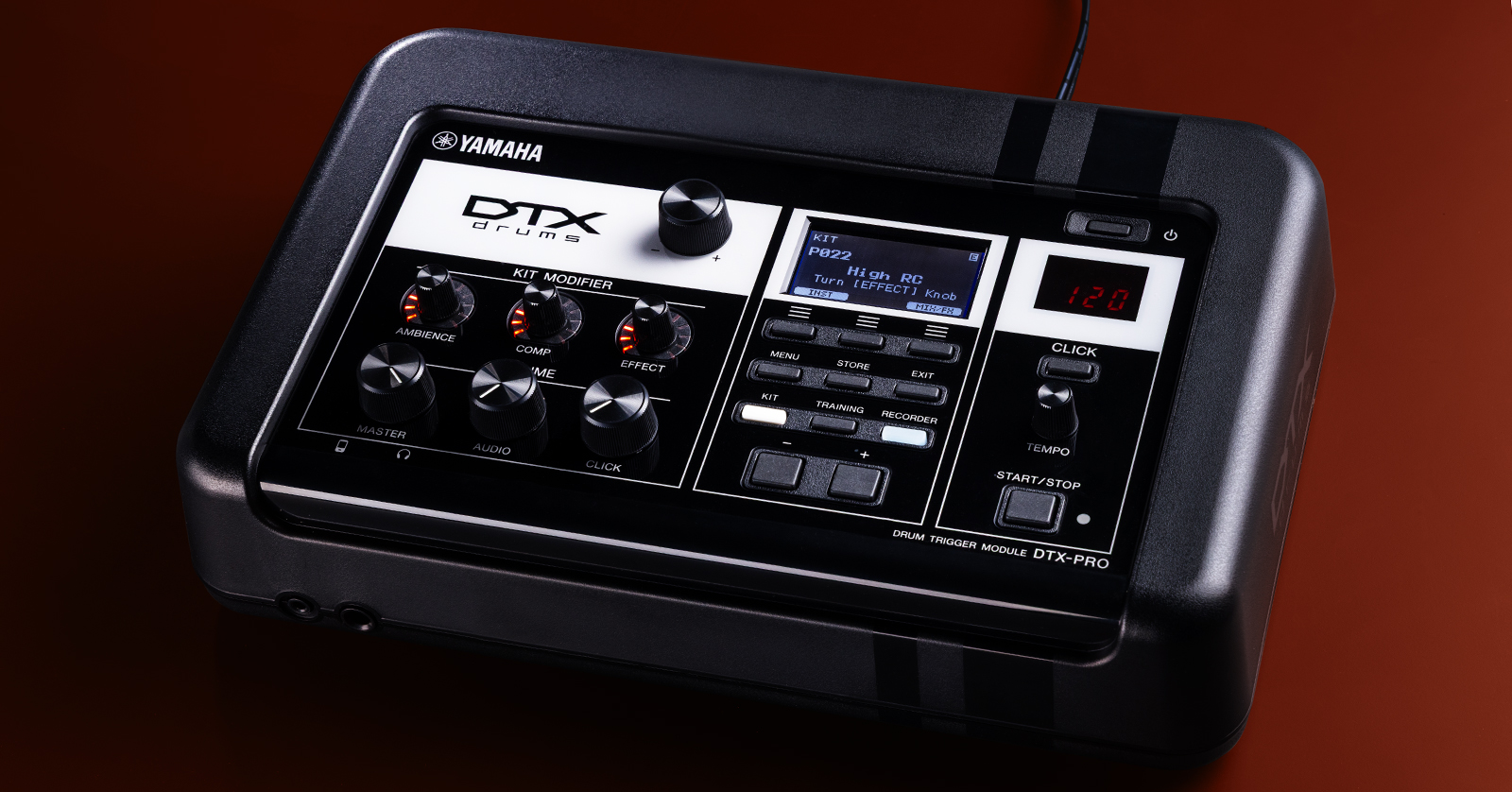
Look closely at the back or side panel of your drum module. You’ll find several audio ports, usually labeled as Line Out, Phones, or Aux Out. These are the main connections to send your drum sounds to speakers or a home theater system.
Most drumsets have a 1/4-inch jack for audio output. Some might also offer RCA outputs, which are perfect for plugging into many home theater receivers. Check if your drumset provides stereo outputs—this can enhance your sound experience significantly.
Locate Usb And Midi Connections
Besides audio jacks, your drumset might include USB or MIDI ports. USB connections often allow direct audio and data transfer to computers or compatible receivers. MIDI ports send digital signals to control other instruments or software.
Knowing these connections lets you choose the best option for your home theater. For example, using USB might give you cleaner audio without extra cables. But if your system only supports analog inputs, focus on the audio ports instead.
Inspect Home Theater Inputs
Before you connect your electronic drumset to your home theater, it’s crucial to inspect the inputs available on your system. This helps you understand what cables and adapters you might need. Knowing your home theater’s input options ensures a smooth setup and the best sound experience.
Find Available Audio Inputs
Start by looking at the back or side panels of your home theater receiver or soundbar. You’ll often find multiple audio inputs, but they might not all be labeled clearly. Common input types include RCA, optical, and AUX ports.
Take note of each input’s label and location. This will save you time and frustration when connecting your drumset. Have you ever tried plugging a cable only to realize you picked the wrong port? Avoid that by double-checking now.
Check For Hdmi And Aux Ports
HDMI ports are popular for high-quality audio and video connections. If your home theater has HDMI ARC or eARC, you might be able to use this for audio input from your drumset’s module or mixer.
Don’t overlook the AUX port, which is often a simple 3.5mm jack. Many electronic drum modules come with a headphone output that fits perfectly into an AUX input. This can be a quick and easy way to get sound from your drums to your speakers.
Ask yourself: does your home theater have both HDMI and AUX inputs? Having multiple options gives you flexibility. You can test which connection delivers the best sound quality and lowest latency for your playing style.
Choose Connection Method
Choosing the right connection method is key to hooking your electronic drumset up to a home theater. The connection affects sound quality and ease of use. Different methods work better for different setups. Understanding these options helps you pick the best one for your needs.
Using Audio Cables
Audio cables provide a simple way to connect your drumset to the home theater. Most electronic drumsets have output jacks for audio cables. Use standard 1/4-inch or RCA cables depending on your drumset and home theater inputs.
This method sends sound directly from the drumset to the speakers. It requires no special drivers or software. The setup is straightforward and reliable. Make sure to check cable length and quality for the best sound.
Connecting Via Usb Or Midi
USB and MIDI connections link your drumset to the home theater system digitally. USB is common on newer drumsets and carries both sound and data. MIDI only sends performance data and needs a sound module or computer.
Using USB can provide clearer sound and more control. It lets you use digital audio workstations or drum software. MIDI is useful if you want to trigger sounds from an external device. Both need compatible ports on your home theater or an adapter.
Utilizing Audio Interfaces
Audio interfaces improve sound quality and expand connection options. They convert drumset signals into high-quality audio for the home theater. Interfaces often support USB, MIDI, and analog cables.
This method suits users who want better control over sound mixing. Audio interfaces also reduce latency for real-time playing. They may require basic setup but offer flexibility and professional audio results.

Credit: www.reddit.com
Connect Drumset To Theater
Connecting your electronic drumset to your home theater creates a powerful sound experience. It makes drum sounds loud and clear. This setup lets you enjoy playing with rich audio quality and deep bass. Follow simple steps to connect your drumset properly.
Plugging In Audio Cables
Use the audio output ports on your drumset to link with the home theater. Most drumsets have 1/4-inch or 1/8-inch audio jacks. Check your theater system’s input options like AUX, RCA, or optical inputs.
- Connect the drumset’s audio output to the theater’s input using the right cable.
- Use adapters if the plug sizes do not match.
- Ensure all cables are secure to avoid signal loss.
Setting Up Usb Connections
Some electronic drumsets offer USB output for digital audio transfer. Connect a USB cable from the drumset to the home theater receiver or a computer linked to the theater.
- Plug the USB cable into the drumset’s USB port.
- Connect the other end to the theater receiver or PC.
- Power on devices to allow automatic recognition.
Configuring Audio Interface
Adjust settings on your home theater or connected device for the best sound. Select the correct input source that matches your drumset connection. Set audio levels to prevent distortion and balance sound.
- Access the home theater’s audio menu.
- Choose the input source (USB, AUX, or RCA) where the drumset is connected.
- Adjust volume and sound modes for clear drum output.
Adjust Theater Audio Settings
Adjusting your home theater’s audio settings is key to getting the best sound from your electronic drumset. It ensures that every beat hits just right and blends seamlessly with your room’s acoustics. Proper tweaks can make your drumming experience more immersive and enjoyable.
Select Correct Input Source
Your home theater system likely has multiple input options. Make sure you select the input that your drumset is connected to, whether it’s HDMI, optical, or an auxiliary port. This simple step guarantees that your system receives the drumset’s audio signal without interference or delay.
Sometimes the input might be labeled differently, like “Game” or “Media Player.” Don’t guess—check your theater’s manual or on-screen menu to confirm the right source. Have you ever played for minutes only to realize the sound was coming from the wrong input?
Adjust Volume And Balance
Volume control is more than just turning the sound up or down. Find a level where your drums are clear without overpowering other speakers in your home theater. Balance the sound so your drums don’t get drowned out by the bass or dialogue channels.
Try adjusting the left-right balance if your drumset’s speakers seem off to one side. This helps create a centered sound stage, making your drumming feel more natural. Don’t hesitate to experiment with small volume changes until it feels just right.
Enable Surround Sound If Needed
Surround sound can add depth to your drumming, especially if your home theater supports advanced audio formats like Dolby Atmos or DTS:X. Enabling surround sound lets your drums feel like they’re coming from all around you, not just in front.
However, some electronic drumsets sound better in stereo mode. Test both settings to see which delivers the clearest and most accurate drum tones. Have you noticed how certain sounds become sharper or more immersive with surround sound turned on?
Test Drumset Sound
Testing the sound of your electronic drumset after hooking it up to your home theater is crucial. This step ensures the audio output is clear and well-balanced. It lets you check if all connections work perfectly and the drums sound natural through the speakers.
Testing also helps find any issues early. This saves time and improves your playing experience. A simple sound test can reveal problems like delays, low volume, or distorted sounds.
Play Sample Beats
Start by playing some sample beats on your drumset. Use built-in rhythms or presets if available. Listen carefully to how the beats sound through your home theater.
- Check if every drum pad triggers sound correctly.
- Notice if the bass drum hits with enough power.
- Ensure cymbals sound crisp and clear.
- Test different volumes to find the best level.
Playing sample beats helps confirm the audio signal is strong and consistent. It also reveals if the speakers reproduce the drum sounds accurately.
Troubleshoot Audio Issues
Identify problems by listening closely to the sound output. Common issues include low volume, echo, or no sound from some pads.
- Check all cable connections for loose plugs.
- Make sure the drumset’s audio output matches your home theater’s input.
- Adjust volume levels on both the drumset and the home theater.
- Test different audio cables if the sound is weak or missing.
- Reset the drumset and home theater system if needed.
Fixing these issues improves sound quality. It ensures your electronic drumset sounds great during practice or performances.
Optimize Sound Quality
Optimizing sound quality is essential when connecting your electronic drumset to a home theater. Clear, balanced sound enhances your playing experience and makes your beats come alive. Fine-tuning audio settings prevents distortion and improves overall sound clarity. Small adjustments can create a big difference in how your drums sound through the speakers.
Use Equalizer Settings
Adjust the equalizer to balance bass, mids, and treble frequencies. Boosting the bass adds depth to the kick drum sounds. Increasing mid frequencies brings out the snare and toms clearly. Lowering treble can reduce harshness in cymbal sounds. Experiment with presets or create your own settings for the best result. Keep changes subtle to avoid unnatural sound.
Minimize Latency
Latency causes a delay between hitting the drum pad and hearing the sound. It can disrupt your timing and make playing frustrating. Use direct audio connections like optical or AUX cables to reduce delay. Avoid wireless connections, as they often add latency. Check your home theater’s audio settings and enable low-latency modes if available. A fast response keeps your drumming tight and natural.
Consider External Amplifiers
External amplifiers boost your drumset’s sound output and quality. They provide clearer audio and more power than built-in home theater speakers. Choose an amplifier with good frequency response for accurate drum tones. Connect it between your drumset and home theater system. Adjust the amplifier’s volume and tone controls for the best sound balance. This setup enhances your drum sound in larger rooms or noisy environments.
Credit: www.sweetwater.com
Credit: www.popsci.com
Frequently Asked Questions
How Do I Connect An Electronic Drumset To Home Theater?
Use the drumset’s audio output, like a headphone jack or line out. Connect it to your home theater’s AUX or HDMI input using appropriate cables. Adjust the home theater volume to balance sound levels for optimal performance.
Can I Use Hdmi To Link Drumset And Home Theater?
Most electronic drumsets don’t support HDMI output. Use audio cables like 1/4-inch, RCA, or 3. 5mm to connect instead. Check your drumset’s manual to identify compatible audio outputs for best connection.
What Audio Cables Are Best For Drumset To Home Theater?
Use shielded 1/4-inch TS, RCA, or 3. 5mm cables depending on drumset and receiver inputs. Quality cables reduce interference and ensure clear sound. Match cable type to both devices for seamless connection.
How Do I Improve Sound Quality From Drumset To Home Theater?
Adjust the equalizer settings on your home theater system. Use high-quality audio cables and minimize cable length. Position speakers properly and reduce background noise for crisp, balanced drum sounds.
Conclusion
Connecting your electronic drumset to a home theater can boost your sound experience. Use the right cables and check the audio settings carefully. Keep the volume balanced to avoid distortion or damage. Test your setup and adjust as needed for clear sound.
Enjoy playing with richer, fuller audio right at home. Small steps make a big difference in sound quality. Try different settings until you find what works best for you. This simple setup brings your drumming to life in a new way.