
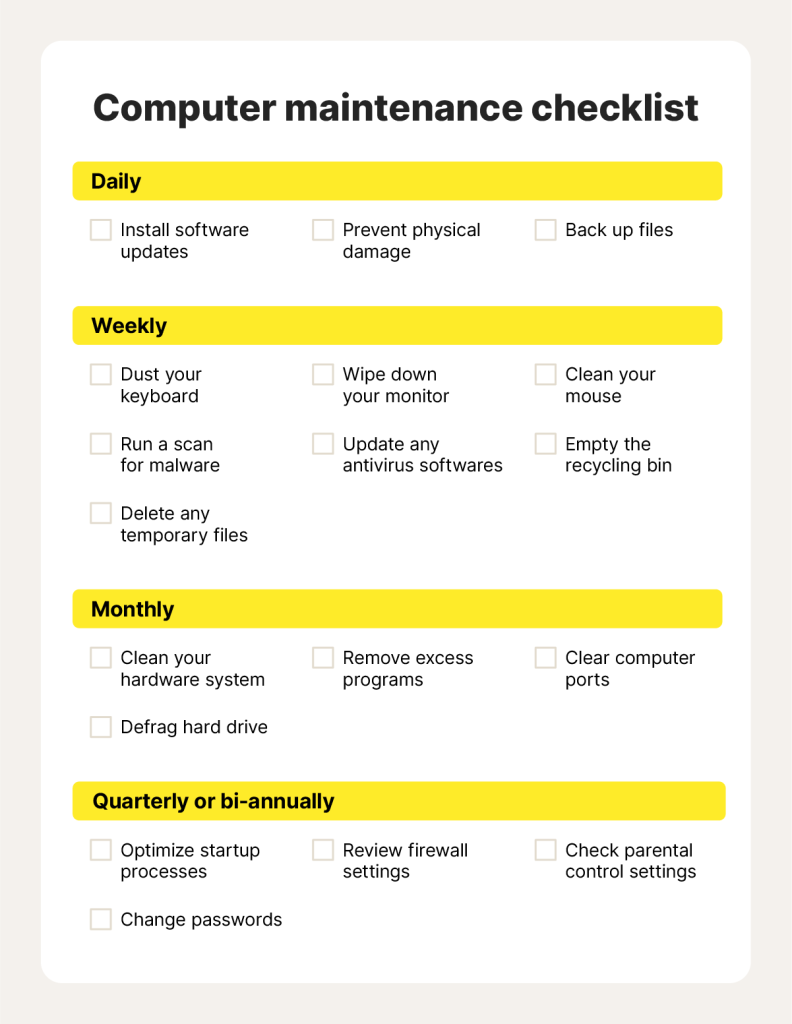
Have you ever wondered why your computer or phone suddenly slows down or stops working properly? The answer often lies in something called system maintenance.
Understanding system maintenance is key to keeping your devices running smoothly and avoiding unexpected problems. You’ll discover what system maintenance really means, why it matters to you, and simple steps you can take to protect your technology. Keep reading—your devices will thank you!
Credit: facilio.com
System Maintenance Overview
System maintenance is a set of tasks that keep computer systems running smoothly. It helps prevent breakdowns and ensures optimal performance. Regular care is important for both hardware and software.
This process includes checking for errors, updating software, and cleaning hardware components. System maintenance reduces downtime and extends the life of equipment. It also protects against security threats and data loss.
What Is System Maintenance?
System maintenance means looking after computer systems to keep them healthy. It involves fixing issues, updating programs, and improving system speed. The goal is to avoid problems before they happen.
- Preventive Maintenance:Tasks done to stop future problems.
- Corrective Maintenance:Repairs made after a problem occurs.
- Adaptive Maintenance:Updates to work with new software or hardware.
- Perfective Maintenance:Improvements to make the system better.
Why System Maintenance Matters
Maintenance keeps computers safe from viruses and hackers. It helps systems run faster and use less energy. Without maintenance, systems may fail and cause data loss.
Types Of System Maintenance
Understanding the different types of system maintenance can help you keep your software running smoothly and efficiently. Each type targets a specific need, ensuring your system stays reliable, up-to-date, and aligned with user expectations. Knowing which kind of maintenance to apply can save you time and reduce unexpected downtime.
Corrective Maintenance
Corrective maintenance focuses on fixing errors or bugs that appear after the system is in use. When you notice glitches or failures, this type of maintenance steps in to restore functionality. Think of it as troubleshooting; it reacts to problems to prevent them from worsening.
Imagine your app crashes every time you try to upload a file. Corrective maintenance would involve identifying the cause and patching the bug quickly. Without it, users might lose trust in your system’s reliability.
Preventive Maintenance
Preventive maintenance is about stopping problems before they start. It involves routine check-ups, updates, and adjustments to keep the system healthy. This proactive approach reduces the chance of unexpected failures and extends the system’s life.
For example, regularly updating security protocols or cleaning up unused code can prevent vulnerabilities. Do you schedule regular check-ins for your system, or do you wait until something breaks?
Perfective Maintenance
Perfective maintenance improves the system’s performance or adds new features based on user feedback. It’s not about fixing bugs but enhancing the system to meet evolving needs. This type keeps your software relevant and useful over time.
If users ask for a faster search function or a new reporting tool, perfective maintenance delivers those upgrades. How often do you gather user feedback to guide improvements?
Adaptive Maintenance
Adaptive maintenance ensures your system stays compatible with changing environments. This includes updates needed because of new hardware, operating systems, or regulations. It helps your software adjust without breaking down.
For instance, when a new version of an operating system is released, adaptive maintenance updates your software accordingly. Have you faced issues because your system wasn’t ready for a platform update?
Importance Of Regular Maintenance
Regular system maintenance is vital for smooth and reliable operation. It helps prevent unexpected issues and keeps systems running efficiently. Consistent care reduces downtime and improves user experience. Skipping maintenance can lead to slow performance and security risks.
Enhancing System Performance
Routine maintenance clears unnecessary files and updates software. This frees up system resources and speeds up processes. Systems respond faster and run more smoothly. Regular checks identify and fix errors early.
Extending System Lifespan
Keeping systems updated and clean reduces wear and tear. Components last longer and avoid overheating or damage. Proper maintenance delays the need for costly replacements. It ensures hardware and software stay in good condition.
Ensuring Data Security
Maintenance includes installing security updates and patches. This protects systems from viruses and hackers. Regular backups prevent data loss during failures. Strong security keeps sensitive information safe and private.
Tools And Techniques
System maintenance relies heavily on a mix of tools and techniques that keep your devices and software running smoothly. Choosing the right approach can save you time and prevent unexpected downtime. Let’s look at some of the most effective tools and methods you can use to maintain your systems efficiently.
Automated Maintenance Tools
Automated tools handle routine tasks without needing constant supervision. These include software that runs updates, cleans temporary files, and scans for malware on a schedule you set. Using automation frees up your time and reduces human error, but it’s important to regularly check that these tools are working as intended.
Think about your own experience: have you ever ignored an update notification only to face bigger issues later? Automated tools can help avoid that by applying patches and fixes automatically. Popular examples include CCleaner for cleanup and Windows Update for system patches.
Manual Checks And Updates
While automation is helpful, some maintenance requires your direct attention. Manual checks allow you to identify issues that machines might miss, like unusual noises or hardware wear. Regularly inspecting hardware connections, cleaning physical components, and verifying software settings can prevent bigger problems.
Have you noticed your computer slowing down after installing new software? Manually checking system resources and uninstalling unnecessary programs can improve performance. This hands-on approach complements automated tools and gives you better control over your system’s health.
Monitoring And Reporting Systems
Monitoring tools track your system’s performance in real-time and alert you to potential issues. These systems generate reports that highlight trends, such as increasing CPU usage or declining disk space. With clear reports, you can spot problems early and act before they disrupt your work.
Imagine receiving a warning about a failing hard drive days before it crashes. Monitoring tools like Nagios or SolarWinds provide this insight, helping you plan maintenance rather than react to emergencies. How often do you review your system’s health reports? Making it a habit could save you from costly repairs.
Challenges In System Maintenance
System maintenance is essential to keep your technology running smoothly, but it comes with its own set of challenges. These challenges can affect your system’s performance and your team’s efficiency. Understanding them helps you prepare and respond better, ensuring minimal disruption.
Resource Allocation
Allocating the right resources for system maintenance is often tricky. You may find your team stretched thin between daily tasks and urgent fixes. Balancing manpower, time, and budget without compromising on quality can feel like a constant juggling act.
Think about your own experience: Have you ever had to delay important updates because your team was busy with other priorities? That’s a common scenario in many organizations. Planning ahead and prioritizing maintenance tasks can help avoid this bottleneck.
Managing Downtime
Downtime during system maintenance can disrupt your business operations and frustrate users. Scheduling maintenance windows without affecting productivity requires careful timing and communication. Unexpected downtime can lead to lost data and customer dissatisfaction.
Ask yourself: How do you currently notify your users about maintenance periods? Clear communication and backup plans are key to managing downtime effectively. Sometimes, even small delays can ripple into bigger issues if not handled properly.
Keeping Up With Technological Changes
Technology evolves rapidly, and keeping your systems updated is a constant challenge. New software versions, security patches, and hardware upgrades require continuous learning and adaptation. Falling behind can expose your system to vulnerabilities and inefficiencies.
Have you noticed how quickly new tools and updates appear in your field? Staying informed means more than just installing patches; it involves understanding how changes impact your system’s overall health. Regular training and proactive monitoring can make this process smoother.

Credit: safetyculture.com
Best Practices
System maintenance is only as effective as the practices you follow to keep your systems running smoothly. Best practices help you avoid common pitfalls, reduce downtime, and improve overall performance. Focusing on key areas like updates, documentation, and proactive troubleshooting can transform how you manage your systems daily.
Regular Updates And Patches
Keeping your system updated is crucial. Software developers release updates to fix bugs, close security holes, and improve functionality. Ignoring these can leave your system vulnerable to attacks or crashes.
Set a schedule for checking and applying updates. Automate the process where possible, but always test critical patches in a controlled environment first. This approach prevents surprises that disrupt your workflow.
Comprehensive Documentation
Clear and detailed documentation saves time when troubleshooting or training new team members. It should include system configurations, update histories, and known issues.
Think about a time when you struggled to solve a problem because no one documented previous fixes. Avoid that frustration by maintaining up-to-date records. Even simple notes can make a big difference.
Proactive Issue Resolution
Waiting for problems to appear before acting can be costly. Monitoring system performance and logs helps you spot potential issues early.
Use alerts to notify you of unusual activity or performance dips. Addressing these signals quickly prevents bigger failures. Ask yourself: are you catching small problems before they turn into major headaches?
Future Trends
The future of system maintenance is rapidly evolving, pushing beyond traditional checklists and reactive fixes. New technologies are setting the stage for smarter, faster, and more efficient ways to keep systems running smoothly. Understanding these trends can help you prepare your maintenance strategy to be proactive and cost-effective.
Ai And Machine Learning In Maintenance
AI and machine learning are changing how maintenance teams spot issues. These technologies analyze data patterns that humans might miss, helping to detect problems early. Have you considered how AI could help you predict equipment failures before they happen?
Using AI, systems learn from past maintenance records and sensor data to improve accuracy over time. This means fewer unexpected breakdowns and more time for your team to focus on important tasks. Imagine a system that gets smarter the more you use it—how would that change your daily workflow?
Predictive Maintenance Models
Predictive maintenance uses data to forecast when a system needs attention, rather than waiting for a breakdown. This approach reduces downtime and saves money by fixing issues before they escalate. What if you could schedule maintenance exactly when it’s needed, avoiding unnecessary work?
These models rely on sensors and historical data to assess equipment health in real-time. Many businesses have already seen the benefits of switching to predictive maintenance, reporting fewer emergency repairs and longer equipment lifespans. Could your system benefit from this shift?
Integration With Cloud Services
Cloud services make system maintenance more accessible and flexible. They allow you to collect and analyze data from anywhere, giving you instant insights into system performance. Have you tried managing your maintenance remotely with cloud tools?
With cloud integration, updates and patches can be deployed quickly without physical intervention. This reduces the time your system is offline and keeps everything running smoothly. How much time could you save if your maintenance tasks were automated and cloud-based?

Credit: medium.com
Frequently Asked Questions
What Is System Maintenance In Simple Terms?
System maintenance involves regular updates and repairs to keep a system running efficiently. It prevents breakdowns and improves performance. Maintenance ensures software and hardware work smoothly, reducing downtime and enhancing security.
Why Is System Maintenance Important For Businesses?
System maintenance helps avoid costly system failures and data loss. It improves system reliability and security. Regular maintenance ensures business operations run smoothly, reducing downtime and boosting productivity.
What Are Common Types Of System Maintenance?
Common types include corrective, adaptive, perfective, and preventive maintenance. Corrective fixes errors, adaptive adjusts to changes, perfective enhances performance, and preventive avoids future issues. Each type plays a vital role in system longevity.
How Often Should System Maintenance Be Performed?
Maintenance frequency depends on the system’s complexity and usage. Typically, routine checks occur monthly or quarterly. Critical systems may require weekly or daily maintenance to ensure optimal performance and security.
Conclusion
System maintenance keeps your devices running smoothly and safely. It helps prevent errors and data loss. Regular updates and checks improve performance and extend device life. Small efforts now save big problems later. Stay consistent with maintenance to avoid downtime.
Remember, a well-maintained system supports your daily tasks better. Simple care makes a big difference in the long run.


