How Often Should You Perform System Maintenance: Ultimate Guide
How often should you perform system maintenance? It’s a question that can save you from unexpected crashes, slowdowns, and costly repairs.
Your computer or device works hard every day, and without regular care, small problems can quickly turn into big headaches. You’ll discover the simple steps you can take to keep your system running smoothly. Stick with me, and you’ll learn exactly when and how to maintain your system—so you can avoid downtime and protect your valuable data.
Ready to make your technology work better for you? Let’s dive in.

Credit: wheellifeblog.com
Importance Of Regular System Maintenance
Regular system maintenance is crucial for keeping your devices running smoothly and securely. Skipping routine checks can lead to unexpected crashes, slower performance, or even data loss. You might think maintenance takes time, but it actually saves you time and stress in the long run.
By maintaining your system regularly, you catch small issues before they become big problems. Think about it like changing the oil in your car; neglecting it doesn’t stop the car from working immediately, but over time, the engine suffers. Have you ever lost important files because you ignored software updates or backups?
Preventing System Failures
Regular maintenance helps you avoid sudden breakdowns. Cleaning up unnecessary files and running diagnostics can prevent crashes that interrupt your work. When I skipped updates once, I lost hours fixing a corrupted file that could have been avoided with timely maintenance.
Enhancing Performance And Speed
Over time, systems get clogged with temporary files and outdated software. Regular maintenance removes these bottlenecks, keeping your system fast and responsive. If you notice your device slowing down, maintenance might be the simple fix you need.
Strengthening Security
Security updates protect your system from new threats. Without regular maintenance, your device becomes vulnerable to malware and hackers. Do you want to risk your personal information by ignoring these critical updates?
Extending Hardware Lifespan
System maintenance isn’t just about software; it helps hardware too. Cleaning dust from fans and checking hardware health can prevent overheating and physical damage. Taking a few minutes for hardware checks can add years to your device’s life.
Saving Money Over Time
Regular upkeep reduces the need for costly repairs or replacements. Small investments in maintenance prevent expensive emergencies later. Would you rather spend a little time now or a lot of money after a system crash?
Types Of System Maintenance
Understanding the different types of system maintenance helps you decide how often to perform each task. Each type serves a unique purpose, keeping your system efficient and reliable. Let’s break down these categories so you can tailor your maintenance schedule effectively.
Preventive Maintenance
Preventive maintenance involves regular checks and updates to stop problems before they happen. Think of it as routine oil changes for your car—small tasks like software updates, backups, and hardware inspections. These actions reduce downtime and extend your system’s life.
Have you ever ignored an update only to face a system crash later? Preventive maintenance saves you from costly surprises.
Corrective Maintenance
This type addresses issues after they occur, fixing bugs or hardware failures. It’s reactive, like repairing a leaky pipe once you notice the drip. Quick corrective maintenance minimizes damage and restores normal function fast.
How quickly do you respond when something breaks? Your system’s health depends on timely corrections.
Adaptive Maintenance
Adaptive maintenance adjusts your system to changes in the environment, such as new software requirements or hardware upgrades. This keeps your system compatible with external changes and future-proof. Ignoring adaptive tasks can make your system outdated and vulnerable.
Are you updating your system to match evolving needs or just hoping it will keep up on its own?
Perfective Maintenance
Perfective maintenance focuses on improving system performance and adding new features based on user feedback. It’s like renovating your home to make it more comfortable and efficient. Regular enhancements keep your system relevant and user-friendly.
What improvements could make your system easier to use or faster? Perfective maintenance answers that question.
Frequency Of Maintenance Activities
Regular system maintenance keeps your technology running smoothly. The right frequency of maintenance helps prevent issues and extends system life. Different tasks fit different time frames. Some need daily care, while others require attention less often. Balancing these tasks reduces downtime and boosts performance.
Daily Checks
Daily checks catch small problems early. Monitor system logs for errors. Check disk space to avoid full drives. Verify backup status to ensure data safety. Look for unusual activity that might signal trouble. These quick checks keep the system stable every day.
Weekly Tasks
Weekly tasks dig a bit deeper. Clear temporary files to free up space. Update antivirus definitions to protect against threats. Review user access and permissions. Test system backups to confirm they work. These tasks prevent buildup of issues over time.
Monthly Routines
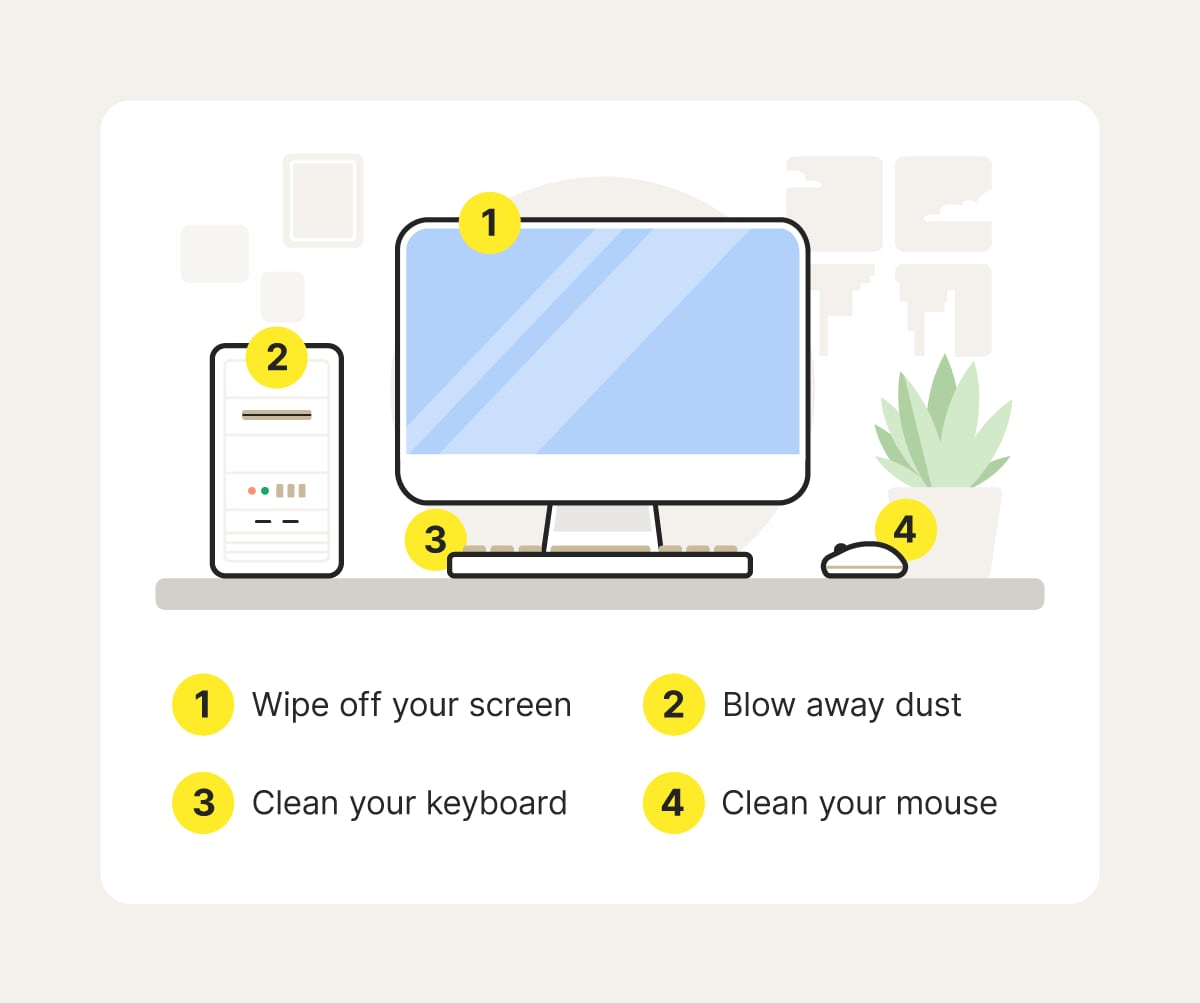
Monthly routines focus on system health. Apply software updates and patches. Check hardware for signs of wear or failure. Analyze performance reports to spot slowdowns. Clean physical components like fans and vents. These actions keep systems running efficiently.
Quarterly Updates
Quarterly updates refresh your system thoroughly. Upgrade major software versions. Review security policies and compliance. Conduct full system scans for hidden threats. Evaluate system capacity and plan upgrades if needed. These updates keep technology current and secure.
Annual Reviews
Annual reviews assess overall system strategy. Audit all hardware and software assets. Plan for major upgrades or replacements. Review disaster recovery and business continuity plans. Train staff on new tools and security practices. This big-picture review ensures long-term system health.

Credit: coboelectric.ca
Factors Influencing Maintenance Frequency
Determining how often you should perform system maintenance depends on several key factors. These factors shape the timing and intensity of the tasks needed to keep your system running smoothly. Understanding them helps you create a maintenance schedule that fits your specific needs and avoids unnecessary downtime.
System Complexity
The more complex your system, the more frequent maintenance it requires. Systems with multiple interconnected components or custom integrations often face higher risks of glitches and conflicts.
If your setup includes various hardware devices, software applications, and network elements, you need to check each part regularly. For example, a simple home PC may only need monthly updates, but a business server with several applications might need weekly or even daily checks.
Usage Patterns
How often you use your system directly impacts maintenance frequency. Systems running 24/7 or handling heavy workloads wear down faster and accumulate more errors.
Consider a retail point-of-sale system active all day versus a personal laptop used a few hours daily. The retail system requires daily or weekly maintenance to prevent disruptions, while the laptop might be fine with monthly tune-ups.
Security Requirements
Security needs can push you to perform maintenance more often. If your system stores sensitive data or faces constant external threats, you must update security patches and scan for vulnerabilities regularly.
Think about a financial services platform versus a personal blog. The platform must have daily or even hourly security checks to protect data and prevent breaches. Ignoring this can lead to costly consequences.
Compliance Standards
Regulatory and industry standards often dictate specific maintenance schedules. If your system must meet compliance rules, regular audits and updates become mandatory.
Healthcare systems following HIPAA or businesses under GDPR must maintain strict schedules for data integrity and system updates. Failing to comply can result in fines and damage to your reputation.
Tools For Effective System Maintenance
Maintaining your system regularly requires the right tools to keep everything running smoothly. Effective system maintenance tools help automate tasks, monitor performance, protect data, and secure your system from threats. Choosing the right tools reduces downtime and improves efficiency.
Automation Software
Automation software handles routine maintenance tasks without manual effort. It schedules updates, cleans temporary files, and optimizes system resources. Using automation tools saves time and reduces human errors. Examples include task schedulers and script-based utilities.
Monitoring Tools
Monitoring tools track system health and performance in real-time. They alert users about unusual activities or potential failures. These tools provide insights into CPU usage, memory load, and disk space. Early warnings help prevent major system issues.
Backup Solutions
Backup solutions protect your data by creating copies regularly. They ensure data recovery after accidental loss or hardware failure. Options include cloud backups, external drives, and network storage. Reliable backups are essential for disaster recovery plans.
Security Applications
Security applications defend your system from malware, viruses, and cyber attacks. Antivirus, anti-malware, and firewall programs form the first line of defense. Keeping security software updated helps protect sensitive information and maintain system integrity.
Best Practices For System Maintenance
Maintaining your system isn’t just about fixing problems when they appear. It’s about setting up a routine that keeps everything running smoothly and prevents issues before they start. Best practices for system maintenance help you stay organized, efficient, and ready for whatever challenges come your way.
Scheduling Regular Checks
Make system checks a non-negotiable part of your routine. Decide on a frequency that fits your system’s complexity and usage—weekly, monthly, or quarterly.
Consistency is key. Setting reminders or using automated tools can help you avoid skipping these vital checks. Have you noticed how skipping even one maintenance session can cause small issues to pile up?
Documenting Maintenance Activities
Keep a detailed record of what you do during each maintenance session. This includes updates applied, errors found, and fixes performed.
Documentation helps you spot recurring problems and understand your system’s history. It also makes handing off responsibilities easier if someone else steps in. Don’t underestimate the power of a well-kept log.
Training Staff
Your system is only as strong as the people who manage it. Regular training ensures everyone knows how to perform maintenance tasks correctly.
Encourage your team to share tips and learn from each other’s experiences. Training isn’t a one-time event—it’s an ongoing process that keeps skills sharp and mistakes rare. How often do you update your team’s knowledge?
Staying Updated With Trends
Technology changes fast. New threats and tools appear regularly, so staying informed is essential.
Subscribe to industry newsletters, join forums, or attend webinars to keep your knowledge current. This awareness lets you adapt your maintenance strategy before problems arise. Are you proactive enough to catch changes early?
Common Mistakes To Avoid
System maintenance keeps devices running smoothly. Avoid mistakes that reduce its effectiveness. Small errors can cause big problems. Learn what to watch out for.
Ignoring Updates
Skipping updates leaves systems open to bugs and errors. Updates fix problems and improve performance. They also patch security holes. Regularly install all software and system updates.
Overlooking Security
Neglecting security makes systems vulnerable to attacks. Use strong passwords and change them often. Enable firewalls and antivirus software. Keep security settings active and updated.
Infrequent Backups
Not backing up data risks losing important files. Backups should happen often and automatically. Store copies in different places. Test backups regularly to ensure they work.
Neglecting Documentation
Failing to document maintenance steps causes confusion. Write down procedures and schedules clearly. Update documents after changes. Good records help troubleshoot problems fast.
Benefits Of Consistent Maintenance
Consistent system maintenance brings a range of benefits that directly impact how smoothly and securely your technology runs. When you keep up with regular checkups and updates, you avoid many common issues before they start. This proactive approach helps you get the most out of your systems every day.
Enhanced Performance
Regular maintenance keeps your system running fast and efficiently. Over time, files pile up, software slows down, and unused programs hog resources. By cleaning up junk files, updating software, and optimizing settings, you keep everything operating at peak speed.
Have you noticed your computer lagging after months without updates? That slowdown is a sign your system needs attention. A quick tune-up can restore responsiveness and save you from frustrating delays.
Improved Security
Security threats evolve constantly, and outdated systems are easy targets. Consistent maintenance ensures your security patches and antivirus software are always up to date. This shields your data from viruses, malware, and hacking attempts.
Think about the last time you ignored a security alert. That small delay could expose your system to serious risks. Staying on top of updates protects your privacy and business information alike.
Extended System Lifespan
Systems that receive regular care last longer. Just like a car needs oil changes to avoid breakdowns, your devices need updates and hardware checks to prevent wear and tear. Small fixes today prevent costly failures tomorrow.
I once worked with a client who ignored maintenance and ended up replacing their entire server much sooner than expected. Regular upkeep would have stretched their investment by years.
Cost Savings
Consistent maintenance helps you avoid expensive repairs and replacements. Fixing minor issues early costs far less than emergency fixes after a breakdown. Plus, efficient systems use less energy, lowering utility bills.
Could a small monthly maintenance routine save you hundreds or even thousands in the long run? The answer is often yes, making regular upkeep a smart financial decision.
Credit: us.norton.com
Frequently Asked Questions
How Often Should I Schedule System Maintenance?
System maintenance should be scheduled at least once a month. Regular checks prevent issues, improve performance, and ensure security updates are applied on time.
What Tasks Are Included In Routine System Maintenance?
Routine maintenance includes software updates, disk cleanup, malware scans, and backup verification. These tasks keep your system secure and running efficiently.
Can Neglecting System Maintenance Cause Problems?
Yes, neglecting maintenance can lead to slow performance, security vulnerabilities, and system crashes. Regular upkeep helps avoid costly repairs and data loss.
Is Monthly Maintenance Enough For Business Systems?
Monthly maintenance is a good baseline for most businesses. High-usage or critical systems may require weekly checks to ensure optimal reliability and security.
Conclusion
Regular system maintenance keeps your devices running smoothly. It prevents slowdowns and avoids unexpected crashes. Set a schedule that fits your device use and needs. Weekly or monthly checks often work well for most users. Simple tasks like updates, backups, and scans make a big difference.
Staying consistent saves time and frustration later. Remember, small efforts now protect your system’s health long-term. Keep it simple. Keep it steady. Your system will thank you.