Best Business Smartphone for Device Management Control with Advanced Biometric Security
In 2026, hybrid and remote work remain standard for most enterprises, making centralized control of corporate mobile devices a non-negotiable for IT teams and business owners. The right business smartphone doesn’t just streamline daily operations — it reduces data breach risk, cuts IT helpdesk overhead, and ensures compliance with global regulations like GDPR, HIPAA, and PCI DSS. This guide breaks down what to look for in a device built for remote management and advanced biometric security, plus complementary tools to create an end-to-end secure workflow for your team.
Key Criteria for Business Smartphones Built for Device Management and Biometric Security
Not all smartphones are suited for enterprise use. When evaluating options for device management and high-security authentication, prioritize these non-negotiable features:
Native MDM/EMM/UEM Compatibility
A business smartphone must integrate seamlessly with your existing mobile device management (MDM), enterprise mobility management (EMM), or unified endpoint management (UEM) platform. Look for official support for tools like Microsoft Intune, VMware Workspace ONE, or MobileIron, as well as out-of-the-box support for zero-touch enrollment to automate new hire device setup. For organizations using Android devices, confirm the model is Android Enterprise certified; for Apple fleets, ensure compatibility with Apple Business Manager for remote policy enforcement. When evaluating MDM support, cross-reference your existing device maintenance workflows to ensure seamless integration without redundant tooling.
Hardware-Backed Security Enclaves
Software-only security is easily bypassed by malware or rooted devices. Opt for smartphones with dedicated, isolated security chips that store biometric data, encryption keys, and sensitive credentials separately from the main operating system. Examples include Apple’s Secure Enclave, Samsung’s Knox Vault, Qualcomm’s Secure Execution Environment, and Google’s Titan M2 chips. For regulated industries handling sensitive customer or patient data, choose devices validated to meet NIST mobile security standards to ensure compliance with federal data protection requirements.
Multi-Modal Advanced Biometric Authentication
Basic fingerprint or 2D facial recognition is no longer sufficient for enterprise security. Look for devices that support multiple biometric modalities with anti-spoofing technology: ultrasonic under-display fingerprint sensors that work with wet or dirty hands (ideal for field teams), 3D structured light or IR facial recognition with liveness detection to prevent photo or video spoofing, and optional iris or palm recognition for hands-free access in high-security environments. A common mistake is assuming all fingerprint sensors offer the same level of security — in practice, ultrasonic sensors outperform optical ones for wet or dirty hands, common in field work environments.
Remote Provisioning and Data Wipe Capabilities
For BYOD (Bring Your Own Device) policies, the smartphone must support work profile separation, allowing IT to remotely wipe only corporate data and apps without touching employee personal files. For corporate-owned devices, look for support for remote lock, location tracking, and automated deprovisioning when an employee leaves the company, eliminating manual data collection steps.
Long-Term Software Support
2026 enterprise security standards require a minimum of 5 years of guaranteed OS and security updates from the device manufacturer. Devices with shorter support windows become compliance risks over time, as unpatched vulnerabilities are easy targets for cyberattacks.
Integrating Mobile Device Management with Physical Access Control Systems
Securing corporate data on smartphones is only one half of the enterprise security puzzle. For full risk mitigation, many businesses sync their mobile device management workflows with physical access control systems for offices, server rooms, and storage facilities. Modern access control solutions that pair with business smartphone MDM platforms let admins grant or revoke physical access permissions automatically when device policies change — for example, revoking a former employee’s door access the moment their corporate phone is deprovisioned, with no extra admin work. Many modern offices also pair mobile device management with smart office controls to streamline access to shared spaces and meeting rooms.
MENGQI-CONTROL WiFi Remote Access Control Device Review
The MENGQI-CONTROL WiFi Remote Add Delete User Biometric Fingerprint RFID Card Password Access Control Device is a cost-effective option for small to medium businesses seeking to integrate physical access control with their existing device management workflows. It supports multi-factor authentication and remote management via WiFi, making it suitable for offices, multi-unit residential properties, and small commercial spaces.
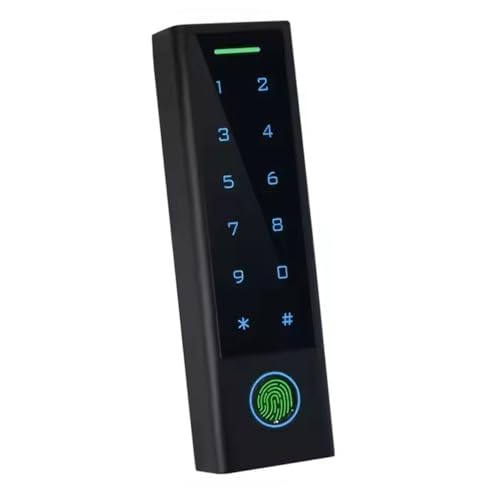 Multi-factor access control system that integrates with business smartphone MDM platforms
Pros:
- Multi-factor authentication combining fingerprint, RFID, and PIN entry to reduce unauthorized physical access risks
- WiFi remote management lets admins add or remove user access from any location, no on-site visits required for routine updates
- API compatibility with most major MDM platforms, so access permissions can be synced automatically with device policy changes
- Built by SecureControl, a brand specializing in small-to-medium business access control with a track record of reliable performance
- Supports up to 500 unique user profiles, making it suitable for offices, storage facilities, and multi-unit residential properties
Cons:
- Initial setup requires basic technical knowledge to configure WiFi settings and MDM integrations
- Performance depends on stable local WiFi connectivity; signal dropouts can delay remote access updates
- Priced higher than basic single-factor access control panels, though it offers more functionality for businesses that need MDM sync
The device’s advanced biometric fingerprint scanner delivers fast, accurate user identification even for users with worn or damaged fingerprints, a common issue in industrial work environments. Its support for RFID cards and PIN entry provides flexible authentication options for contractors, temporary staff, or visitors who should not have permanent biometric enrollment. The WiFi remote management feature eliminates the need for an on-site administrator to make access changes, which is particularly valuable for businesses with multiple locations or limited on-site IT staff. When integrated with your business smartphone MDM platform, you can automate access revocation the moment an employee’s device is deprovisioned, eliminating the risk of former staff retaining physical access to secure areas. If you are implementing a new physical access system, first identify the smart switch configuration for your existing door hardware to avoid compatibility issues during installation.
For small to medium businesses seeking a low-cost access control solution that syncs with your existing device management tools, the MENGQI-CONTROL system offers a straightforward entry point — view current pricing and compatibility details.
Top 2026 Business Smartphone Picks for Device Management and Biometric Security
Below are the top 2026 business smartphones that meet all the criteria for robust device management and advanced biometric security, selected for performance, compliance, and long-term support:
| 2026 Model | Best For | Key MDM Features | Biometric Security | Starting Price |
|---|---|---|---|---|
| Samsung Galaxy S26 Ultra | Large enterprise, hybrid teams | Full Samsung Knox integration, zero-touch enrollment, support for all major UEM platforms, remote app whitelisting/blacklisting | Ultrasonic under-display fingerprint, 3D facial recognition with liveness detection, Knox Vault biometric storage | $1,299 |
| Apple iPhone 17 Pro Max | Healthcare, finance, Apple-centric organizations | Apple Business Manager enrollment, remote work profile separation for BYOD, automated compliance reporting, Find My integration for lost devices | Face ID with IR liveness detection, Secure Enclave biometric storage, no biometric data shared with third-party apps | $1,199 |
| Google Pixel 9 Pro | Startups, small businesses, cost-conscious teams | Google Zero Touch enrollment, 5 years of guaranteed security updates, Android Enterprise recommended certification, remote wipe for work profiles | Under-display optical fingerprint, Titan M2 security chip for biometric storage, Passkey support | $899 |
| OnePlus 12 Pro Business Edition | Field teams, budget-focused enterprises | Android Enterprise full management, remote device lockdown, support for custom MDM policies, dual-SIM for global teams | Side-mounted capacitive fingerprint, optional IR iris scanner, hardware-backed security enclave | $749 |
For field teams that use paired wearable devices for hands-free access, wearable biometric benefits often overlap with smartphone security protocols to reduce friction for on-the-go workers. If you are exploring wearable options to complement your mobile device management strategy, review our guide to paired wearable options for enterprise use cases.
Common Pitfalls to Avoid When Selecting a Business Smartphone
Even devices with strong specs can create unnecessary risk or overhead if they don’t align with your business needs. Avoid these common mistakes:
Prioritizing Cost Over Security Validation
Consumer-grade smartphones are often cheaper upfront, but they lack the hardware-backed security enclaves and long-term update support required for enterprise compliance. For regulated industries, unvalidated devices can lead to costly compliance fines or data breaches that far outweigh the upfront cost savings of consumer models.
Ignoring Biometric Spoofing Risks
2D facial recognition and low-quality optical fingerprint sensors can be bypassed with high-resolution photos or silicone fingerprint molds. Always opt for devices with 3D IR facial recognition or ultrasonic fingerprint sensors, which include liveness detection to prevent spoofing.
Overlooking Long-Term Software Support
A smartphone with only 2-3 years of security updates will become a liability as new vulnerabilities emerge. For fleets that will be used for 3+ years, prioritize devices with 5+ years of guaranteed OS and security updates to avoid forced early replacements.
Failing to Test BYOD Compatibility
If you support a BYOD policy, test the device’s work profile separation features before purchasing to ensure IT cannot access employee personal data during remote management or wipe processes, which is a requirement for employee privacy in most regions.
Frequently Asked Questions
What biometric security features are most important for business smartphones?
Prioritize devices with hardware-backed security enclaves that store biometric data separately from the operating system, plus multi-modal options like ultrasonic fingerprint scanners and 3D facial recognition with liveness detection to prevent spoofing. Avoid devices that rely solely on 2D facial recognition or optical fingerprint sensors, which are easier to bypass.
Do all business smartphones work with third-party MDM platforms?
Most modern business-grade smartphones support cross-platform MDM solutions like Microsoft Intune, VMware Workspace ONE, and MobileIron, but confirm compatibility before purchasing. Apple devices require enrollment in Apple Business Manager, while Android devices need Android Enterprise certification for full remote management capabilities. Per NIST’s digital identity guidelines, multi-modal biometric authentication is recommended for high-security use cases to minimize false acceptance and spoofing risks.
How does advanced biometric security reduce device management overhead?
Biometric authentication eliminates the need for frequent password resets, which account for roughly 30% of IT helpdesk tickets in enterprise environments. It also streamlines user provisioning: admins can enroll biometric data remotely during onboarding, reducing time-to-productivity for new hires.
Can I use a consumer smartphone for business device management?
While consumer smartphones can be used for basic MDM, business-grade models include built-in security features like Knox Vault, Secure Enclave, and Titan M chips that are not available on consumer variants. These features are required for compliance with regulations like HIPAA, GDPR, and PCI DSS for industries handling sensitive data.
How do I integrate physical access control systems with my mobile device management platform?
Many modern access control systems, including WiFi-enabled multi-factor options, support API integration with major MDM tools. This lets you sync access permissions for physical spaces with corporate device policies, so when an employee’s device is deprovisioned, their physical access is automatically revoked as well.
Conclusion
The right business smartphone for device management and advanced biometric security does more than protect corporate data — it reduces administrative burden, ensures regulatory compliance, and creates a seamless, secure experience for hybrid and remote teams. When paired with integrated physical access control solutions, you can create a unified security workflow that covers both digital and physical enterprise assets. For teams looking to expand their device ecosystem beyond smartphones, exploring paired wearable options can further streamline access control and device management for hybrid workforces.
If you are upgrading your business device fleet in 2026, start by auditing your current MDM platform’s compatibility requirements and prioritize devices with validated biometric security to reduce long-term risk and administrative burden.