What GPU Do You Need for an Ultrawide Monitor?
You've probably noticed that most GPU buying guides treat ultrawide monitors like standard screens with a wider aspect ratio. They'll tell you an RTX 4070 handles 1440p great, so it should crush ultrawide. That advice misses something critical.
When someone asks what graphics card is needed for ultrawide monitor setups, the answer depends heavily on which specific ultrawide resolution you're running.
The jump from standard 2560×1440 to 3440×1440 ultrawide adds roughly 34% more pixels your GPU must push every single frame. A card that hits 144 FPS in regular 1440p might suddenly struggle to maintain 90 FPS at ultrawide. That difference matters far more than most guides let on, especially as of 2026 when games demand even more from your hardware.
Quick Answer
For a 3440×1440 ultrawide at 60Hz, an NVIDIA RTX 4060 or AMD RX 7600 with 8GB VRAM works for most games. At 144Hz or higher refresh rates, step up to an RTX 4070 or RX 7800 XT. For 3840×1600 or 5120×1440 super ultrawides, you need at least an RTX 4080 or RX 7900 XTX.
Productivity tasks like video editing benefit from 12GB or more VRAM regardless of refresh rate.
Why Your Standard GPU Advice Doesn't Work for Ultrawides
Most GPU recommendations you'll find online are built around standard 16:9 resolutions. They test at 1080p, 1440p, and 4K. Ultrawide resolutions fall into awkward gaps between those standard tiers.
That creates a blind spot for buyers.
A 3440×1440 ultrawide has about 4.95 million pixels. Standard 1440p has roughly 3.69 million. That's not a small bump.
It's a substantial increase in workload that doesn't show up in most benchmark charts. Manufacturers rarely test at ultrawide resolutions either, so you're left extrapolating from numbers that don't quite apply.
The refresh rate compounds this issue further. A 3440×1440 monitor running at 144Hz demands nearly double the frame output of the same resolution at 60Hz. Many buyers pair a high-refresh ultrawide with a GPU that was only validated for 60Hz gaming at lower resolutions.
The result is stuttering, frame dropping, and a wasted monitor purchase.
Image source: Web (Bing) / robots.net (Web image (fair-use with source credit))
The Real Pixel Count Difference You Need to Understand
Let's put real numbers on this. The table below compares common ultrawide resolutions against standard display tiers. You'll see exactly why your GPU choice needs to scale differently.
| Resolution | Aspect Ratio | Total Pixel Count | vs Standard 1440p |
|---|---|---|---|
| 2560×1080 | 21:9 | ~2.76 million | 25% fewer pixels |
| 2560×1440 | 16:9 | ~3.69 million | Baseline |
| 3440×1440 | 21:9 | ~4.95 million | 34% more pixels |
| 3840×1600 | 21:9 | ~6.14 million | 66% more pixels |
| 3840×2160 (4K) | 16:9 | ~8.29 million | 125% more pixels |
| 5120×1440 | 32:9 | ~7.37 million | 100% more pixels |
That 34% jump from standard 1440p to 3440×1440 ultrawide is the most common trap buyers fall into. They assume their existing GPU will handle it fine because "it's just a little wider." In reality, your graphics card is rendering over a million additional pixels every frame. At 144Hz that adds up fast.
Super ultrawides like 5120×1440 push this even further. You're essentially running two 2560×1440 monitors side by side without a bezel. The pixel count rivals 4K.
Only high-end GPUs can drive that resolution smoothly at high refresh rates.
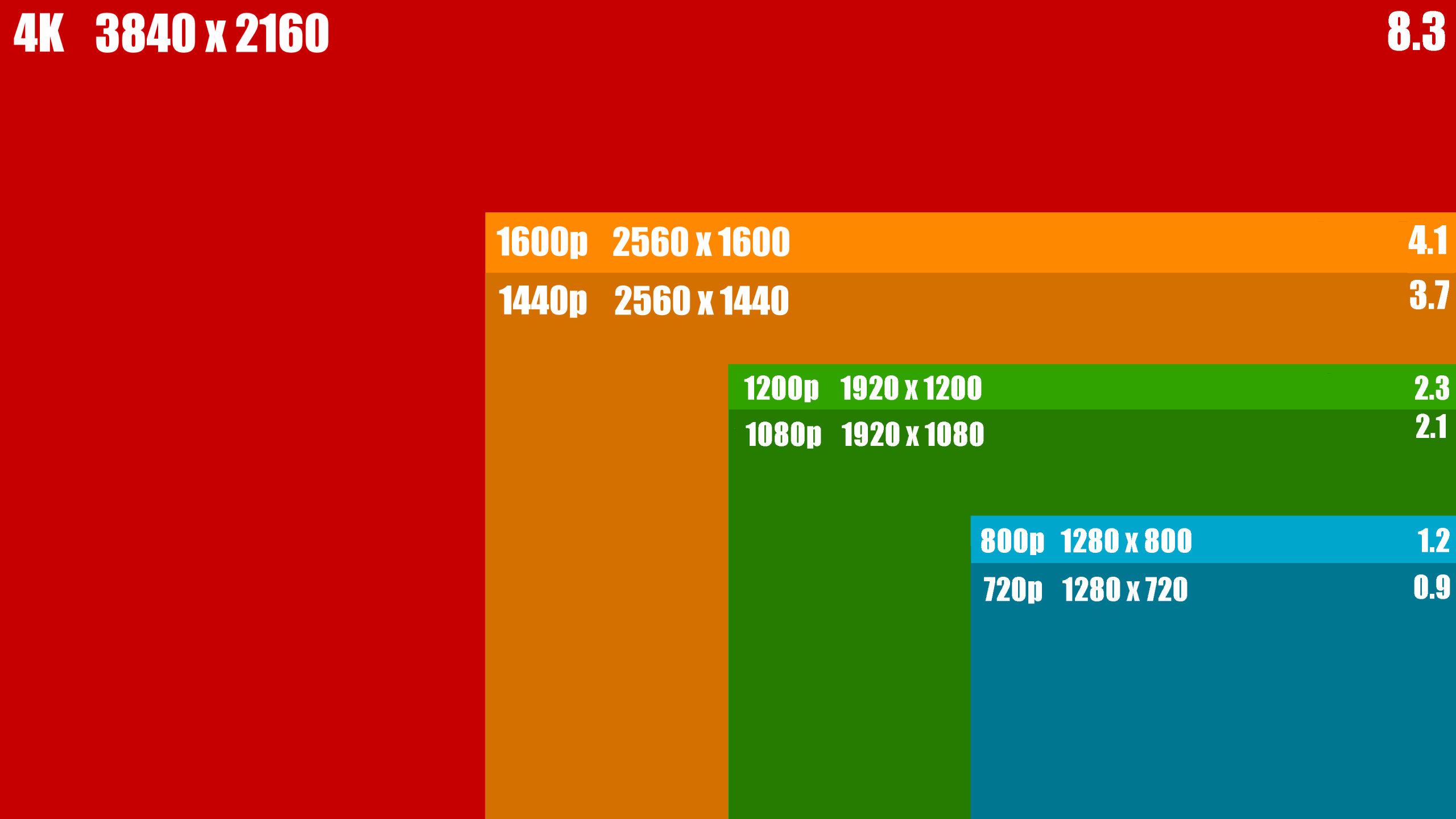
Image source: Bing (Web (fair-use with source credit))
How to Match Your GPU to Your Specific Ultrawide Resolution
Your exact resolution dictates which GPU tier makes sense. There's no one-size-fits-all answer because ultrawide covers a huge performance range.
3440×1440 (The Most Common Ultrawide)
This is where most buyers land. It's the sweet spot between immersion and performance. For 60Hz gaming, an RTX 4060 or RX 7600 handles most titles at medium to high settings.
Step up to 100Hz or 144Hz and you'll want an RTX 4070 or RX 7800 XT to maintain smooth frame rates in demanding games. Esports titles like Valorant or CS2 run fine on mid-range cards because those games are less graphically intensive.
3840×1600 (The High-End Productivity Sweet Spot)
This resolution appears on premium productivity and creator-focused ultrawides. The pixel count jumps significantly, so GPU demands rise accordingly. For mixed productivity and light gaming, an RTX 4070 Ti or RX 7900 XT is the practical floor.
For serious gaming at high refresh rates, you're looking at an RTX 4080 or better. The extra screen real estate is fantastic for timeline-based editing work, which is why many creators pair these with high-VRAM cards.
5120×1440 (Super Ultrawide, Basically Two Monitors)
Super ultrawides deliver an unmatched field of view for racing sims and flight sims. They also demand serious GPU power. An RTX 4080 is the realistic starting point for smooth gaming.
For 100Hz+ at high settings, an RTX 4090 becomes the sensible choice. These displays are niche, and the GPU requirements reflect that niche status.
2560×1080 (Entry-Level Ultrawide, Often Overlooked)
Budget ultrawides at 2560×1080 actually require less GPU power than standard 1440p. A basic RTX 3050 or RX 6600 handles this resolution comfortably even at high refresh rates. This is a solid option if you want the ultrawide experience without a massive GPU investment.
If you're considering a portable monitor for laptops as a secondary display alongside your ultrawide, keep in mind that driving two high-resolution screens further increases the load on your GPU.
The VRAM Trap: Why 8GB Isn't Enough for Most Ultrawides
VRAM is where many ultrawide builds fall apart. Games at 3440×1440 routinely consume 7-9GB of VRAM at high texture settings. That leaves almost no headroom on an 8GB card.
When you exceed your VRAM capacity, frame times spike dramatically and you get visible stuttering.
Modern titles at ultrawide resolutions push VRAM usage higher than their 16:9 counterparts. The extra horizontal screen space means more textures loaded into memory simultaneously. Open-world games are particularly aggressive about this.
Titles like Cyberpunk 2077, Hogwarts Legacy, and Starfield can easily exceed 8GB at ultrawide with high-res texture packs.
Twelve gigabytes is the practical minimum for a comfortable ultrawide gaming experience in 2026. That means an RTX 4070 with its 12GB framebuffer or an RX 7800 XT with 16GB. If you're buying a card with 8GB, plan to lower texture quality in future titles or accept occasional stuttering.
For video editing and 3D rendering workflows, VRAM matters even more. A 4K video timeline in Premiere Pro or DaVinci Resolve can consume 12GB or more during playback and rendering. If productivity is your primary use case, prioritize VRAM capacity over raw clock speeds.
An RTX 4060 Ti with 16GB might serve you better than a faster card with only 8GB, depending on your specific applications.
NVIDIA's official specifications for the GeForce RTX series show a clear trend toward higher VRAM on mid-range and above cards. That shift directly reflects the demands of higher-resolution displays. AMD has pushed even harder here, offering 16GB on cards like the RX 7700 XT and RX 7800 XT at competitive price points.
Best GPUs for Ultrawide Gaming in 2025
Now let's get specific. These recommendations target actual gaming performance at ultrawide resolutions based on aggregate review data and benchmark databases.
Budget Pick: What Actually Handles 3440×1440 at 60Hz+
The NVIDIA GeForce RTX 4060 and AMD Radeon RX 7600 both sit in this tier. They'll handle 3440×1440 at 60 FPS in most games with settings adjusted to medium or high. The RX 7600 often trades blows with the RTX 4060 in raw rasterization but lacks an equivalent to DLSS 3 frame generation.
DLSS can be a significant advantage on ultrawide displays where the performance headroom is tighter.
Expect to use upscaling in demanding titles. Native 3440×1440 with max settings will push these cards too hard in AAA games. For esports and older titles, though, they deliver smooth gameplay without compromise.
If your monitor tops out at 60Hz and you're not chasing ultra settings, this tier gets the job done.
Mid-Range Champion: Smooth 100Hz+ at 3440×1440
The NVIDIA GeForce RTX 4070 and AMD Radeon RX 7800 XT define this category. The RTX 4070's 12GB VRAM gives it breathing room at ultrawide, while DLSS 3 helps maintain high frame rates. The RX 7800 XT offers 16GB VRAM for about the same price, which helps in VRAM-heavy scenarios.
Either card will push 100+ FPS at 3440×1440 in most games with high settings. Competitive titles run well above 144 FPS. This is the tier where ultrawide gaming feels genuinely smooth without requiring upscaling tricks.
It matches the sweet spot for the popular 3440×1440 144Hz monitors on the market.
High-End Powerhouse: 3840×1600 and 5120×1440 Ready
The NVIDIA GeForce RTX 4080 and AMD Radeon RX 7900 XTX handle the heavier ultrawide resolutions with confidence. The RTX 4080 excels at 3840×1600, delivering high frame rates even without DLSS. The RX 7900 XTX's 24GB VRAM makes it particularly strong for productivity alongside gaming at these resolutions.
For super ultrawide 5120×1440 at high refresh rates, the RTX 4080 is the practical entry point. The RX 7900 XTX competes well here too, especially in titles that favor AMD's architecture. Both cards handle the pixel count without breaking a sweat in most scenarios.
The 4K Ultrawide Tier: Only a Few Cards Need Apply
The NVIDIA GeForce RTX 4090 remains the only card that comfortably drives 5120×1440 at 120Hz+ with ray tracing enabled. Its 24GB VRAM and massive memory bandwidth give it an edge that no other current GPU matches. For pure ultrawide gaming dominance, this is the card.
It's overkill for 3440×1440 unless you're chasing 240Hz. But for 5120×1440 super ultrawides or 3840×1600 at high refresh rates with maximum settings, the RTX 4090 earns its price. If your workflow includes GPU rendering or AI tasks alongside gaming, the extra VRAM and compute power justify the investment.
Many buyers in this tier also use their ultrawide as part of a larger setup. A card powerful enough to drive a super ultrawide can easily handle additional displays. If you're running a laptop for working from home alongside your desktop ultrawide, the RTX 4090 handles multi-display workloads without flinching.
Best GPUs for Ultrawide Productivity and Creative Work
Gaming isn't the only reason people buy ultrawides. Video editors, graphic designers, developers, and financial traders all benefit from the extra horizontal space. GPU needs for these workflows differ from gaming priorities.
Video editing in DaVinci Resolve or Premiere Pro benefits from VRAM and hardware encoding. An NVIDIA RTX 4070 with 12GB handles 4K timeline playback smoothly. Step up to 6K or 8K footage and you'll want an RTX 4080 or RTX 4090.
AMD's encoder has improved but still lags behind NVIDIA's NVENC for most editing software.
Software developers and data scientists often run multiple virtual machines or containers across that ultrawide screen. Here, raw GPU power matters less than sufficient VRAM and driver stability. An RTX 4060 Ti with 16GB often outperforms a faster card with 8GB when juggling multiple high-resolution displays and memory-hungry applications.
Photo editing in Lightroom or Photoshop rarely stresses modern GPUs heavily. Even mid-range cards handle brush strokes, filters, and exports without issue. The display quality matters more than GPU horsepower for this use case. Invest in a good monitor first, then allocate remaining budget to your GPU.
Traders running charting applications across a 32:9 super ultrawide need reliable multi-display output more than gaming performance. Any current-gen GPU drives these productivity workloads fine. Focus on cards with multiple DisplayPort outputs if you're daisy-chaining or running additional screens alongside your ultrawide.
NVIDIA vs AMD vs Intel for Ultrawide Setups
The GPU brand you choose affects more than raw performance. Feature sets, driver stability, and software ecosystems all play a role in the ultrawide experience.
NVIDIA leads in ray tracing performance and DLSS adoption. DLSS 3 with frame generation is particularly valuable at ultrawide resolutions where native performance is tighter. Many games launch with DLSS support but add FSR later or not at all.
Reflex technology also reduces input latency, which matters for competitive gaming on high-refresh ultrawides.
AMD offers more VRAM at most price points. The RX 7800 XT's 16GB versus the RTX 4070's 12GB gives AMD an edge in VRAM-heavy scenarios. FSR 3 is AMD's answer to DLSS 3 and it works across both AMD and NVIDIA cards, but image quality sometimes trails DLSS in direct comparisons.
AMD's driver software has improved significantly, though NVIDIA still holds an edge in day-one game optimization.
Intel Arc has carved out a budget niche. The Arc A750 and A770 handle 3440×1440 at 60Hz in many titles, especially with XeSS upscaling enabled. Driver maturity remains a concern for some professional applications, though gaming performance has improved with recent updates.
Intel's AV1 hardware encoding is excellent for streamers.
For most ultrawide buyers in 2025, NVIDIA offers the most consistent experience. AMD provides better raw value in VRAM-heavy workflows. Intel serves budget builds well if you're willing to accept occasional driver quirks.
Your specific software and games should drive this decision more than brand loyalty.
Side-by-Side GPU Comparison at Ultrawide Resolutions
This comparison uses aggregate benchmark data across common ultrawide resolutions. Frame rates represent averages in demanding AAA titles at high settings without upscaling.
| GPU | VRAM | 3440×1440 (60Hz Target) | 3440×1440 (144Hz Target) | 5120×1440 (60Hz Target) | Price Range |
|---|---|---|---|---|---|
| RTX 4060 | 8GB | Comfortable | Struggles | Not recommended | $280-320 |
| RX 7600 | 8GB | Comfortable | Struggles | Not recommended | $250-280 |
| RTX 4070 | 12GB | Very smooth | Good with DLSS | Marginal | $500-550 |
| RX 7800 XT | 16GB | Very smooth | Good with FSR | Marginal | $450-500 |
| RTX 4080 | 16GB | Excellent | Very smooth | Comfortable | $1,000-1,100 |
| RX 7900 XTX | 24GB | Excellent | Very smooth | Comfortable | $900-1,000 |
| RTX 4090 | 24GB | Excellent | Excellent | Very smooth | $1,600-1,800 |
These numbers shift with upscaling enabled. DLSS and FSR can boost frame rates by 30-60%, effectively moving each card up a tier in practice. An RTX 4070 with DLSS 3 at 3440×1440 can match or exceed a stock RX 7900 XTX in supported titles.
If you're weighing a laptops for work and gaming purchase that will connect to an external ultrawide, remember that mobile GPUs perform below their desktop counterparts. An RTX 4070 laptop GPU performs closer to a desktop RTX 4060. Factor in that performance gap when choosing your portable machine.
What to Check Before You Buying: Ports, Cables, and Case Fit
Your new GPU needs to physically connect to your ultrawide. This sounds obvious but catches people off guard regularly.
DisplayPort 1.4 supports 3440×1440 at up to 144Hz with DSC (Display Stream Compression). For 3840×1600 or 5120×1440 at high refresh rates, you need DisplayPort 2.1 or HDMI 2.1. Not every GPU includes these newer ports.
Check the specific card's output configuration before buying. Some budget models still ship with HDMI 2.0 and DisplayPort 1.4 only.
Cable quality matters too. A poor DisplayPort cable can cause flickering, signal dropouts, or force you to run at a lower refresh rate. Use the cable that came with your monitor, or buy a certified VESA DisplayPort cable.
The VESA DisplayPort standard specifies the bandwidth requirements for each resolution and refresh rate combination.
Physical GPU length is another common headache. High-end cards like the RTX 4090 can exceed 330mm in length. Measure your case clearance before ordering.
Also check your power supply wattage. An RTX 4080 typically needs a 750W PSU minimum. The RTX 4090 recommends 850W or higher.
Undersized power supplies cause crashes under load, especially during gaming sessions.
Common Mistakes That Bottleneck Your Ultrawide Experience
Buying the wrong GPU for your ultrawide is the obvious error. But several other mistakes degrade the experience just as badly.
Ignoring VRAM requirements tops the list. An 8GB card might run fine today but stutter in future titles. Games are trending toward higher VRAM consumption with each passing year.
If you're buying a new GPU in 2026, 12GB should be your minimum for ultrawide gaming.
Forgetting about display cable bandwidth causes unnecessary frustration. You might own a 144Hz ultrawide but run it at 60Hz because your GPU only has HDMI 2.0 outputs. Always verify port versions on both your GPU and monitor before building your setup.
Underspending on the power supply creates instability. A GPU transient spike can trip an underpowered PSU even if the average draw seems fine. This is especially common with NVIDIA's RTX 40-series cards.
Buy a quality PSU with at least 20% headroom above your estimated system draw.
Neglecting case thermals compounds performance issues. High-end GPUs dump significant heat into your case. Poor airflow leads to thermal throttling, which reduces your effective frame rates.
Ensure your case has adequate intake and exhaust fans. This matters more with each generation of increasingly powerful cards.
If you're budgeting your entire setup, consider the monthly cost of home electronics including the increased power draw from a high-end GPU. An RTX 4090 system draws noticeably more electricity during gaming sessions than a mid-range build.
Real-World Scenarios: Which GPU for Your Exact Situation
Let's match common buyer profiles to specific GPU recommendations. These scenarios reflect how people actually use ultrawides.
The casual gamer with a 3440×1440 75Hz monitor plays Fortnite, Rocket League, and occasional single-player titles. An RTX 4060 or RX 7600 handles this well. You'll hit the monitor's refresh cap without breaking the bank.
Invest the savings in a quality chair or peripherals.
The competitive gamer with a 3440×1440 240Hz monitor needs every frame possible. An RTX 4070 Ti Super or RX 7900 XT is the starting point. In esports titles, these cards push well above 200 FPS.
For AAA games at high refresh rates, an RTX 4080 becomes necessary. DLSS or FSR will be your friend here.
The video editor using a 3840×1600 productivity ultrawide needs VRAM and encoding performance. An RTX 4070 with 12GB handles most 4K editing workflows. For 6K and 8K footage, step up to an RTX 4080 or RTX 4090.
AMD's RX 7900 XTX with 24GB is also strong here, especially if your software leverages OpenCL acceleration.
The racing sim enthusiast with a 5120×1440 super ultrawide demands serious GPU power. An RTX 4080 is the minimum for smooth gameplay with high detail settings. The RTX 4090 delivers the most consistent experience.
Sim titles often push draw calls and physics calculations harder than traditional games, so raw performance matters.
The budget buyer eyeing a 2560×1080 ultrawide gets away with modest hardware. Even an RTX 3050 or RX 6600 drives this resolution comfortably. This is a great entry point into ultrawide without requiring a premium GPU purchase.
Save the difference for a future monitor upgrade.
If you're timing your purchase, the best month to buy a TV often coincides with GPU sales events. Black Friday, Prime Day, and new product launches all bring temporary price drops on graphics cards.
Frequently Asked Questions About GPUs and Ultrawide Monitors
Can my current GPU run an ultrawide monitor?
Check your GPU's maximum supported resolution and the ports available. Most GPUs from the last decade support at least 3440×1440 at 60Hz through DisplayPort 1.2 or HDMI 2.0. For high refresh rates, you need newer port versions.
Also verify that your GPU has enough VRAM for your intended use case.
Is ray tracing possible at ultrawide resolutions?
Ray tracing is extremely demanding at ultrawide resolutions due to the high pixel count. An RTX 4080 or RTX 4090 handles ray tracing at 3440×1440 reasonably well with DLSS enabled. Without upscaling, even high-end cards struggle to maintain 60 FPS with ray tracing in demanding titles.
Do I need a new GPU for a 3440×1440 ultrawide if I currently game at 2560×1440?
Expect a 25-35% performance drop when moving from standard 1440p to ultrawide 1440p with the same GPU and settings. If you currently average 100 FPS at standard 1440p, expect roughly 65-75 FPS at ultrawide. A GPU upgrade becomes necessary if your current card can't maintain your target frame rate at the higher resolution.
How much VRAM do I need for ultrawide gaming in 2026?
Twelve gigabytes is the practical minimum for comfortable ultrawide gaming. Eight gigabyte cards work for now but will struggle with future titles at high texture settings. Sixteen gigabytes provides comfortable headroom for the next several years, especially at 3840×1600 or 5120×1440 resolutions.
Will a laptop GPU drive an external ultrawide effectively?
A laptop GPU can drive an external ultrawide, but mobile GPUs perform below their desktop equivalents. An RTX 4070 laptop GPU performs closer to a desktop RTX 4060. For high-refresh ultrawide gaming, a desktop GPU delivers a noticeably better experience.
For productivity and casual gaming, modern laptop GPUs handle ultrawides fine.
Should I choose NVIDIA or AMD for ultrawide?
NVIDIA offers better ray tracing, DLSS, and broader professional software support. AMD provides more VRAM at lower price points and competitive raw performance. For most ultrawide gaming builds, NVIDIA's feature set gives it an edge.
For productivity-focused builds with VRAM-heavy workflows, AMD offers strong value.
The Bottom Line: Your Ultrawide GPU Decision Guide
The right GPU for your ultrawide depends on three factors: your monitor's resolution, its refresh rate, and what you actually do with it. There's no universal answer, but the patterns are clear.
For 3440×1440 at 60Hz, an RTX 4060 or RX 7600 gets the job done. Step up to 144Hz and you need an RTX 4070 or RX 7800 XT. For 3840×1600 or 5120×1440, start at an RTX 4080 and go up from there.
Productivity workloads benefit from 12GB or more VRAM regardless of gaming performance.
Avoid the trap of buying based on standard 1440p or 4K benchmarks alone. Ultrawide resolutions carry a pixel premium that directly impacts GPU demands. Check your VRAM headroom, verify your display ports, and match your card to your actual resolution and refresh rate.
The ultrawide experience is fantastic when your GPU can actually drive it. Take the time to match your hardware to your display, and you'll get the smooth, immersive experience that made you want an ultrawide in the first place.
Best GPUs for Ultrawide Productivity and Creative Work
For 3D rendering in Blender or Maya, NVIDIA's CUDA acceleration reduces render times significantly compared to OpenCL alternatives. Machine learning workloads benefit from Tensor Cores found on RTX-series cards. Multi-display productivity setups need sufficient display outputs for your ultrawide plus additional monitors.
NVIDIA vs AMD vs Intel for Ultrawide Setups
Driver update frequency affects day-to-day stability. NVIDIA typically releases optimized drivers for major game launches. Resale value trends historically favor NVIDIA cards over AMD equivalents.
Software ecosystem differences matter for streaming, broadcasting, and video conferencing workflows.
Side-by-Side GPU Comparison at Ultrawide Resolutions
Memory bandwidth directly impacts performance at higher resolutions. Cards with wider memory buses handle ultrawide pixel counts more efficiently. Warranty length and manufacturer support quality differ significantly between brands.
Factor in post-purchase support when choosing between similarly priced options.
What to Check Before You Buying: Ports, Cables, and Case Fit
Active adapter solutions can introduce latency or limit refresh rates. Native DisplayPort or HDMI connections always perform better. GPU bracket support prevents sag with heavy high-end cards.
Power connector types vary, with some cards requiring 12VHPWR and others using traditional 8-pin connectors.
Common Mistakes That Bottleneck Your Ultrawide Experience
Outdated drivers cause compatibility issues and performance problems. Background applications like browser hardware acceleration consume GPU resources. Windows power settings can prevent your GPU from reaching full performance.
Set your power plan to high performance for consistent results.
Real-World Scenarios: Which GPU for Your Exact Situation
The casual gamer with a 3440×1440 75Hz monitor plays Fortnite, Rocket League, and occasional single-player titles. An RTX 4060 or RX 7600 handles this well. You'll hit the monitor's refresh cap without breaking the bank.
The competitive gamer with a 3440×1440 240Hz monitor needs every frame possible. An RTX 4070 Ti Super or RX 7900 XT is the starting point. DLSS or FSR will be your friend here.
The video editor using a 3840×1600 productivity ultrawide needs VRAM and encoding performance. An RTX 4070 with 12GB handles most 4K editing workflows. For 6K and 8K footage, step up to an RTX 4080 or RTX 4090.
The racing sim enthusiast with a 5120×1440 super ultrawide demands serious GPU power. An RTX 4080 is the minimum for smooth gameplay. The RTX 4090 delivers the most consistent experience.
Frequently Asked Questions About GPUs and Ultrawide Monitors
Can my current GPU run an ultrawide monitor?
Check your GPU's maximum supported resolution and the ports available. Most GPUs from the last decade support at least 3440×1440 at 60Hz through DisplayPort 1.2 or HDMI 2.0.
Is ray tracing possible at ultrawide resolutions?
Ray tracing is extremely demanding at ultrawide resolutions. An RTX 4080 or RTX 4090 handles it reasonably well with DLSS enabled. Without upscaling, even high-end cards struggle to maintain 60 FPS.
How much VRAM do I need for ultrawide gaming in 2026?
Twelve gigabytes is the practical minimum. Eight gigabyte cards work for now but will struggle with future titles. Sixteen gigabytes provides comfortable headroom for the next several years.
Will a laptop GPU drive an external ultrawide effectively?
Mobile GPUs perform below their desktop equivalents. An RTX 4070 laptop GPU performs closer to a desktop RTX 4060. For high-refresh ultrawide gaming, a desktop GPU delivers a noticeably better experience.
The Bottom Line: Your Ultrawide GPU Decision Guide
The right GPU depends on your monitor's resolution, its refresh rate, and what you actually do with it. For 3440×1440 at 60Hz, an RTX 4060 or RX 7600 gets the job done. Step up to 144Hz and you need an RTX 4070 or RX 7800 XT.
For 3840×1600 or 5120×1440, start at an RTX 4080.
Avoid the trap of buying based on standard 1440p benchmarks alone. Ultrawide resolutions carry a pixel premium that directly impacts GPU demands. Check your VRAM headroom, verify your display ports, and match your card to your actual resolution and refresh rate.
The ultrawide experience is fantastic when your GPU can actually drive it. Take the time to match your hardware to your display, and you'll get the smooth, immersive experience that made you want an ultrawide in the first place.