What is the Erp Maintenance Process for Erp System: Essential Guide
Are you using an ERP system to manage your business? If so, you might wonder how to keep it running smoothly over time.
The ERP maintenance process is the key to making sure your system stays efficient, secure, and up to date. Without proper maintenance, your ERP can slow down, cause errors, or even put your data at risk. You’ll discover exactly what the ERP maintenance process involves and why it’s essential for your business success.
Keep reading to learn how to protect your investment and get the most out of your ERP system.
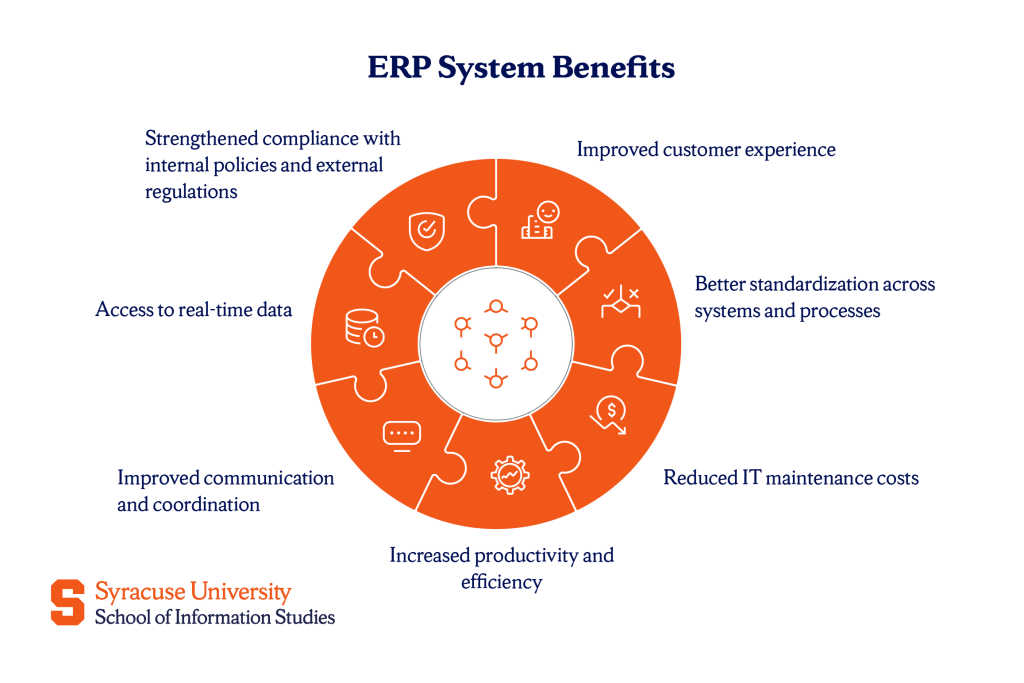
Credit: ischool.syracuse.edu
Erp Maintenance Basics
ERP maintenance is essential for keeping your ERP system running smoothly. It involves regular checks, updates, and fixes to ensure the software meets business needs. Without proper maintenance, ERP systems can face errors, slow performance, or security risks. Understanding the basics helps in managing the system effectively and avoiding costly downtimes.
Purpose Of Erp Maintenance
The main goal of ERP maintenance is to keep the system reliable and efficient. It helps prevent system failures that disrupt business operations. Maintenance ensures the software adapts to new business processes and technology changes. It also improves system security by fixing vulnerabilities. Regular maintenance supports user satisfaction and boosts overall productivity.
Types Of Maintenance Activities
ERP maintenance includes several key activities:
- Corrective Maintenance:Fixing bugs and errors that appear in the system.
- Adaptive Maintenance:Updating the ERP to work with new hardware or software environments.
- Perfective Maintenance:Enhancing system features to improve performance and usability.
- Preventive Maintenance:Conducting regular checks to avoid future problems.
These activities ensure the ERP system stays current and continues to meet business demands efficiently.
Planning Maintenance Tasks
Planning maintenance tasks for your ERP system is a crucial step that ensures smooth and uninterrupted operations. Without a clear plan, updates and fixes can become chaotic, causing downtime and frustration. Careful planning helps you stay proactive rather than reactive, minimizing risks and maximizing system efficiency.
Scheduling Regular Updates
Regular updates keep your ERP system secure and performing well. Set a consistent schedule for updates, such as monthly or quarterly, depending on your system’s complexity and usage. Don’t wait for issues to pop up; routine updates prevent problems before they start.
Think about your team’s workload and pick times that cause the least disruption. For example, scheduling updates during off-peak hours can reduce interruptions to your daily business activities. You can also use automated tools to remind you when updates are due, so nothing slips through the cracks.
Assigning Responsibilities
Clear roles are essential to avoid confusion during the maintenance process. Decide who will monitor system health, who will install updates, and who will handle unexpected issues. This clarity speeds up problem-solving and keeps everyone accountable.
In my experience, having a dedicated maintenance lead makes a huge difference. This person becomes the go-to expert, improving communication between IT, management, and users. It’s helpful to document each person’s tasks so your team knows exactly what’s expected.
What steps can you take today to make sure every maintenance task has an owner? Identifying these roles early can save you from last-minute chaos.
Monitoring System Performance
Monitoring system performance is essential to keep an ERP system running smoothly. It helps identify issues early and ensures the system meets business needs. Regular checks improve reliability and prevent downtime. Tracking performance also supports better decision-making for future upgrades.
Tracking Key Metrics
Tracking key metrics gives a clear view of system health. Metrics include response time, transaction speed, and error rates. Monitoring these helps spot slowdowns or failures. Regular review of these numbers guides maintenance priorities. It ensures the ERP system operates efficiently.
Using Diagnostic Tools
Diagnostic tools scan the ERP system for hidden problems. They analyze logs, database performance, and server status. These tools provide detailed reports and alerts for quick action. Using diagnostics helps fix issues before they affect users. It keeps the system stable and secure.

Credit: medium.com
Handling Software Updates
Handling software updates is a vital part of ERP maintenance. It keeps the system safe and efficient. Updates fix bugs and add new features. Regular updates prevent system failures and improve performance.
Applying Patches And Fixes
Patches fix security holes and software errors quickly. They are small, targeted updates that do not change the whole system. Applying patches regularly reduces risks of cyberattacks. It also ensures the software runs smoothly without interruptions.
IT teams should test patches before applying them. This avoids unexpected problems in live systems. Scheduling patch application during off-hours limits disruption to daily work. Keeping a patch log helps track what has been updated and when.
Upgrading Erp Modules
ERP modules control specific business functions like finance or inventory. Upgrading modules brings new capabilities and better integration. It helps the company stay competitive and meet new business needs.
Module upgrades require careful planning and backup. Testing the upgrade in a safe environment prevents errors. Staff training after upgrades ensures smooth use of new features. Regular upgrades extend the ERP system’s life and value.
Data Management And Backup
Data management and backup are vital parts of the ERP maintenance process. They keep your system data safe and accessible. Proper handling prevents data loss and ensures smooth operations. Backing up data regularly guards against unexpected issues. Maintaining data integrity ensures accurate and reliable information.
Regular Data Backups
Backing up ERP data should happen often. Set a schedule based on how often data changes. Common backup types include full, incremental, and differential backups.
- Full backups save all data at once.
- Incremental backups save only changed data since the last backup.
- Differential backups save all changes since the last full backup.
Store backups in multiple locations. Use cloud storage and physical drives for extra safety. Test backups regularly to confirm they work. Without reliable backups, data loss risks increase.
Ensuring Data Integrity
Data integrity means data is accurate and consistent. Check data for errors during and after input. Use validation rules within the ERP system to catch mistakes early.
Run routine audits on data to find inconsistencies. Fix errors quickly to avoid bigger problems. Protect data with access controls to prevent unauthorized changes. Encryption helps secure sensitive information from breaches.
Maintain logs of data changes for tracking purposes. These steps keep your ERP system data trustworthy and reliable.
User Support And Training
User support and training are crucial parts of the ERP maintenance process. They ensure users can work efficiently with the system. Proper support helps solve problems fast. Training builds users’ skills and confidence. Both keep the ERP system running smoothly and reduce errors.
Addressing User Issues
Quickly solving user problems keeps the system effective. Support teams must listen carefully to user questions. They should provide clear and simple answers. Common issues include login troubles, data entry errors, and report generation problems. A good support system uses:
- Helpdesk tickets to track issues
- FAQs and guides for quick fixes
- Regular updates on issue status
Fast response lowers downtime and user frustration. It also improves trust in the ERP system.
Conducting Training Sessions
Training helps users understand ERP features. It reduces mistakes and increases productivity. Sessions should be easy to follow and interactive. Use examples that relate to daily tasks. Training can be:
- Live workshops for hands-on experience
- Video tutorials for self-paced learning
- Step-by-step manuals for reference
Regular training updates keep users informed about new features. Well-trained users make the ERP system more valuable.
Security And Compliance
Security and compliance are the backbone of any effective ERP maintenance process. Without proper attention to these areas, your ERP system becomes vulnerable to data breaches, legal issues, and operational disruptions. Maintaining a strong security posture while meeting regulatory requirements ensures your business runs smoothly and stays protected.
Implementing Security Measures
Start by regularly updating your ERP software to patch known vulnerabilities. Ignoring updates leaves your system exposed to attackers who exploit outdated code. Use strong authentication methods like multi-factor authentication to control who accesses your system.
Monitor user activities continuously to catch unusual behavior early. Setting up role-based access limits the risk of internal errors or malicious actions. Encrypt sensitive data both in transit and at rest to protect it from interception.
Have you reviewed your current security setup lately? Small changes, like tightening password policies or disabling unused accounts, can make a big difference in preventing breaches.
Maintaining Regulatory Compliance
Compliance means your ERP system meets all relevant laws and industry standards. Different industries have unique rules, such as GDPR for data privacy or SOX for financial reporting. Make sure your ERP processes align with these requirements to avoid fines and reputational damage.
Keep detailed audit logs that document every transaction and change in the system. These records help during audits and prove your system’s integrity. Regularly train your team on compliance requirements so everyone understands their role in maintaining standards.
Are you confident your ERP system supports your compliance needs as regulations evolve? Regular reviews and updates keep you ahead of legal challenges and maintain trust with customers and partners.
Evaluating Maintenance Effectiveness
Evaluating the effectiveness of your ERP maintenance process is essential to ensure your system runs smoothly and supports your business goals. Without regular assessment, small issues can turn into costly problems that disrupt operations. Understanding how well your maintenance efforts are performing helps you make better decisions and improve your ERP system continuously.
Reviewing Performance Reports
Performance reports provide clear data on how your ERP system is functioning after maintenance tasks. Look for trends in system uptime, error rates, and response times. These reports reveal which areas are improving and which need more attention.
Check if maintenance actions have reduced downtime or fixed recurring issues. Are updates and patches applied on schedule? If the reports show persistent problems, it’s time to dig deeper and adjust your maintenance plan.
Continuous Improvement Strategies
Maintaining an ERP system is not a one-time effort—it requires ongoing improvement. Use insights from performance reports to refine your maintenance approach regularly. This might include updating processes, training your team, or investing in better tools.
Ask yourself: How can you prevent the same issues from happening again? Encourage feedback from users to identify hidden problems early. By focusing on continuous improvement, you keep your ERP system aligned with evolving business needs and technology changes.

Credit: highbartechnocrat.com
Frequently Asked Questions
What Is The Erp Maintenance Process?
The ERP maintenance process involves regular updates, bug fixes, performance tuning, and user support. It ensures smooth system operation and adapts the ERP to evolving business needs.
Why Is Erp System Maintenance Important?
ERP maintenance prevents system downtime, improves efficiency, and secures data integrity. It also helps adapt the software to new business processes and technology changes.
How Often Should Erp Systems Be Maintained?
ERP systems should be maintained regularly, typically monthly or quarterly. Frequent checks prevent issues, optimize performance, and keep the system aligned with business goals.
What Are Common Erp Maintenance Tasks?
Common tasks include software updates, security patches, database backups, performance monitoring, and user training. These tasks ensure system reliability and user satisfaction.
Conclusion
Maintaining an ERP system keeps it running smoothly every day. Regular updates fix issues and improve performance. Checking data accuracy prevents costly mistakes later. User training helps staff use the system well. Quick problem-solving stops small issues from growing. A clear maintenance plan saves time and money.
Consistent care makes your ERP system reliable and strong. This ensures your business stays organized and efficient.