What Does System Maintenance Mean: Essential Tips for Smooth Performance
Have you ever noticed your computer or phone running slower or acting strange? Maybe you’ve seen messages about system maintenance and wondered what they really mean for you.
Understanding system maintenance is key to keeping your devices running smoothly and avoiding unexpected problems. You’ll discover exactly what system maintenance means, why it matters, and how it can protect your important data. Keep reading to learn simple steps you can take to keep your technology in top shape—because your time and peace of mind are worth it.
Importance Of System Maintenance
System maintenance is vital for any digital setup. It keeps computers and networks running smoothly. Without regular care, systems can slow down or fail. This can cause frustration and lost time. Regular maintenance prevents many common issues. It also helps protect against security threats. Proper upkeep ensures software and hardware work well. This keeps your data safe and accessible.
Improves System Performance
Maintenance removes unnecessary files and programs. It updates software to fix bugs and improve speed. This keeps systems responsive and efficient. Slow systems waste time and reduce productivity. Regular care keeps everything running fast.
Prevents Security Risks
Updates include security patches to block new threats. Systems without updates are easy targets for hackers. Maintenance helps close security gaps. This reduces the risk of data theft or loss.
Extends Hardware Lifespan
Cleaning and checking hardware prevents wear and damage. It stops small problems from becoming big ones. Well-maintained hardware lasts longer and works better. This saves money by delaying replacements.
Ensures Data Integrity And Backup
Regular backups protect important files from loss. Maintenance checks backup systems to ensure they work. This protects against accidental deletion or hardware failure. Data safety is crucial for any user.
Reduces Unexpected Downtime
Routine checks identify issues before they cause problems. This lowers the chance of sudden system crashes. Less downtime means more work gets done. Businesses and individuals both benefit from reliable systems.

Credit: medium.com
Types Of System Maintenance
System maintenance involves various tasks to keep systems running smoothly. Different types of maintenance address specific needs. Each type plays a key role in system health and performance.
Preventive Maintenance
Preventive maintenance aims to stop problems before they occur. It includes regular check-ups and updates. This type reduces the chance of system failure. Tasks might involve cleaning, updating software, or replacing worn parts.
Corrective Maintenance
Corrective maintenance fixes issues after they appear. It focuses on repairing errors and bugs. This keeps the system working properly. Quick response is important to minimize downtime and data loss.
Adaptive Maintenance
Adaptive maintenance adjusts systems to new environments or requirements. It helps systems stay compatible with updated software or hardware. This type ensures that the system meets changing business needs.
Perfective Maintenance
Perfective maintenance improves system performance and features. It enhances user experience and system efficiency. This type involves refining code and optimizing processes to make systems better over time.
Common System Maintenance Tasks
System maintenance involves several routine tasks to keep devices running smoothly. These tasks help avoid breakdowns and improve overall performance. Regular checks and updates ensure systems stay secure and efficient.
Software Updates And Patches
Software updates fix bugs and add new features. Patches close security gaps and improve system stability. Installing updates regularly prevents crashes and protects against cyber threats.
Hardware Inspections
Hardware checks identify worn or faulty parts early. Inspecting cables, fans, and drives avoids unexpected failures. Cleaning dust and debris keeps components cool and extends lifespan.
Data Backup And Recovery
Backing up data prevents loss from accidents or attacks. Regular backups save copies of important files and settings. Recovery plans restore data quickly after system issues.
Security Checks
Security checks scan for malware and vulnerabilities. Updating antivirus and firewall settings blocks unauthorized access. Regular audits keep systems safe from hackers and viruses.

Credit: www.leanmanufacture.net
Essential Tools For System Maintenance
Essential tools keep your computer running smoothly and safely. They help detect issues, clean unnecessary files, protect against threats, and save your important data. Using the right tools can prevent many common problems.
System Monitoring Software
System monitoring software tracks your computer’s health in real time. It checks CPU, memory, and disk usage. These tools alert you to overheating or high resource use. This helps avoid crashes and slowdowns. Popular options include simple dashboards with clear alerts.
Antivirus And Security Tools
Antivirus tools scan for viruses and malware. They block harmful software from damaging your system. Security tools also include firewalls and anti-spyware programs. These protect your data from hackers and online threats. Regular updates keep these tools effective.
Disk Cleanup Utilities
Disk cleanup utilities remove junk files and free up space. They delete temporary files, cache, and unused data. Cleaning your disk helps your system run faster. These tools also fix minor errors on your hard drive. Many systems have built-in cleanup options.
Backup Solutions
Backup solutions save copies of your important files. They protect your data in case of hardware failure or accidents. Backups can be stored on external drives or cloud services. Scheduling automatic backups ensures your data is always safe. This step is vital for peace of mind.
Best Practices For Effective Maintenance
Effective system maintenance keeps technology running smoothly and prevents unexpected problems. Following best practices helps save time and money. It ensures systems stay reliable and secure.
Clear routines and organized efforts make maintenance easier. Everyone involved understands their role. This leads to fewer errors and faster fixes.
Regular Scheduling
Set fixed times for maintenance tasks. This avoids last-minute rushes and missed checks. Regular checks catch issues early, reducing downtime. Use calendars or software reminders to stay on track.
Documentation And Tracking
Keep detailed records of all maintenance activities. Note what was done, when, and by whom. Track recurring problems to spot patterns. Good documentation helps with audits and future planning.
Employee Training
Train staff on maintenance procedures and tools. Ensure they understand system basics and safety rules. Well-trained employees perform tasks faster and more accurately. Regular updates keep skills sharp as systems change.
User Feedback And Reporting
Encourage users to report problems promptly. Feedback reveals issues that routine checks might miss. Create easy reporting channels like forms or help desks. Respond quickly to reports to maintain trust and system health.
Challenges In System Maintenance
System maintenance is essential but comes with its fair share of challenges. These obstacles can slow down progress and test your ability to keep systems running smoothly. Understanding these challenges helps you prepare better and manage your resources effectively.
Resource Constraints
One of the biggest hurdles you face in system maintenance is limited resources. Whether it’s time, budget, or skilled personnel, shortages can delay critical updates and repairs.
I’ve seen teams struggle when they don’t have enough staff to handle both daily operations and maintenance tasks. This often forces tough decisions about what gets prioritized, sometimes at the expense of long-term stability.
How can you optimize your available resources without compromising system reliability? Planning and clear communication can help, but knowing where to invest your efforts remains key.
Keeping Up With Technological Changes
Technology evolves rapidly, and keeping your systems updated is like hitting a moving target. New software versions, security patches, and hardware upgrades demand constant attention.
In one project, we delayed updating software because the team was unsure about compatibility issues. That hesitation led to vulnerabilities that could have been avoided with timely maintenance.
Are you regularly reviewing the latest technology trends affecting your systems? Staying informed and agile is crucial to avoid falling behind and exposing your system to risks.
Balancing Downtime And Performance
Maintaining your system often means scheduling downtime, which can frustrate users and affect productivity. Finding the right balance between maintenance windows and system availability is tricky.
From my experience, communicating clearly about scheduled downtimes reduces user frustration and sets realistic expectations. But unexpected issues during maintenance can still cause delays.
How do you plan maintenance to minimize disruption while keeping your system performing at its best? Prioritizing critical updates and using off-peak hours can make a significant difference.
Future Trends In System Maintenance
The future of system maintenance is shifting rapidly. New technologies are changing how we keep systems running smoothly. Staying updated on these trends can help you manage maintenance more effectively and avoid costly downtime.
Automation And Ai
Automation is taking over routine maintenance tasks. You can set up systems to handle updates, patches, and basic troubleshooting without manual effort.
Artificial intelligence adds a smart layer by learning from past issues to predict and fix problems faster. Imagine your system identifying an error and correcting it before you even notice.
Have you considered how much time you could save by letting AI handle repetitive checks? This shift means you focus more on strategic improvements rather than firefighting.
Cloud-based Maintenance Solutions
Cloud platforms offer flexibility and remote access for maintenance tasks. You no longer need to be physically present to monitor or repair systems.
These solutions often include real-time updates and collaboration tools, making teamwork easier. You can track performance metrics and spot issues from anywhere.
Think about how cloud maintenance could streamline your workflow, especially if your team is spread out geographically. It’s a practical way to keep systems healthy without being tied to a single location.
Predictive Maintenance Technologies
Predictive maintenance uses data and sensors to forecast when a system might fail. This helps you act before a problem causes downtime or damage.
By analyzing trends, you can schedule repairs at the best time, saving money and reducing disruptions. It’s a smarter approach than waiting for something to break.
Have you tried using sensor data to anticipate issues? Even simple monitoring tools can give you an edge, preventing surprises and keeping your system reliable.
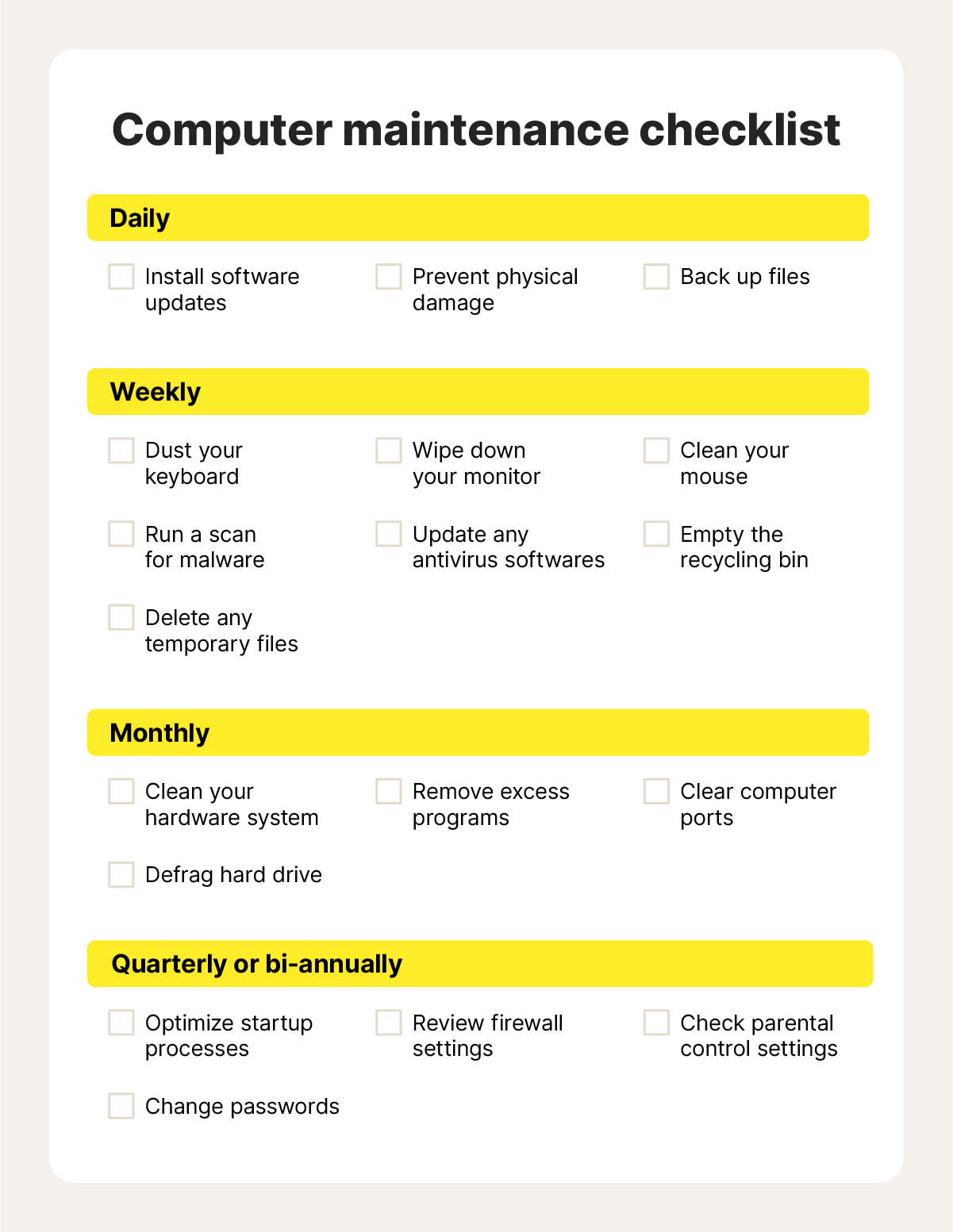
Credit: us.norton.com
Frequently Asked Questions
What Does System Maintenance Involve?
System maintenance includes updating software, fixing bugs, optimizing performance, and ensuring security. It keeps systems running smoothly and prevents failures.
Why Is System Maintenance Important?
System maintenance prevents crashes, improves speed, protects data, and extends hardware life. Regular upkeep avoids costly downtime and security risks.
How Often Should System Maintenance Be Performed?
System maintenance should be done regularly, typically weekly or monthly. Frequency depends on system use, complexity, and organizational needs.
What Are Common Types Of System Maintenance?
Common types include corrective, adaptive, perfective, and preventive maintenance. Each type addresses different system needs and improvements.
Conclusion
System maintenance keeps your devices and software running smoothly. It helps prevent problems before they start. Regular checks improve performance and security. This saves time and avoids costly repairs. Everyone who uses technology benefits from simple upkeep. Remember, a little care goes a long way.
Stay proactive to keep systems healthy and fast. Maintenance is not hard but very important. Keep your devices updated and safe every day.