Are Ultrawide Monitors Good for Watching Movies?
You've probably seen those super-wide monitors at a friend's desk or in a YouTube setup video. They look incredible for gaming and multitasking. But is ultrawide monitor good for watching movies?
The answer isn't a simple yes or no. It hinges on one thing most buyers overlook: the shape of the content you actually watch.
Most films are shot in a cinematic aspect ratio wider than your screen, while TV shows and streaming hits are shaped differently. That mismatch creates black bars, and where those bars appear changes everything. Let's break down exactly what happens before you spend your money.

Image source: Web (Bing) / robots.net (Web image (fair-use with source credit))
The Real Problem With Ultrawide Monitors and Movies
The core issue is a shape mismatch. An ultrawide monitor has a 21:9 aspect ratio. Most Hollywood films are shot in 2.35:1 or 2.39:1, which is close but not identical.
The vast majority of streaming content, from Netflix originals to YouTube, is 16:9. That's the same shape as a standard TV. When you force a 16:9 image onto a 21:9 screen, you get black bars on the sides.
That's called pillarboxing. It shrinks the movie you're trying to enjoy.
This isn't a minor quirk. It's the daily reality of using an ultrawide as a movie screen. You'll either watch a smaller image surrounded by black, or you'll stretch and crop the picture.
Neither option gives you the full-screen cinematic feel you probably imagined.
Quick Answer: It Depends on What You Watch
An ultrawide monitor is good for watching movies if you mostly watch cinematic 2.35:1 films. Those fill the screen edge to edge with almost no black bars. If you watch a lot of 16:9 TV shows, sports, or streaming content, you'll see black bars on the sides.
The experience is worse than a standard 16:9 screen for that content. Your viewing habits decide whether it's a great choice or a compromise.
How Aspect Ratios Actually Work (And Why It Matters)
Aspect ratio is just the shape of the image. It's expressed as a comparison of width to height. A 16:9 screen is 16 units wide for every 9 units tall.
A 21:9 ultrawide is 21 units wide for every 9 units tall. That extra width is what gives you the immersive feel. But the content has to match that shape to use the whole screen.
Cinema has used various widescreen formats for decades. The modern standard for big-budget films is around 2.39:1, often called Anamorphic Widescreen. That's slightly wider than a 21:9 monitor's 2.33:1.
You'll still get thin black bars top and bottom on a 21:9 screen, but they're minimal. For 16:9 content, the math is brutal. A 16:9 image on a 21:9 screen leaves roughly 25% of the panel as black bars on the sides.
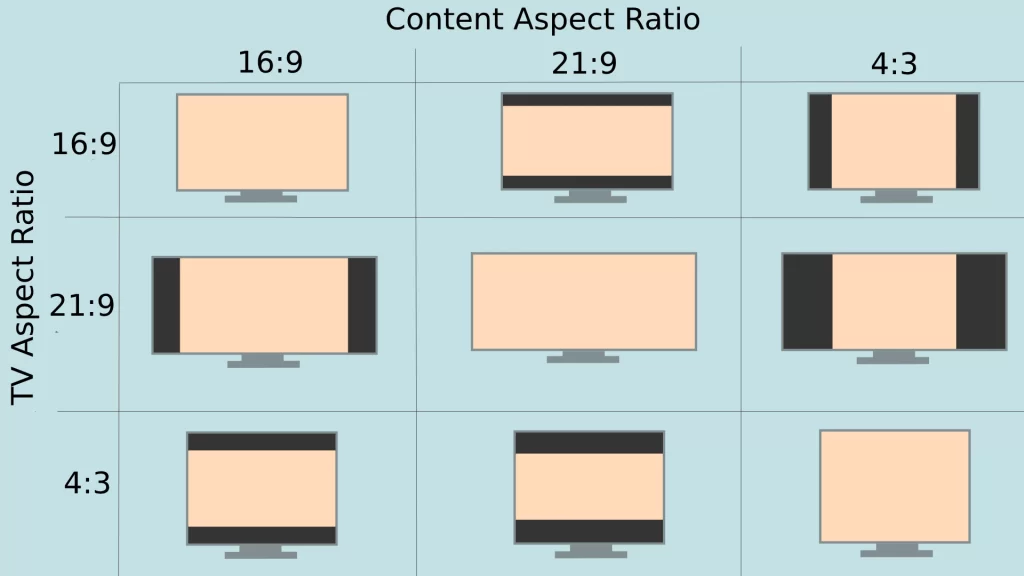
Image source: Web (Bing) / tab-tv.com (Web image (fair-use with source credit))
The 21:9 Sweet Spot for Cinema
When you play a 2.35:1 film on a 21:9 monitor, the image stretches almost perfectly from edge to edge. The thin letterbox bars top and bottom are barely noticeable. This is the scenario where an ultrawide shines.
The film fills your peripheral vision. It feels like a private cinema. If your movie library is full of Blu-ray rips of epic films, you'll love this.
The 16:9 Problem You'll Face Daily
Now take that same monitor and open Netflix. Most Netflix originals are 16:9. The movie will appear as a rectangle in the center of your screen, with thick black columns on the left and right.
The image height is the same as a 27-inch 16:9 monitor, but you're using a 34-inch panel to display it. You paid for all that screen real estate and you're not using it. Some media players can zoom in to fill the width, but that crops the top and bottom of the picture.
You lose part of the frame.
What Happens When You Play Different Content on an Ultrawide
Not all content behaves the same. The aspect ratio of what you're watching dictates the experience. Here's a breakdown of the most common scenarios.
2.35:1 Films — The Perfect Fit
Big-budget action films, sci-fi epics, and most cinema releases use this ratio. On a 21:9 ultrawide, the image fills the screen horizontally. You might see thin black bars top and bottom, but they're minimal.
The immersion is excellent. This is the content that makes an ultrawide monitor feel like a home theater replacement.
16:9 Shows and Streaming — The Black Bar Reality
Sitcoms, dramas, YouTube videos, and most streaming series are 16:9. On an ultrawide, you'll get pillarboxing. The image will be centered with black bars on both sides.
The picture quality isn't degraded, but the screen feels wasted. If you watch a lot of this content, a standard 16:9 monitor or a TV is a better fit. You could use the extra screen space for other apps while the movie plays in a window, but that's a different use case.
4:3 and Older Content — The Worst Case
Classic films, old TV shows, and some streaming archives use the 4:3 ratio. That's almost square. On an ultrawide, the black bars on the sides are enormous.
The image becomes a tiny box in the middle of a vast black field. It's the least appealing way to watch older content. A smaller 16:9 screen handles 4:3 better because the bars are less extreme.
Variable Aspect Ratio Films — The Constant Resizing
Some directors, like Christopher Nolan and Quentin Tarantino, use different aspect ratios within a single film. An IMAX sequence might expand to fill a 16:9 screen, then cut back to 2.39:1 for dialogue scenes. On an ultrawide, this causes the image size to jump around.
The black bars grow and shrink. It can be distracting. A 16:9 screen handles variable ratios more consistently because the width stays fixed.
The Hidden Trade-Offs Nobody Talks About
Beyond aspect ratio, there are physical and performance factors that affect movie watching. These are the details that spec sheets don't emphasize.
Screen Height Is Smaller Than You Think
A 34-inch ultrawide monitor has the same screen height as a 27-inch 16:9 monitor. That's about 13.4 inches tall. A 43-inch 4K TV is over 21 inches tall.
If you're sitting close to a desk, the height difference is noticeable. The image feels less imposing. For a cinematic feel, height matters as much as width.
You can calculate this yourself: a 34-inch 21:9 panel has a height of roughly 13.4 inches, while a 32-inch 16:9 panel is about 15.7 inches tall. That's a significant drop.
HDR and Brightness Often Disappoint
Many ultrawide monitors advertise HDR, but the implementation is often weak. True HDR requires high peak brightness, local dimming, and wide color gamut. Most ultrawides hit 300 to 400 nits of brightness and lack full-array local dimming.
The result is a washed-out HDR image that looks worse than a good SDR signal. A mid-range TV with a VA panel and decent local dimming will deliver a far better HDR movie experience. If HDR is a priority, check reviews for actual HDR performance, not just the HDR10 label.
Built-in Speakers Are Basically Useless
Almost every ultrawide monitor has built-in speakers. They're small, rear-firing, and tinny. Movie dialogue sounds flat, and there's zero bass.
You'll want external speakers or headphones. A pair of bookshelf speakers or a soundbar will transform the experience. Factor that into your budget.
Some monitors have better audio than others, but none compete with even a basic TV speaker.
Curved vs. Flat for Movie Watching
Most ultrawides are curved. The curve is meant to keep the edges equidistant from your eyes. For movies, a curve can enhance immersion if you sit close.
But it can also distort straight lines in the frame, especially in wide establishing shots. A flat ultrawide is rarer but avoids that distortion. If you watch a lot of content with horizontal lines, like cityscapes, a flat panel might be preferable.
The curve strength, measured in radius (like 1000R or 1500R), also matters. A tighter curve (lower number) wraps around you more aggressively.
When an Ultrawide Is Actually Great for Movies
An ultrawide monitor excels for movies when your viewing habits align with its strengths. If you primarily watch cinematic 2.35:1 films, the screen fills edge to edge with minimal black bars. The immersion at desk distance is remarkable.
Your peripheral vision gets engaged in a way that a standard monitor can't match.
The format also shines when you multitask. You can run a movie in a window while browsing, working, or monitoring a stream. Picture-by-Picture mode lets you connect two sources simultaneously.
A laptop and a media player, for example, can share the screen. This flexibility is something a standard TV can't offer.
OLED ultrawides are particularly compelling for movie nights. The infinite contrast and perfect blacks of OLED technology translate beautifully to dark room viewing. Colors pop, and shadow detail is excellent.
If you watch in a dim room and prioritize film content, an OLED ultrawide can rival a dedicated TV for the cinematic experience.
When You Should Skip the Ultrawide for Movies
You should avoid an ultrawide for movies if your diet consists mainly of 16:9 streaming content. Netflix, Disney+, and most YouTube programming will leave you with black bars on the sides. The image will feel smaller than on a standard monitor.
You're paying for screen real estate you can't use.
Skip the ultrawide if screen height matters to you. A 34-inch ultrawide is only about 13.4 inches tall. That's significantly shorter than a 32-inch 16:9 monitor or any decent TV.
For a cinematic feel, vertical size contributes heavily to the sense of scale. A shorter image feels less imposing.
Also skip it if HDR performance is a priority. Most ultrawides deliver mediocre HDR with low peak brightness and no local dimming. A mid-range TV with a VA panel will give you a far more impactful HDR experience.
If you want the full cinematic treatment with bright highlights and deep blacks, a TV is the better investment.
The Decision Flow: Should You Buy an Ultrawide for Movies?
Step 1: Check Your Most-Watched Content
Look at what you actually watch. If over 70% of your viewing is cinematic films in 2.35:1 or wider, an ultrawide is a strong choice. If most of your time goes to 16:9 series, sports, or YouTube, you'll be fighting black bars daily.
Be honest about your habits. Marketing materials show epic films filling the screen, but your actual queue might look very different.
Step 2: Consider Your Viewing Distance
Ultrawides are designed for desk viewing, typically 2 to 3 feet away. At that distance, the curve and width create immersion. If you sit farther back, like 6 to 10 feet from a TV, an ultrawide won't fill your field of view effectively.
You'd need a massive screen or a projector for that distance. Your seating position determines whether the format works.
Step 3: Decide What Else You'll Use It For
If the monitor is purely for movies, a TV or projector is usually better value. If you also work, game, or multitask, an ultrawide pulls double duty. The productivity benefits can justify the movie compromises.
Many buyers find that the versatility outweighs the aspect ratio limitations. Think about your full workflow, not just movie nights.
Better Alternatives If Movies Are Your Priority
A Large 4K OLED TV
A 42-inch or 48-inch OLED TV delivers superior HDR, better built-in speakers, and a larger image. The 16:9 shape matches streaming content perfectly. OLED panels from LG and Samsung offer exceptional contrast and color.
If you watch mostly 16:9 content and want the best picture quality, a TV is the clear winner. You can find excellent options by researching the best month to buy a TV for deals.
A 32" 4K 16:9 Monitor
A 32-inch 4K monitor gives you sharp 16:9 content with no aspect ratio headaches. The pixel density is high enough for crisp text and video. It's a simpler, more compatible choice for mixed use.
You won't get the immersive width, but you also won't deal with black bars or compatibility issues.
A Projector Setup
For a true cinematic experience at home, a projector can fill a wall with a massive image. Modern projectors offer 4K resolution and decent brightness. The setup requires a dark room and some installation effort, but the scale is unmatched.
If you have a dedicated viewing space, a projector outclasses any monitor for pure movie impact.
Common Mistakes People Make When Buying an Ultrawide for Movies
The biggest mistake is ignoring the aspect ratio mismatch. Buyers see the wide screen and assume all content will fill it. In reality, most daily content won't.
They end up with a expensive monitor that shows black bars more often than not.
Another error is expecting good HDR from an ultrawide. The HDR label on a monitor is often misleading. Without high brightness and local dimming, HDR looks washed out.
Buyers who prioritize HDR should look at TVs with full-array local dimming or OLED panels.
People also forget about audio. Built-in monitor speakers are almost always terrible. Budget for external speakers or a soundbar.
The visual experience is only half the equation. Poor audio undermines even the best picture.
Finally, many buyers choose based on specs alone. A high refresh rate and fast response time matter for gaming, not movies. For film viewing, contrast ratio, color accuracy, and panel type are far more important.
A 60Hz OLED ultrawide will outperform a 165Hz IPS panel for movie quality every time.
Final Verdict: Who Should Actually Do This
An ultrawide monitor is the right choice for movie watching if you're a film enthusiast who primarily watches cinematic 2.35:1 content. The edge-to-edge image creates a genuinely immersive experience at desk distance. If you also value productivity and multitasking, the versatility makes the investment worthwhile.
It's the wrong choice if you mainly watch 16:9 streaming shows, sports, or YouTube. The black bars will frustrate you daily. You'll get a better movie experience from a quality 16:9 TV or a projector for the same money.
Be honest about your actual viewing habits, not the idealized version where you only watch epic cinema.
The middle ground is where most people land. If you watch a mix of films and series, and you also work or game on the same screen, an ultrawide is a solid compromise. Just go in with realistic expectations about the black bar situation.
Frequently Asked Questions
Do movies look good on an ultrawide monitor?
Movies shot in 2.35:1 or wider look excellent, filling the screen edge to edge. Content in 16:9 will have black bars on the sides. The picture quality itself isn't degraded, but the unused screen space can be annoying.
Is a 34-inch ultrawide big enough for movies?
A 34-inch ultrawide has the same height as a 27-inch standard monitor. That's about 13.4 inches tall. For a cinematic feel, it's adequate at desk distance but less imposing than a 40-inch or larger TV.
Your viewing distance matters more than the diagonal measurement.
Can I watch Netflix on an ultrawide without black bars?
Most Netflix content is 16:9, so you'll get black bars on the sides of a 21:9 screen. Some Netflix originals are shot in wider ratios and will fill more of the screen. There's no way to avoid pillarboxing for 16:9 content without cropping or stretching the image.
Is an ultrawide better than a TV for movies?
Not necessarily. A TV offers larger screen size, better HDR performance, and speakers that don't sound like a tin can. An ultrawide wins on desk immersion and multitasking flexibility.
The better choice depends on your space, viewing distance, and how you use the screen.
What size monitor is best for watching movies?
For a desk setup, a 34-inch ultrawide works well for cinematic films. For 16:9 content, a 32-inch 16:9 monitor or a 43-inch TV provides a larger image without black bar compromises. Screen height is the key measurement for perceived size.
Should I get a curved or flat ultrawide for movies?
A curved screen enhances immersion at close distances but can distort straight lines in wide shots. A flat panel avoids distortion and is better if you also do productivity work. For pure movie watching at desk distance, most people prefer the curve.