How to Detect Faulty Electronic Components: Easy Steps for Success
How to Detect Faulty Electronic Components:
Have you ever faced a device that just stopped working, and you didn’t know why? Faulty electronic components are often the hidden cause.
If you want to fix your gadgets or avoid costly repairs, learning how to detect these faulty parts is essential. You’ll discover simple, effective ways to spot problems before they get worse. By the end, you’ll feel confident in identifying issues and saving both time and money.
Keep reading to unlock the secrets of detecting faulty electronic components with ease.

Credit: www.youtube.com
Common Signs Of Faulty Components
Detecting faulty electronic components early saves time and money. Components often show clear signs before they fail completely. Recognizing these signs helps prevent further damage.
Visual Indicators
Look closely for physical damage on parts. Common issues include:
- Burn marks or discoloration on circuit boards
- Cracked or broken components
- Leaking or swollen capacitors
- Corroded or rusted connectors
- Loose or bent pins
These visible signs often indicate internal failure or overheating.
Performance Issues
Faulty components affect device function. Watch for:
- Slow or unresponsive operation
- Frequent crashes or errors
- Random shutdowns or restarts
- Inconsistent or weak signal output
- Overheating or excessive power use
Such problems usually trace back to failing parts inside.
Unusual Noises Or Smells
Listen and smell for abnormal signs. Faulty parts may cause:
- Buzzing or clicking sounds
- Burning or chemical odors
- Hissing or popping noises
These clues often point to electrical shorts or overheating components.
Tools Needed For Detection
Detecting faulty electronic components requires the right tools to identify issues quickly and accurately. Without proper equipment, you may waste time guessing or replace parts unnecessarily. Having a reliable set of tools can make troubleshooting straightforward and efficient.
Multimeter Basics
A multimeter is your most essential tool for testing components like resistors, capacitors, and diodes. It measures voltage, current, and resistance, which helps you spot components that are out of spec.
Start by setting the multimeter to the correct mode for what you want to test. For instance, use resistance mode to check if a resistor is damaged or continuity mode to see if a wire or connection is broken. Learning to read the display correctly can save hours of frustration.
Oscilloscope Usage
An oscilloscope allows you to view the actual signals in a circuit, showing voltage changes over time. This is crucial when you need to see how a component behaves under real operating conditions.
You can spot irregular waveforms or noise that indicate faulty capacitors or transistors. If you’ve ever seen a distorted signal on your oscilloscope, you know how it instantly points to the problem area.
Thermal Camera Benefits
Thermal cameras reveal heat patterns on circuit boards, helping you find components that overheat or fail silently. Overheating parts often signal short circuits or excessive current draw.
Using a thermal camera, you can quickly scan a board and detect hot spots without touching it. This saves time and prevents accidental damage while troubleshooting complex electronics.
Step-by-step Testing Process
Testing electronic components requires a careful and systematic approach to identify faults accurately. Following a clear process helps you avoid damage to the components and ensures your diagnosis is reliable. The steps below guide you through essential checks that anyone can perform with basic tools and attention to detail.
Safety Precautions
Always start by disconnecting power from the circuit before testing. Handling live circuits can cause injury or damage your testing equipment.
Wear protective gear like insulated gloves and goggles if you’re unsure about the circuit’s condition. Keep your workspace clean and organized to prevent accidental shorts or component damage.
Component Isolation
Remove or isolate the component from the circuit. Testing a component while it’s connected can give false readings due to other parts influencing the results.
Use a soldering iron or desoldering pump carefully to avoid overheating the component, which could lead to further damage. If removal isn’t possible, try to disconnect at least one leg to isolate it.
Measuring Resistance And Continuity
Use a multimeter set to resistance or continuity mode to check if the component is open or shorted.
- For resistors, compare the reading to the color code value.
- For capacitors and inductors, expect a steady resistance or a brief continuity beep, respectively.
- Diodes should show low resistance in one direction and high resistance in the other.
Unexpected zero or infinite readings usually indicate a faulty component. Have you ever found a resistor that seemed fine visually but failed this test?
Checking Voltage And Current
Reapply power to the circuit and measure voltage across the component terminals. This reveals if the component is receiving correct voltage.
Measure current flow using your multimeter in series with the component. Abnormal current values often pinpoint faulty parts or wiring issues.
Be cautious not to exceed the multimeter’s current rating, as it can blow the fuse inside your device. Accurate measurements here can save you hours of troubleshooting.
Thermal Inspection
Components that heat up abnormally often indicate internal faults or overloading. Use a thermal camera or an infrared thermometer to detect hotspots.
Even touching the component carefully can help, but avoid burns or electric shock. Have you noticed how a tiny transistor can get hotter than expected, signaling trouble?
Look for discoloration or burnt smells, which are clear signs a component needs replacement. Thermal inspection adds a valuable layer to your testing process beyond electrical measurements.
Common Component Failures
Faulty electronic components are often the root cause of device failures. Knowing the common issues with these parts can save you time and frustration when troubleshooting. Recognizing the symptoms early helps you replace or repair components before they cause bigger problems.
Resistors And Capacitors
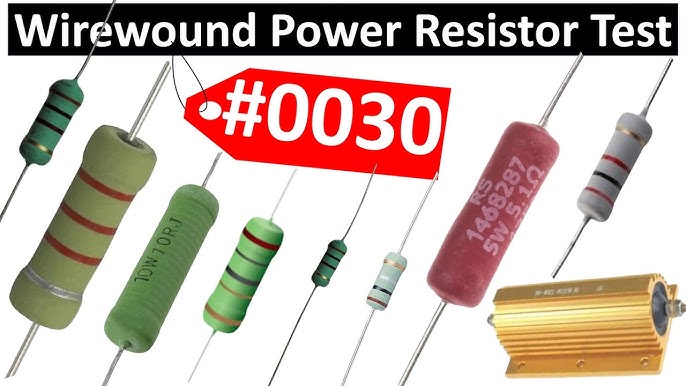
Resistors usually fail by drifting out of their specified resistance range. This can cause circuits to behave unpredictably or not work at all. Look for signs like burnt marks, discoloration, or a resistor that feels hotter than usual.
Capacitors often fail due to aging or voltage spikes. A swollen or leaking capacitor is a clear sign of trouble. You might notice your device not powering on, or it resets randomly because the capacitor can’t store charge properly.
Transistors And Diodes
Transistors can fail by short-circuiting or losing gain, which affects signal amplification. If you see unusual heat or smell burnt components, the transistor might be damaged. Diodes fail by shorting or opening, disrupting current flow and causing circuit malfunction.
Testing these components with a multimeter is a quick way to identify faults. Do you know how to check for forward voltage drop in a diode? This simple test can save you from replacing perfectly good parts.
Integrated Circuits
Integrated circuits (ICs) are complex, but they often fail from overheating or electrical overstress. Symptoms include no response, erratic behavior, or complete device shutdown. Physical damage like cracked chips or burnt spots can also indicate a faulty IC.
Sometimes the issue lies in the surrounding circuitry, not the IC itself. Have you checked the power supply and input signals before blaming the chip? This approach can prevent unnecessary replacements and wasted money.
Tips For Accurate Diagnosis
Accurately diagnosing faulty electronic components demands a sharp eye and the right resources. Skipping essential checks or relying on guesswork can lead you down the wrong path, wasting time and money. Use these practical tips to sharpen your diagnosis skills and avoid common pitfalls.
Cross-referencing With Schematics
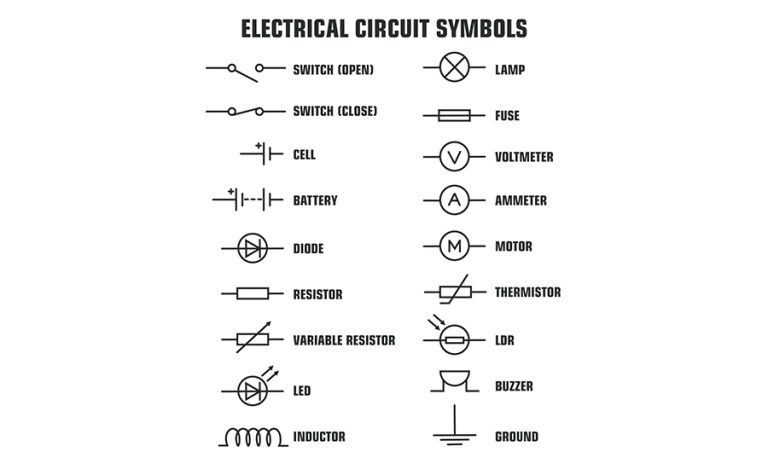
Schematics are your roadmap to understanding the circuit’s design. Always have the relevant schematic on hand when testing components. It helps you confirm where each part sits and how it connects to others, which can reveal if a component is out of place or behaving unusually.
Try comparing the actual voltage readings or signal outputs with those shown in the schematic. If the values differ significantly, you’ve likely found a point of failure. Have you noticed how a single wrong connection can make an entire circuit misbehave? Schematics help you catch those errors early.
Using Manufacturer Datasheets
Datasheets provide detailed specs for every component, including operating voltage, current ratings, and pin configurations. Refer to these documents to understand the limits and expected behavior of the parts you’re testing. Ignoring datasheets can lead to misinterpretation of test results.
For example, a capacitor might look fine visually but fail under specific voltage conditions outlined in its datasheet. Checking these specs ensures you don’t overlook subtle faults. Have you ever found a component that passed one test but failed another when you checked its datasheet? That’s why these sheets are essential tools.
Avoiding Common Mistakes
Many technicians rush through testing and overlook simple errors, like poor probe contact or incorrect meter settings. Take your time to double-check connections and use the right tools for the job. A small mistake can make a working component appear faulty.
Another frequent error is testing components out of circuit without considering surrounding parts that affect readings. Try to understand the context of each component within the circuit before drawing conclusions. What small detail could you have missed that might change your diagnosis?

Credit: www.youtube.com
Repair And Replacement Advice
Repairing faulty electronic components requires more than just swapping parts. You need the right guidance to ensure your fixes last and your devices run smoothly again. This section offers clear advice on selecting replacements, mastering soldering, and confirming your repairs work as expected.
Choosing Replacement Parts
Picking the correct replacement parts is crucial for a successful repair. Always match the specifications exactly—check voltage, current ratings, and package size to avoid compatibility issues.
Consider buying components from reputable suppliers to reduce the risk of counterfeit parts. Have you ever replaced a capacitor only to find the device still malfunctioned? Often, it’s because the new part wasn’t a proper match.
Proper Soldering Techniques
Good soldering can make or break your repair job. Use a clean, well-tinned soldering iron tip and apply heat just long enough to create a strong joint without damaging the component.
Keep your workspace organized, and avoid cold solder joints by heating both the pad and the lead simultaneously before applying solder. Remember, neat soldering isn’t just about aesthetics—it impacts electrical connectivity and durability.
Testing After Repair
Once you’ve replaced the component, testing is essential before reassembling everything. Use a multimeter or specialized testers to verify continuity, resistance, and proper operation of the repaired section.
Don’t rely solely on visual inspections; subtle faults can persist if you skip thorough testing. What measures do you take to ensure your repair truly fixed the problem?

Credit: www.youtube.com
Frequently Asked Questions
How Can I Identify Faulty Electronic Components?
To identify faulty electronic components, use a multimeter to check resistance, voltage, and continuity. Visual inspection for physical damage like burns or corrosion can also help. Testing in a controlled environment ensures accurate results. Anomalies in readings often indicate a faulty component needing replacement.
What Are The Signs Of A Bad Capacitor?
A bad capacitor may bulge, leak, or show burn marks. It could also emit unusual sounds or smells. If a device doesn’t power on or functions erratically, the capacitor might be failing. Testing with a multimeter can confirm if the capacitor holds the correct charge.
How Do I Test A Diode For Faults?
Testing a diode involves using a multimeter in diode mode. Connect the probes to the diode’s terminals. A good diode shows low resistance in one direction, high in the reverse. If it shows continuity in both directions or open circuit, it’s likely faulty and needs replacement.
Can A Faulty Resistor Cause Device Failure?
Yes, a faulty resistor can cause device failure by disrupting current flow. This could lead to overheating or insufficient voltage. Check for discoloration, burning, or irregular readings with a multimeter. Replacing the faulty resistor usually restores device functionality and prevents further damage.
Conclusion
Detecting faulty electronic components saves time and money. Start with a visual check for obvious damage. Use a multimeter to test resistance and continuity. Listen for unusual sounds or smells from devices. Regular testing helps prevent bigger problems later. Trust your tools and your senses together.
Keep practicing these steps to improve skill. Stay patient; accuracy grows with experience. Your devices will last longer and work better. Simple checks make a big difference every day.