How to Start Hobby Electronics: Easy Steps for Beginners Success
Are you fascinated by the blinking lights of circuit boards or the intricate dance of wires and components? Have you ever wondered how to bring your creative ideas to life through electronics?
If so, you’re in the right place. Starting a hobby in electronics can be both exciting and rewarding, offering endless possibilities for innovation and problem-solving. Imagine the thrill of building your own gadgets or fixing broken devices. In this guide, you’ll discover the essential steps to begin your journey into hobby electronics.
Whether you’re a complete novice or just looking to refresh your skills, this article will provide you with the knowledge and confidence you need to dive in. Keep reading to unlock the secrets of this fascinating world and start creating your own electronic masterpieces.
Choosing Your First Project
Choosing your first project in hobby electronics is a crucial step that shapes your learning experience and keeps your motivation high. Picking something too complex can lead to frustration, while a project that’s too simple might not hold your interest. The key is to find a balance that challenges you just enough and sparks your curiosity.
Simple Kits For Beginners
Starting with a simple electronics kit is a smart move. These kits come with all the parts you need and clear instructions to guide you through the process. They help you understand basic components like resistors, LEDs, and capacitors without overwhelming you.
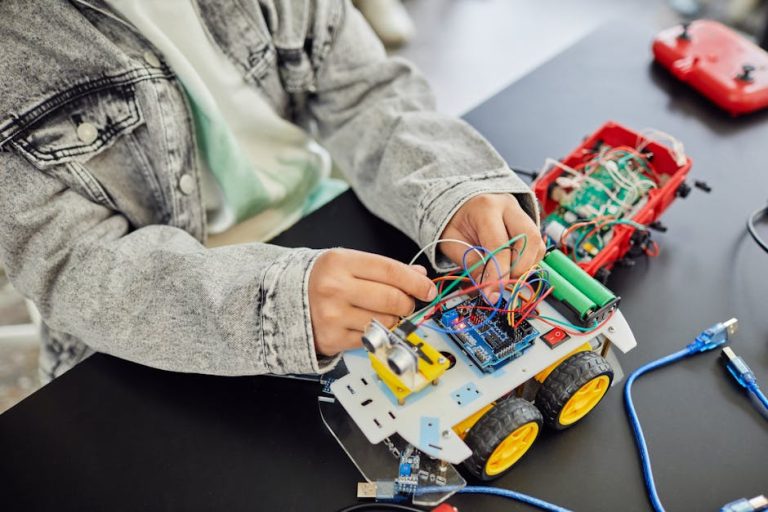
Brands like Arduino and Raspberry Pi offer beginner-friendly kits that introduce you to both hardware and software. Building a small LED flashlight or a basic buzzer circuit can give you a quick win and boost your confidence. Have you ever felt stuck trying to identify parts? Kits solve that by labeling everything clearly.
Project Ideas To Spark Interest
Your first project should connect to something you find exciting. Are you into music? Try making a simple synthesizer. Interested in home automation? Build a basic sensor that detects light or temperature. Linking electronics to your hobbies keeps you engaged and makes learning feel less like a chore.
Consider projects that solve small problems or create fun gadgets. A DIY night light or a door alarm can be both practical and entertaining. What everyday annoyance could you fix with a little electronics?
Balancing Challenge And Fun
It’s easy to get stuck in the trap of picking projects that are either too easy or too hard. Challenge yourself to learn something new but avoid frustration by breaking the project into smaller steps. This way, you celebrate small successes on the way to completing the entire build.
Remember, the goal is to enjoy the process. If you find yourself bored or overwhelmed, adjust the project scope. How do you know when a project is just right? When you’re curious to keep going but not ready to quit.
Essential Tools And Components
Starting with hobby electronics can feel overwhelming, but having the right tools and components makes all the difference. These essentials help you build circuits, troubleshoot issues, and bring your ideas to life. Knowing what to gather first saves time and frustration as you dive into your projects.
Basic Tools You Need
Every beginner should have a few core tools at their side. A good soldering iron is key for connecting components reliably. Pair it with solder wire and a stand to keep your workspace safe.
A multimeter helps you measure voltage, current, and resistance. It’s invaluable for testing circuits and finding problems quickly. Wire strippers and cutters make preparing wires neat and easy, avoiding damage to delicate parts.
Don’t overlook a breadboard for building and testing circuits without soldering. It lets you experiment freely and swap components as needed. A set of tweezers and small screwdrivers also come in handy for handling tiny parts.
Common Electronic Components
Start your collection with basic components found in most projects. Resistors control electrical flow and come in various values. Capacitors store and release energy, smoothing out power supply fluctuations.
Transistors amplify signals or act as switches, essential for many circuits. LEDs provide visual feedback and are easy to use for testing. Don’t forget wires and connectors to link everything together.
As you gain experience, you might add microcontrollers like Arduino or Raspberry Pi. These let you build smarter, programmable devices. But at first, focus on mastering simple components to build a solid foundation.
Where To Buy Supplies
Finding good sources for parts can be tricky but makes a huge difference. Online retailers like Digi-Key, Mouser, and SparkFun offer wide selections and detailed specs. They’re reliable and ship worldwide.
Local electronics stores can be great for quick needs and hands-on advice. You might find kits and starter bundles tailored to beginners. Sometimes, flea markets or surplus stores offer unique deals on components.
Have you checked community groups or maker spaces nearby? They often share parts and tools, which can help you save money and connect with others. Gathering supplies becomes easier when you know where to look and who to ask.
Learning The Basics
Starting hobby electronics begins with learning the basics. Understanding simple ideas builds a strong foundation. This knowledge helps you feel confident and ready to create projects.
Reading Circuit Diagrams
Circuit diagrams are maps for electronic projects. They show how parts connect and work together. Learning to read these diagrams makes building easier.
Focus on common symbols like resistors, capacitors, and batteries. Each symbol has a meaning and a role. Practice by following simple circuit diagrams to see how they flow.
Understanding Key Concepts
Basic concepts include voltage, current, and resistance. Voltage is the power that moves electrons. Current is the flow of electrons through a wire. Resistance slows down the current.
Knowing these helps in choosing the right parts. Learn about series and parallel circuits. These explain how parts connect and share power.
Using Online Resources
Many websites and videos teach electronics for beginners. Use tutorials to see step-by-step instructions. Forums and groups offer help from other hobbyists.
Look for beginner-friendly guides with pictures and simple words. Online simulators allow safe practice without real parts. This saves money and avoids mistakes.
Building Your First Circuit
Building your first circuit is where theory meets practice. It’s an exciting moment to see components come alive with power and purpose. You’ll gain confidence and a deeper understanding of how electronics work by carefully assembling your own setup.
Step-by-step Assembly Tips
Start by gathering all your components and tools. Keep your workspace tidy to avoid losing tiny parts like resistors or capacitors.
- Read the circuit diagram carefully before touching anything.
- Place components on a breadboard or PCB in the order the schematic suggests.
- Use a multimeter to check component values if you’re unsure.
- Insert components firmly but gently—avoid bending leads excessively.
- Solder connections securely if using a PCB, but don’t overheat parts.
Have you ever tried assembling a circuit only to realize a simple mistake held everything back? Taking your time and double-checking each step prevents that frustration.
Troubleshooting Common Issues
When your circuit doesn’t work as expected, don’t get discouraged. Most beginners face common problems that are easy to fix once identified.
- Check for loose connections or missing wires first.
- Verify component orientation—diodes and transistors only work one way.
- Look for solder bridges that might cause shorts.
- Confirm power supply voltage matches your circuit’s needs.
- Inspect for damaged components that could break the flow.
Have you noticed how a single misplaced wire can stop a circuit from working? Careful inspection often reveals the culprit.
Testing And Measuring
Before powering your circuit fully, test it step-by-step. This cautious approach protects components and helps isolate issues early.
- Use a multimeter to check voltage at various points in the circuit.
- Measure current to ensure it stays within safe limits.
- Test continuity to confirm connections are solid.
- Use an oscilloscope if you want to see signal waveforms in real time.
Do you know the satisfaction of seeing your circuit output the exact voltage you calculated? Testing is where you confirm your work matches your design.
Expanding Your Skills
Expanding your skills in hobby electronics opens new doors. It helps you build more complex and exciting projects. Developing new abilities boosts your confidence and creativity. Dive deeper into the world of electronics with focused learning and practice.
Exploring Microcontrollers
Microcontrollers are small computers on a chip. They control many electronic devices and gadgets. Start with popular boards like Arduino or Raspberry Pi. These platforms have many tutorials and projects for beginners. Experiment with sensors, motors, and lights. Learning microcontrollers enhances your understanding of how devices work.
Programming Basics For Electronics
Programming lets you tell microcontrollers what to do. Simple coding languages like C or Python are common. Begin with basic commands and control structures. Write code to read sensors and control outputs. Practice writing short programs to solve problems. Programming skills make your electronics projects smarter and interactive.
Joining Maker Communities
Maker communities connect you with fellow hobbyists. You find support, ideas, and project inspiration there. Join online forums, social media groups, or local clubs. Share your projects and ask questions freely. Collaborate on group projects or challenges. Being part of a community speeds up learning and keeps motivation high.
Safety Tips For Hobby Electronics
Safety is crucial when you dive into hobby electronics. Handling tiny parts and electrical currents without caution can lead to damage or injury. Paying attention to safety tips not only protects you but also helps your projects succeed without costly mistakes.
Handling Components Safely
Always handle components with clean, dry hands to avoid corrosion or short circuits. Use anti-static wrist straps or mats when working with sensitive parts like microchips to prevent static electricity from damaging them.
Store components in labeled containers to keep track and prevent accidental mixing. Have you ever grabbed the wrong resistor value because they were all jumbled together? Organizing saves time and frustration.
Working With Power Sources
Never connect a power source without double-checking your circuit. A small wiring mistake can cause sparks or burn out components instantly. Always use a multimeter to verify voltage and polarity before powering up.
Keep power supplies on a stable surface and away from water or conductive materials. Disconnect power when you are not actively testing your circuit to avoid accidental shocks or shorts.
Preventing Damage And Injuries
Wear safety glasses when soldering or cutting wires to protect your eyes from splashes or flying debris. Use tools properly and keep your workspace tidy to avoid accidental cuts or burns.
Are you sure your soldering iron has cooled down before putting it away? A small lapse in caution can cause burns or fires. Keep a fire extinguisher nearby and know how to use it just in case.
Frequently Asked Questions
What Basic Tools Do I Need To Start Hobby Electronics?
To start hobby electronics, get a soldering iron, multimeter, breadboard, jumper wires, and basic components. These tools help you build and test circuits safely and effectively.
How Can Beginners Learn Electronics Quickly?
Beginners can learn electronics quickly by following online tutorials, joining electronics forums, and practicing simple projects regularly. Hands-on experience is key to understanding concepts.
What Are The Best Starter Projects For Hobby Electronics?
The best starter projects include LED blinkers, simple alarms, and basic sensors. These projects teach fundamental skills and boost confidence in circuit building.
Is Programming Necessary For Hobby Electronics?
Programming is often necessary, especially for microcontroller projects like Arduino. Learning basic coding enhances your ability to create interactive and advanced electronic devices.
Conclusion
Starting hobby electronics opens a world of creativity and learning. Small steps build your skills and confidence fast. Use simple tools and parts to try your ideas. Mistakes happen; they help you improve. Enjoy the process and stay curious every day.
Share your projects with friends or online groups. Keep experimenting, and watch your knowledge grow. This hobby can bring fun and new challenges. Begin now, and see where electronics take you.