What are the Main Components of Electronic Data Processing: Key Elements Explained
Have you ever wondered how vast amounts of information get organized and turned into useful data so quickly? Electronic Data Processing (EDP) is the secret behind this magic.
Understanding the main components of EDP can help you see how computers handle data efficiently and accurately. You’ll discover the key parts that make EDP work smoothly—and why each one matters to your everyday digital experience. Keep reading, and you’ll unlock the simple yet powerful elements that drive the technology you rely on every day.
Data Input
Data input is the foundation of electronic data processing. Without accurate and timely data entry, the entire system can falter. You rely on this step to feed information into computers, making it essential to understand how data reaches the processing stage.
Methods Of Data Collection
Collecting data can happen in many ways, depending on the nature of your project. You might gather data through manual forms, sensors, or online surveys.
- Manual Collection:Using paper forms or checklists that are later digitized.
- Automated Collection:Devices like barcode scanners or RFID tags capture data instantly and reduce errors.
- Online Methods:Web forms and apps allow users to input data directly, speeding up the process.
Choosing the right method affects the accuracy and speed of your data processing. Have you considered how the source of your data impacts your overall results?
Data Entry Techniques
Once data is collected, it must be entered into the system correctly. This step can be manual or automated, depending on your resources and accuracy requirements.
- Manual Entry:Typing data into software; suitable for small volumes but prone to human error.
- Optical Character Recognition (OCR):Converts scanned documents into editable text, speeding up entry and reducing mistakes.
- Direct Data Capture:Devices like magnetic stripe readers or touchscreens input data instantly into systems.
Have you noticed how using automated tools can save time and reduce errors in your workflow? Choosing the right technique can make a big difference in your data quality and processing speed.
Data Processing
Data processing is the heart of electronic data processing systems. It involves collecting raw data and transforming it into meaningful information. This process helps businesses and organizations make decisions based on accurate data.
Data processing can take different forms depending on the needs of the task. Some methods handle large amounts of data at once, while others work instantly with new data. Cloud technology also plays a big role in modern data processing.
Batch Processing
Batch processing collects data over time and processes it all at once. This method is efficient for handling large volumes of data. It works well for tasks like payroll or billing, where information is gathered and processed in groups.
Batch processing saves time and system resources by running jobs during off-peak hours. It is less suitable when immediate results are needed.
Real-time Processing
Real-time processing handles data instantly as it arrives. This method is essential for applications that require immediate action. Examples include online banking, traffic control, and live monitoring systems.
Real-time processing ensures fast responses and up-to-date information. It needs powerful systems to process data quickly without delays.
Cloud-based Processing
Cloud-based processing uses online servers to process data remotely. It offers flexibility and scalability for businesses of all sizes. Users can access data and computing power from anywhere with internet access.
Cloud processing reduces the need for physical hardware and lowers costs. It also supports collaboration by allowing multiple users to work on data simultaneously.
Data Output
Data output is a vital part of electronic data processing. It involves converting processed data into a usable form. This step allows users to understand and use the information effectively. The output can be in many forms, depending on the needs of the business or system.
Output Formats
Data output appears in several formats. Common formats include:
- Reports:Structured documents showing summarized data.
- Charts and Graphs:Visual representations for quick analysis.
- Lists:Detailed itemized information.
- Alerts and Notifications:Messages to inform users about important changes.
- Electronic Files:Data saved in formats like CSV, PDF, or XML for sharing or storage.
Choosing the right format depends on how the data will be used.
Distribution Channels
Once data is output, it must reach the right users. Distribution happens through various channels, such as:
- Printers:Producing hard copies for physical use.
- Email:Sending digital reports directly to recipients.
- Online Dashboards:Real-time access through web interfaces.
- File Transfers:Sharing data via cloud services or FTP.
- Mobile Devices:Delivering data through apps or notifications on phones and tablets.
Effective distribution ensures timely and easy access to information.
Data Storage
Data storage is a vital part of electronic data processing. It holds all information safely for easy access and use. Proper storage ensures data is organized, secure, and ready to support business processes. It helps companies handle large amounts of data effectively.
Database Management Systems
Database Management Systems (DBMS) organize data into structured forms. They allow users to store, retrieve, and manage data easily. DBMS supports multiple users and controls data access. It keeps data consistent and reduces errors. Popular DBMS include MySQL, Oracle, and Microsoft SQL Server. These systems help businesses maintain accurate and up-to-date information.
Data Warehousing
Data warehousing collects data from different sources into one place. It stores large volumes of historical data for analysis and reporting. Data warehouses support decision-making by providing a clear view of business trends. They use processes like data cleaning and integration to improve data quality. Companies rely on data warehousing to gain insights and improve strategies.
Data Security
Data security is a vital part of electronic data processing. It protects sensitive information from theft, loss, or damage. Strong data security helps maintain trust and ensures smooth business operations. It stops unauthorized access and keeps data safe from cyber threats.
Encryption Methods
Encryption converts data into a secret code. This code is unreadable without the correct key. It protects data during storage and transmission. Common types include:
- Symmetric encryption:Uses one key for both encrypting and decrypting data.
- Asymmetric encryption:Uses a pair of keys – one public and one private.
- Hashing:Converts data into a fixed-size string, used for verifying data integrity.
Encryption keeps data private and safe from hackers. It is essential for online transactions and confidential information.
Access Control
Access control limits who can see or use data. It ensures only authorized users have permission. Types include:
- Role-based access control (RBAC):Users get access based on their job role.
- Discretionary access control (DAC):Data owners decide who can access their data.
- Mandatory access control (MAC):System strictly enforces access policies.
Access control prevents data leaks and misuse. It tracks user activity and enforces security rules.
Credit: www.jaroeducation.com
Data Backup And Recovery
Data Backup and Recovery is a critical part of electronic data processing that ensures your valuable information stays safe and accessible. Losing data can disrupt your operations, damage your reputation, and cost you time and money. That’s why having a solid backup and recovery plan is essential to protect your digital assets.
Backup Strategies
Choosing the right backup strategy can make all the difference. You want a method that fits your data size, frequency of changes, and how quickly you need to restore information.
- Full Backup:Copies all data every time. It’s reliable but time-consuming and requires more storage.
- Incremental Backup:Only backs up data changed since the last backup. This saves space and time but can complicate recovery.
- Differential Backup:Backs up all changes since the last full backup. It strikes a balance between full and incremental methods.
Have you evaluated how often your data changes? This helps decide the frequency and type of backups you need. Also, consider storing backups offsite or in the cloud for extra security.
Recovery Procedures
Backing up data is just half the battle. Knowing how to recover it quickly and accurately when something goes wrong is crucial.
- Test Your Backups:Regularly check if your backups can be restored. A backup that can’t be recovered is useless.
- Prioritize Critical Data:Identify which data needs urgent recovery to minimize downtime.
- Document Steps:Create clear, easy-to-follow recovery instructions for your team.
Imagine losing a client database just before a big presentation—how fast could you recover? Testing your recovery process ensures you won’t be caught off guard. What recovery plan do you have ready today?
Data Integrity
Data integrity is a key part of electronic data processing. It means keeping data accurate, consistent, and reliable over time. Good data integrity ensures that information is not lost, changed, or corrupted. Systems rely on this to make correct decisions and maintain trust.
Maintaining data integrity involves several processes and tools. These processes check data at every stage, from entry to storage and use. They help catch errors early and fix them quickly. This reduces risks and improves system performance.
Validation Techniques
Validation techniques check data for correctness before processing. They confirm that data meets rules and standards. For example, numbers must be within a certain range. Dates must follow a valid format.
- Format checks: Verify data matches a set pattern.
- Range checks: Ensure numbers fall within limits.
- Consistency checks: Compare data fields for logical sense.
- Completeness checks: Confirm no required data is missing.
Using these checks stops bad data from entering the system. It keeps the database clean and useful.
Error Detection And Correction
Error detection finds problems in data after entry or during transmission. Correction fixes these errors to restore accuracy. Techniques include:
- Parity checks: Detect errors in binary data.
- Checksums: Calculate sums to verify data integrity.
- Error-correcting codes: Automatically fix small errors.
- Audit trails: Track changes to locate mistakes.
These methods catch errors fast and reduce data loss. They support smooth electronic data processing and reliable results.
Credit: goglobalways.com
Human Resources
Human resources play a crucial role in electronic data processing (EDP). Without skilled and motivated people, even the most advanced systems can’t function effectively. Your team is the backbone that manages, operates, and improves the entire data processing cycle.
Roles And Responsibilities
In EDP, human resources cover a wide range of roles, from system analysts to data entry operators. Each person has specific duties that keep the system running smoothly.
- System Analysts:They study and design the data processing system to meet business needs.
- Programmers:These professionals write and maintain the software that processes data.
- Data Entry Operators:They input data accurately, ensuring quality and consistency.
- Database Administrators:They manage data storage, security, and retrieval.
- IT Support Staff:Responsible for troubleshooting and maintaining hardware and software.
Each role demands attention to detail and coordination with others. Have you ever considered how missing one link in this chain could disrupt an entire data process?
Training And Skill Development
Technology changes fast, and so should your skills. Continuous training helps your team stay up-to-date with new tools and techniques.
- Regular workshops on the latest software updates keep everyone current.
- Hands-on training sessions improve practical knowledge beyond theory.
- Soft skills like problem-solving and communication are equally important.
Investing in training reduces errors and boosts efficiency. Think about the last time you struggled with a new system—could training have made it easier?
Technology Infrastructure
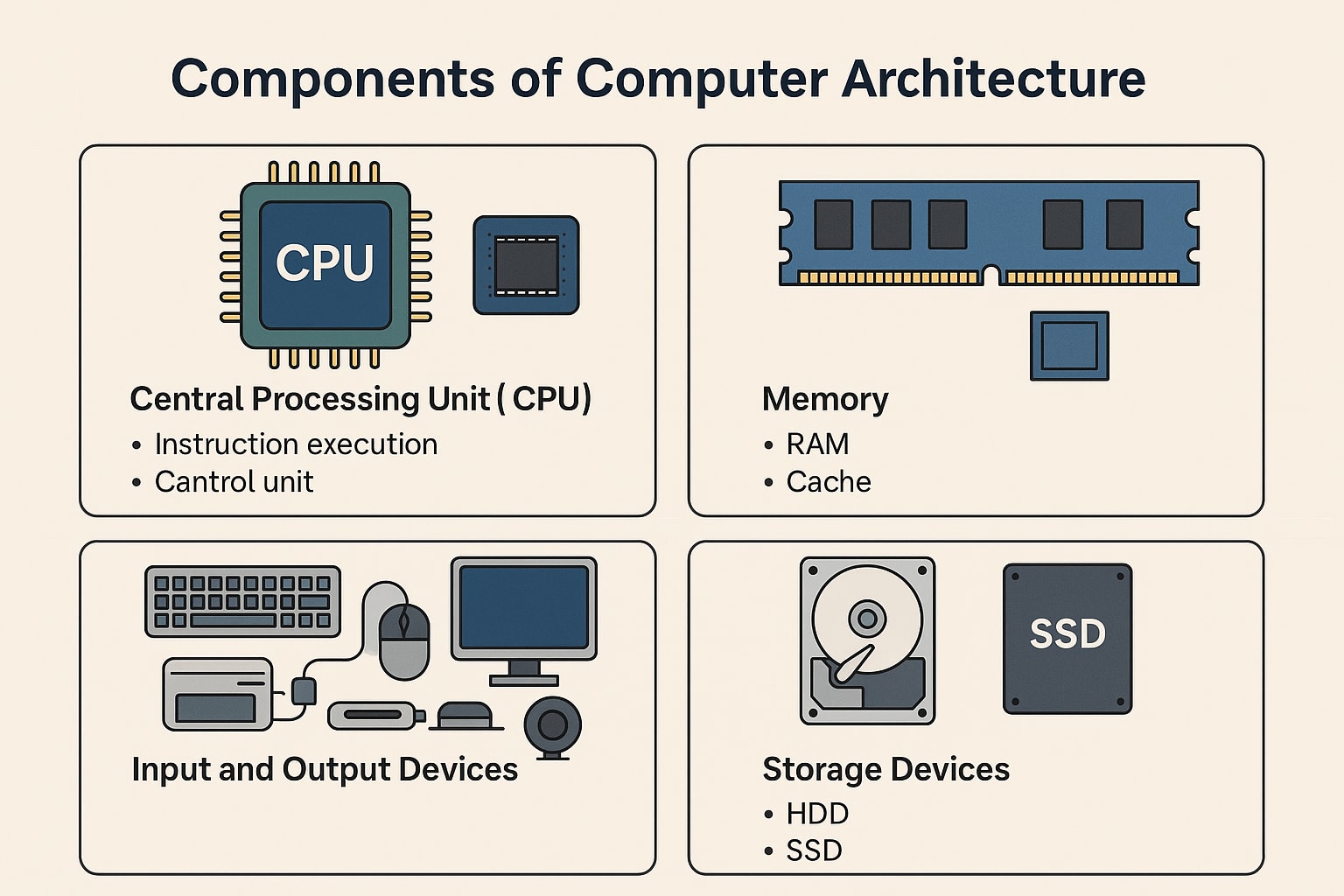
Technology infrastructure forms the backbone of electronic data processing. It includes all the tools and systems needed to collect, store, and manage data efficiently. This infrastructure ensures smooth operation and quick access to data. It supports businesses in making informed decisions and maintaining data accuracy.
Hardware Components
Hardware consists of physical devices that process and store data. Key hardware includes:
- Servers:Store and manage large amounts of data.
- Computers:Perform data processing and user tasks.
- Storage Devices:Save data securely, like hard drives and SSDs.
- Networking Equipment:Connect devices for data sharing, such as routers and switches.
- Input/Output Devices:Allow data entry and retrieval, like keyboards and monitors.
Reliable hardware is essential for fast and accurate data handling. Without it, data processing slows down or fails.
Software Solutions
Software controls hardware and manages data tasks. It includes:
- Operating Systems:Manage hardware and run applications.
- Database Management Systems (DBMS):Organize and retrieve data efficiently.
- Data Processing Applications:Perform calculations and data manipulation.
- Security Software:Protect data from unauthorized access.
- Backup Solutions:Ensure data safety with regular copies.
Effective software helps automate tasks and reduce errors. It supports data accuracy and accessibility.
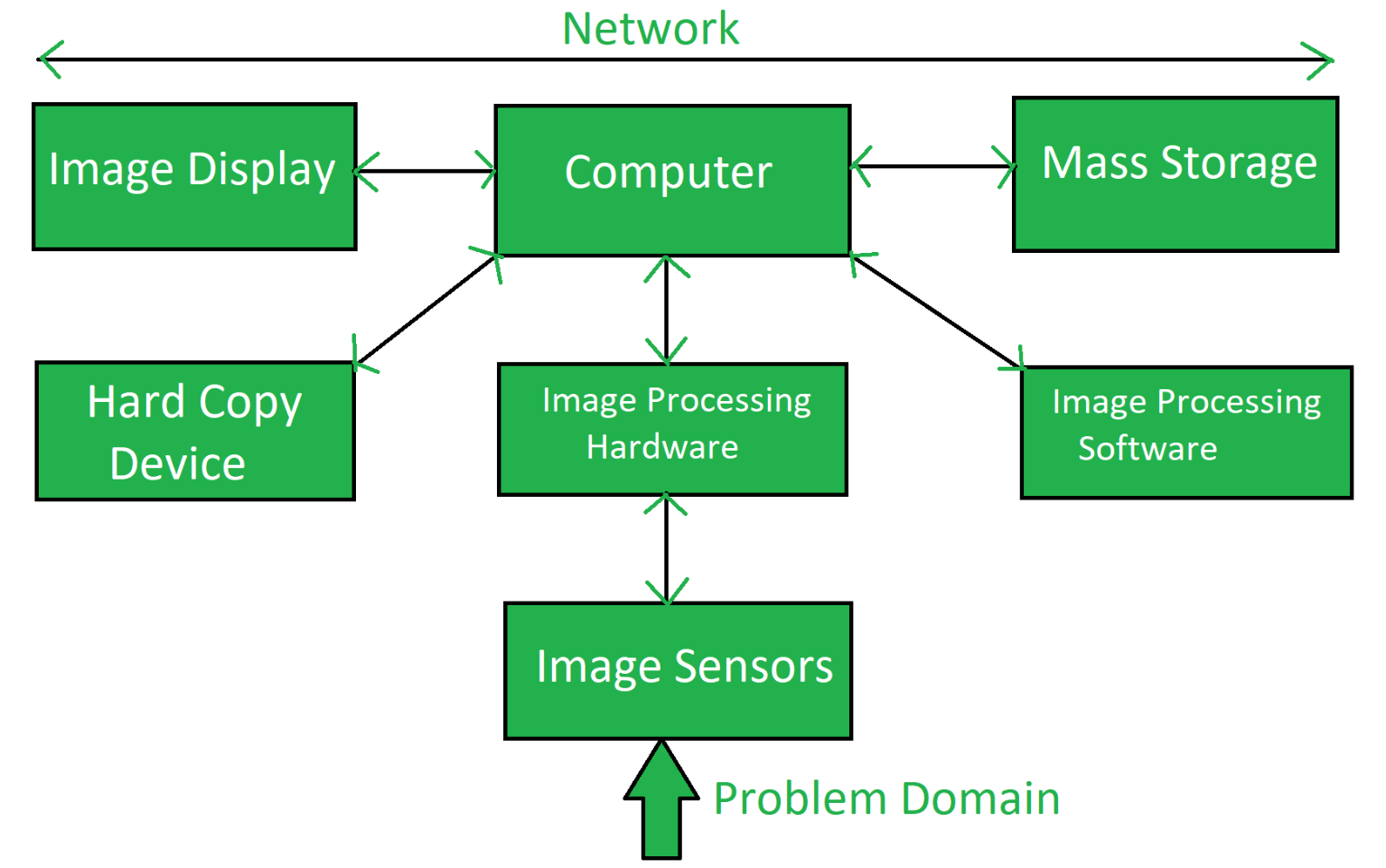
Credit: utkarsh-blogs.medium.com
Frequently Asked Questions
What Are The Key Components Of Electronic Data Processing?
The key components include input devices, processing units, storage, output devices, and communication systems. These work together to capture, process, store, and distribute data efficiently.
How Does Data Input Function In Electronic Data Processing?
Data input involves capturing raw data using devices like keyboards, scanners, and sensors. This step is crucial for accurate and effective data processing.
Why Is Data Storage Important In Edp Systems?
Data storage preserves processed and raw data for future use. It ensures data is accessible, secure, and can be retrieved quickly when needed.
What Role Does Data Processing Play In Edp?
Data processing transforms raw data into meaningful information using software and hardware. It enables decision-making and supports business operations.
Conclusion
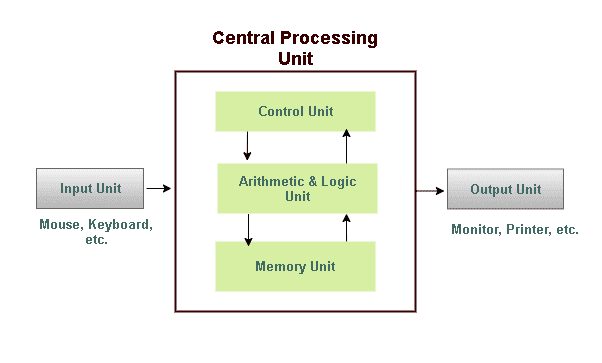
Electronic Data Processing depends on key parts working together. Input gathers data from various sources. Processing changes raw data into useful information. Storage keeps data safe and ready to use. Output shows the final results clearly. Control manages the entire system smoothly.
Understanding these components helps grasp how data flows. Each part plays a vital role every day. This knowledge supports better use of technology. It simplifies complex tasks and boosts efficiency. Remember, solid data processing builds strong decisions.